> ## Documentation Index
> Fetch the complete documentation index at: https://help.decodo.com/llms.txt
> Use this file to discover all available pages before exploring further.
# 用户名:密码请求
> 通过用户名:密码身份验证使用数据中心按IP付费代理高级参数
使用**回连**时,端点代理**服务器**保持不变:`dc.decodo.com`
对于**静态**连接会话,代理**端口**是以下范围内的任意数字:`10001`-`63000`
如果您使用的端口号超过了您计划购买的IP总数,端口将循环使用您现有的IP。
对于**轮换**连接会话,代理**端口**是:`10000`
下面的示例中将显示`cURL`代码。您可以在您的机器上尝试它们。
### 城市、州和ASN参数
* 客户必须已购买某个国家/地区的IP,才能定位其城市或ASN。
* 用户必须在城市定位、州定位和ASN定位之间进行选择,因为它们不能同时使用。
***
## `用户名:密码`
### 用户名和密码参数
要使用代理用户名和密码,请注意您的用户名行将**始终**以`user-`开头,后跟您的代理用户名。
使用代理用户名和密码的**轮换代理**示例,返回来自随机位置的IP地址:
```shellscript cURL theme={null}
curl -U "user-username:password" -x "dc.decodo.com:10000" "https://ip.decodo.com/json"
```
将`username`和`password`替换为您的凭据,并在您的**终端**或**命令提示符**中运行该命令。
您将在输出中看到为此特定请求分配给您的IP地址,以及该IP地址的信息,包括其位置。
***
## 直接IP定位
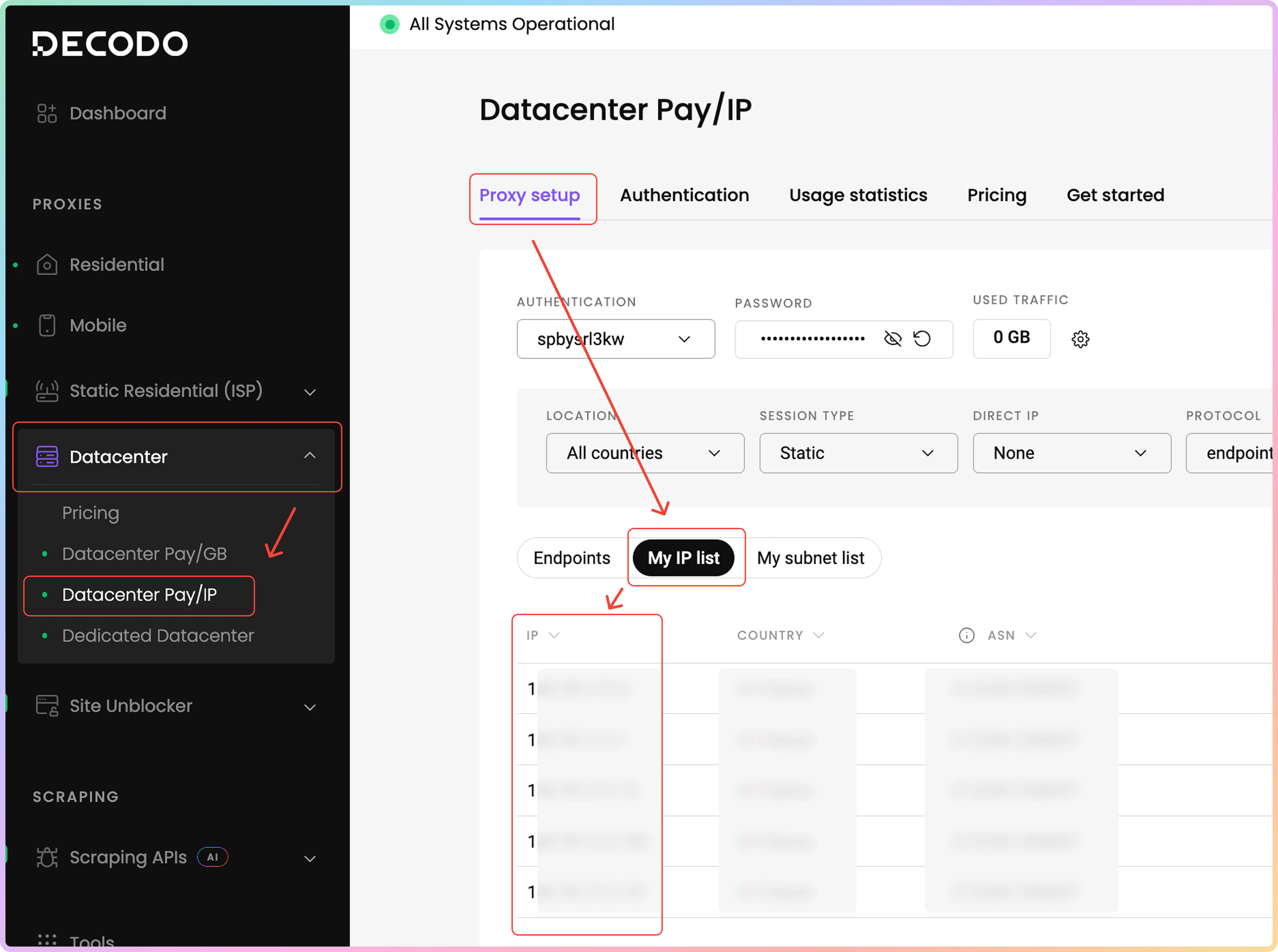
可以从您购买的代理IP列表中定位特定的IP地址。要查找您的代理IP,请导航至[**数据中心 → DC按IP付费 → 代理设置**](https://dashboard.decodo.com/datacenter-ips/proxy-setup)仪表板页面。然后,点击**我的IP列表**选项卡。在下面的表格中,您将找到您购买的**IP地址**、它们的原产**国家**和**ASN**。
请记住,列出的某些IP可能没有关联的ASN。
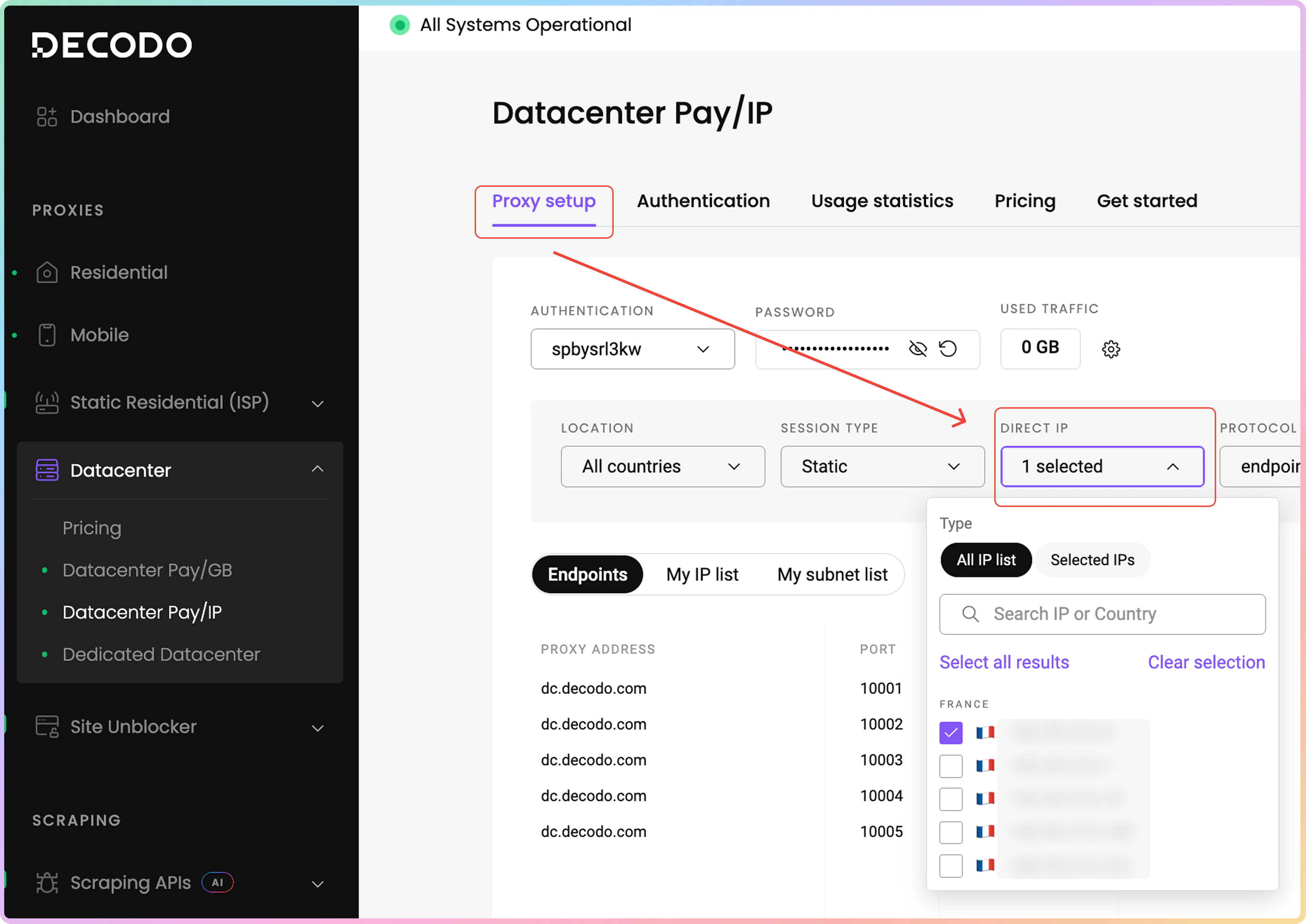
 如果您希望生成**端点列表**(然后可以导出)或带有特定IP地址的**请求示例**,在同一**代理设置**页面中,点击**直接IP**字段,在下拉菜单中勾选您首选的代理IP地址。在那里,您可以选择所有IP或使用搜索栏查找特定IP。
 返回**特定IP地址**的**静态代理**示例。代理IP保持未指定。
```shellscript cURL theme={null}
curl -U "user-username-ip-x.x.x.x:password" -x "dc.decodo.com:10001" "ip.decodo.com/json"
```
***
## 国家定位
如果需要来自特定国家的IP,则修改用户名以包含`country-xx`参数。使用两个字母的Alpha-2代码。[**这里**](https://www.iban.com/country-codes)有完整的列表。
[**这里**](https://help.decodo.com/docs/datacenter-pay-per-ip-proxy-locations)是DC按IP付费代理可购买位置的完整列表。
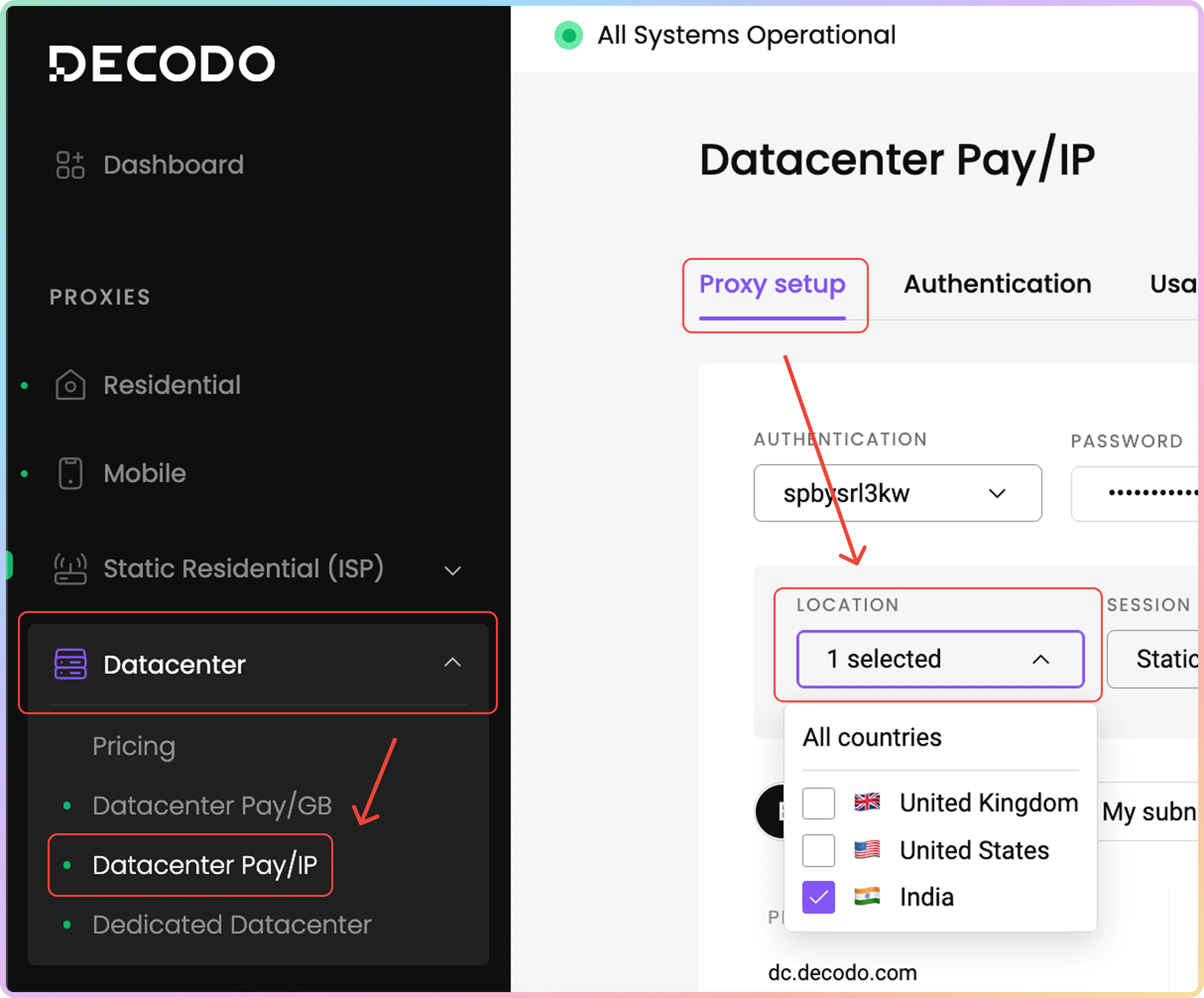
要查找IP的国家,请前往[**数据中心 → 数据中心按IP付费 → 代理设置**](https://dashboard.decodo.com/datacenter-ips/proxy-setup)仪表板页面。点击**位置**字段,在下拉菜单中,您可以选择一个或所有国家。
**请注意**,您只能定位您**购买**了代理IP的国家。
返回**特定IP地址**的**静态代理**示例。代理IP保持未指定。
```shellscript cURL theme={null}
curl -U "user-username-ip-x.x.x.x:password" -x "dc.decodo.com:10001" "ip.decodo.com/json"
```
***
## 国家定位
如果需要来自特定国家的IP,则修改用户名以包含`country-xx`参数。使用两个字母的Alpha-2代码。[**这里**](https://www.iban.com/country-codes)有完整的列表。
[**这里**](https://help.decodo.com/docs/datacenter-pay-per-ip-proxy-locations)是DC按IP付费代理可购买位置的完整列表。
要查找IP的国家,请前往[**数据中心 → 数据中心按IP付费 → 代理设置**](https://dashboard.decodo.com/datacenter-ips/proxy-setup)仪表板页面。点击**位置**字段,在下拉菜单中,您可以选择一个或所有国家。
**请注意**,您只能定位您**购买**了代理IP的国家。
 返回来自美国IP的**轮换代理**示例:
```shellscript cURL theme={null}
curl -U "user-username-country-us:password" -x "dc.decodo.com:10000" "ip.decodo.com/json"
```
返回来自意大利IP的**静态代理**示例:
```shellscript cURL theme={null}
curl -U "user-username-country-it:password" -x "dc.decodo.com:10001" "ip.decodo.com/json"
```
***
## 城市定位
在用户名中添加`city-xxxx`参数,以指定某个国家/地区内的城市。
它与`country`参数配合使用,不能单独使用。
如果城市名称由多个单词组成,请使用下划线。
返回纽约市IP的**轮换代理**示例:
```shellscript cURL theme={null}
curl -U "user-username-country-us-city-new_york:password" -x "dc.decodo.com:10000" "https://ip.decodo.com/json?provider=IPinfo"
```
返回罗马IP的**轮换代理**示例:
```shellscript cURL theme={null}
curl -U "user-username-country-it-city-rome:password" -x "dc.decodo.com:10000" "https://ip.decodo.com/json?provider=IPinfo"
```
***
## 州定位
在用户名中添加`state-xxxxx`将允许进行州定位。目前仅支持美国各州。
返回纽约州IP的**轮换代理**示例:
```shellscript cURL theme={null}
curl -U "user-username-country-us-state-new_york:password" -x "dc.decodo.com:10000" "https://ip.decodo.com/json?provider=IPinfo"
```
来自加利福尼亚州的**轮换**IP:
```shellscript cURL theme={null}
curl -U "user-username-country-us-state-california:password" -x "dc.decodo.com:10000" "https://ip.decodo.com/json?provider=IPinfo"
```
***
## ASN定位
添加`asn`参数将允许您定位来自特定运营商的IP。
* 您必须在`city`、`state`定位和`asn `定位之间进行选择,因为它们不能同时使用。
* 相同的逻辑适用于`continent`和`country`参数。
* 使用**AT\&T Mobility LLC** `asn`编号并采用轮换会话的代理示例:
```shellscript cURL theme={null}
curl -U "user-username-asn-20057:password" -x "dc.decodo.com:10000" "https://ip.decodo.com/json?provider=IPinfo"
```
***
需要帮助或只是想打个招呼?我们的支持团队全天候为您服务。 \
您也可以随时通过电子邮件 [support@decodo.com](mailto:support@decodo.com) 联系我们。
找不到您要找的内容?请求一篇文章! \
有反馈意见?分享您对我们如何改进的想法。
返回来自美国IP的**轮换代理**示例:
```shellscript cURL theme={null}
curl -U "user-username-country-us:password" -x "dc.decodo.com:10000" "ip.decodo.com/json"
```
返回来自意大利IP的**静态代理**示例:
```shellscript cURL theme={null}
curl -U "user-username-country-it:password" -x "dc.decodo.com:10001" "ip.decodo.com/json"
```
***
## 城市定位
在用户名中添加`city-xxxx`参数,以指定某个国家/地区内的城市。
它与`country`参数配合使用,不能单独使用。
如果城市名称由多个单词组成,请使用下划线。
返回纽约市IP的**轮换代理**示例:
```shellscript cURL theme={null}
curl -U "user-username-country-us-city-new_york:password" -x "dc.decodo.com:10000" "https://ip.decodo.com/json?provider=IPinfo"
```
返回罗马IP的**轮换代理**示例:
```shellscript cURL theme={null}
curl -U "user-username-country-it-city-rome:password" -x "dc.decodo.com:10000" "https://ip.decodo.com/json?provider=IPinfo"
```
***
## 州定位
在用户名中添加`state-xxxxx`将允许进行州定位。目前仅支持美国各州。
返回纽约州IP的**轮换代理**示例:
```shellscript cURL theme={null}
curl -U "user-username-country-us-state-new_york:password" -x "dc.decodo.com:10000" "https://ip.decodo.com/json?provider=IPinfo"
```
来自加利福尼亚州的**轮换**IP:
```shellscript cURL theme={null}
curl -U "user-username-country-us-state-california:password" -x "dc.decodo.com:10000" "https://ip.decodo.com/json?provider=IPinfo"
```
***
## ASN定位
添加`asn`参数将允许您定位来自特定运营商的IP。
* 您必须在`city`、`state`定位和`asn `定位之间进行选择,因为它们不能同时使用。
* 相同的逻辑适用于`continent`和`country`参数。
* 使用**AT\&T Mobility LLC** `asn`编号并采用轮换会话的代理示例:
```shellscript cURL theme={null}
curl -U "user-username-asn-20057:password" -x "dc.decodo.com:10000" "https://ip.decodo.com/json?provider=IPinfo"
```
***
需要帮助或只是想打个招呼?我们的支持团队全天候为您服务。 \
您也可以随时通过电子邮件 [support@decodo.com](mailto:support@decodo.com) 联系我们。
找不到您要找的内容?请求一篇文章! \
有反馈意见?分享您对我们如何改进的想法。