> ## Documentation Index
> Fetch the complete documentation index at: https://help.decodo.com/llms.txt
> Use this file to discover all available pages before exploring further.
# 快速开始
> 免费代理快速入门
免费代理必须先**激活**后才能使用。
激活需要一个**已注册**且**邮箱已验证**的账户。
1. 前往您仪表盘上的[**免费代理**](https://dashboard.decodo.com/free-proxies/proxy-setup)部分。
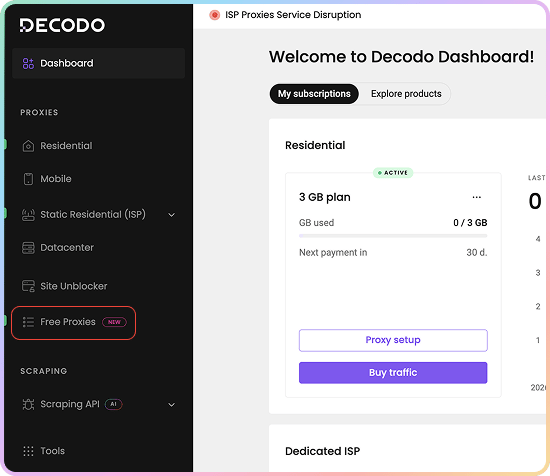 2. 点击**尝试免费代理**。
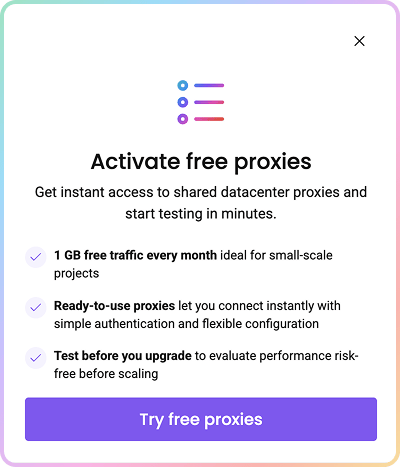 激活后,您的免费月度订阅和代理用户将自动创建,并为您分配**10个IP列表**。
### Decodo 代理使用的端点
* 端点就像通往IP池的门户。
* 当您连接到端点时,您的流量将**自动**通过Decodo IP池中的一个随机IP地址路由。
* 免费代理使用以下端点:
```text theme={null}
dc.decodo.com:10001
```
* 以下是一些使用不同编程语言的基本请求示例:
```shellscript cURL theme={null}
curl -U "USERNAME:PASSWORD" -x "dc.decodo.com:10001" "https://ip.decodo.com/json?provider=IPinfo"
```
```python Python theme={null}
import requests
url = 'https://ip.decodo.com/json'
username = 'USERNAME'
password = 'PASSWORD'
proxy = f"http://{username}:{password}@dc.decodo.com:10001"
result = requests.get(url, proxies = {
'http': proxy,
'https': proxy
})
print(result.text)
```
```javascript Node theme={null}
const axios = require('axios');
const { HttpsProxyAgent } = require('https-proxy-agent');
const url = 'https://ip.decodo.com/json';
const proxyAgent = new HttpsProxyAgent(
'http://username:password@dc.decodo.com:10001');
axios
.get(url, {
httpsAgent: proxyAgent,
})
.then((response) => {
console.log(response.data);
});
```
```php PHP theme={null}
```
```go Go theme={null}
package main
import (
"log"
"net/http"
"net/url"
)
func main() {
proxyUrl, err := url.Parse("http://username:password@dc.decodo.com:10001")
if err != nil {
log.Fatalln(err)
}
client := &http.Client{
Transport: &http.Transport{Proxy: http.ProxyURL(proxyUrl)},
}
req, err := http.NewRequest("GET", "https://ip.decodo.com/json", nil)
if err != nil {
log.Println(err)
}
res, err := client.Do(req)
log.Println(res)
if err != nil {
log.Println(err)
}
}
```
```java Java theme={null}
import java.net.*;
import java.io.*;
import java.util.Scanner;
public class ProxyTest
{
public static void main(String[] args) throws Exception
{
InetSocketAddress proxyAddress = new InetSocketAddress("dc.decodo.com", 10001); // Set proxy IP/port.
Proxy proxy = new Proxy(Proxy.Type.HTTP, proxyAddress);
URL url = new URI("https://ip.decodo.com/").toURL(); //enter target URL
Authenticator authenticator = new Authenticator() {
public PasswordAuthentication getPasswordAuthentication() {
return (new PasswordAuthentication("username","password".toCharArray())); //enter credentials
}
};
Authenticator.setDefault(authenticator);
URLConnection urlConnection = url.openConnection(proxy);
//Scanner to view output
Scanner scanner = new Scanner(urlConnection.getInputStream());
System.out.println(scanner.nextLine());
scanner.close();
}
}
```
### 控制您的连接
* 每个IP都有自己的端口,因此切换IP就像切换端口一样简单。
* 您还可以通过添加`country`参数使请求更具体。免费代理IP位于**美国**。
* 阅读下面的分步骤教程,或查阅[**高级参数**](https://help.decodo.com/docs/free-proxy-advanced-parameters)文章以深入了解。
## 认证
免费代理**仅**支持**用户名和密码**认证。不支持IP白名单。
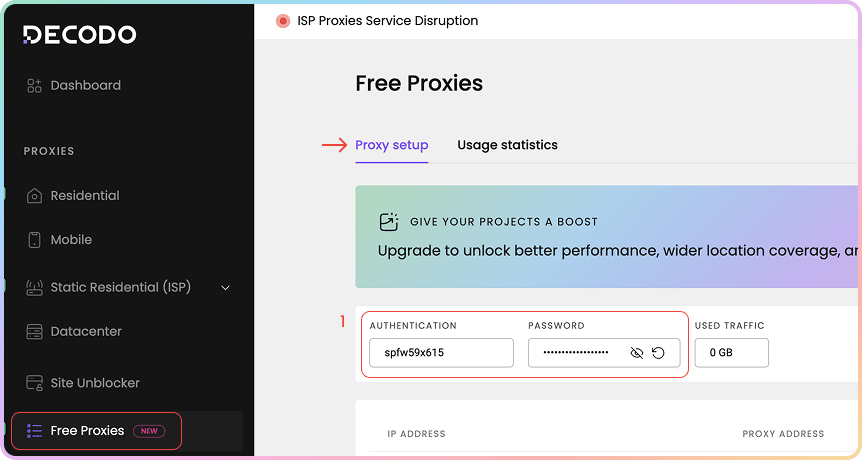
1. 前往您仪表盘上的[**免费代理 → 代理设置**](https://dashboard.decodo.com/free-proxies/proxy-setup)页面,找到代理认证和密码字段。
* 您会看到代理用户名和密码已自动创建。
激活后,您的免费月度订阅和代理用户将自动创建,并为您分配**10个IP列表**。
### Decodo 代理使用的端点
* 端点就像通往IP池的门户。
* 当您连接到端点时,您的流量将**自动**通过Decodo IP池中的一个随机IP地址路由。
* 免费代理使用以下端点:
```text theme={null}
dc.decodo.com:10001
```
* 以下是一些使用不同编程语言的基本请求示例:
```shellscript cURL theme={null}
curl -U "USERNAME:PASSWORD" -x "dc.decodo.com:10001" "https://ip.decodo.com/json?provider=IPinfo"
```
```python Python theme={null}
import requests
url = 'https://ip.decodo.com/json'
username = 'USERNAME'
password = 'PASSWORD'
proxy = f"http://{username}:{password}@dc.decodo.com:10001"
result = requests.get(url, proxies = {
'http': proxy,
'https': proxy
})
print(result.text)
```
```javascript Node theme={null}
const axios = require('axios');
const { HttpsProxyAgent } = require('https-proxy-agent');
const url = 'https://ip.decodo.com/json';
const proxyAgent = new HttpsProxyAgent(
'http://username:password@dc.decodo.com:10001');
axios
.get(url, {
httpsAgent: proxyAgent,
})
.then((response) => {
console.log(response.data);
});
```
```php PHP theme={null}
```
```go Go theme={null}
package main
import (
"log"
"net/http"
"net/url"
)
func main() {
proxyUrl, err := url.Parse("http://username:password@dc.decodo.com:10001")
if err != nil {
log.Fatalln(err)
}
client := &http.Client{
Transport: &http.Transport{Proxy: http.ProxyURL(proxyUrl)},
}
req, err := http.NewRequest("GET", "https://ip.decodo.com/json", nil)
if err != nil {
log.Println(err)
}
res, err := client.Do(req)
log.Println(res)
if err != nil {
log.Println(err)
}
}
```
```java Java theme={null}
import java.net.*;
import java.io.*;
import java.util.Scanner;
public class ProxyTest
{
public static void main(String[] args) throws Exception
{
InetSocketAddress proxyAddress = new InetSocketAddress("dc.decodo.com", 10001); // Set proxy IP/port.
Proxy proxy = new Proxy(Proxy.Type.HTTP, proxyAddress);
URL url = new URI("https://ip.decodo.com/").toURL(); //enter target URL
Authenticator authenticator = new Authenticator() {
public PasswordAuthentication getPasswordAuthentication() {
return (new PasswordAuthentication("username","password".toCharArray())); //enter credentials
}
};
Authenticator.setDefault(authenticator);
URLConnection urlConnection = url.openConnection(proxy);
//Scanner to view output
Scanner scanner = new Scanner(urlConnection.getInputStream());
System.out.println(scanner.nextLine());
scanner.close();
}
}
```
### 控制您的连接
* 每个IP都有自己的端口,因此切换IP就像切换端口一样简单。
* 您还可以通过添加`country`参数使请求更具体。免费代理IP位于**美国**。
* 阅读下面的分步骤教程,或查阅[**高级参数**](https://help.decodo.com/docs/free-proxy-advanced-parameters)文章以深入了解。
## 认证
免费代理**仅**支持**用户名和密码**认证。不支持IP白名单。
1. 前往您仪表盘上的[**免费代理 → 代理设置**](https://dashboard.decodo.com/free-proxies/proxy-setup)页面,找到代理认证和密码字段。
* 您会看到代理用户名和密码已自动创建。
 ### 其他认证选项
1. 您可以点击密码来**复制**它。
2. 要查看密码,请点击**眼睛**图标。
3. 您可以通过点击**箭头图标**并选择**确认**来生成新密码。
4. 在这里,您还可以查看您的**已用流量**与每月额度的对比。
* 有关更多详情,请参阅[认证方法](https://help.decodo.com/docs/free-proxy-authentication-methods)文章。
### 其他认证选项
1. 您可以点击密码来**复制**它。
2. 要查看密码,请点击**眼睛**图标。
3. 您可以通过点击**箭头图标**并选择**确认**来生成新密码。
4. 在这里,您还可以查看您的**已用流量**与每月额度的对比。
* 有关更多详情,请参阅[认证方法](https://help.decodo.com/docs/free-proxy-authentication-methods)文章。
.png?fit=max&auto=format&n=eHnaKujrgx580g2h&q=85&s=358626d771c548a39fb8aa1b23a0b62f) ## 代理设置
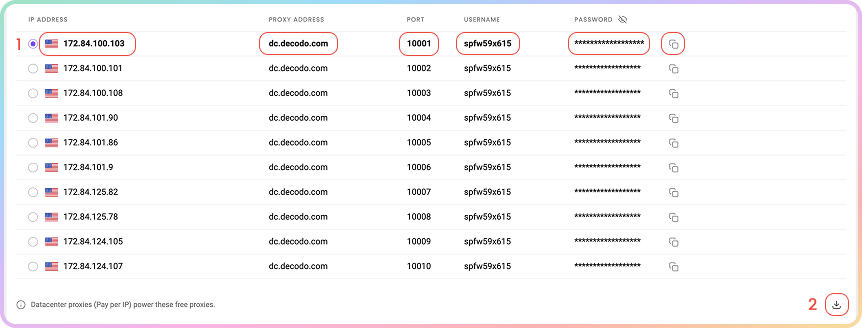
免费代理的所有内容都在同一个仪表盘页面上。在您的认证信息下方,您会看到现成可用的**代理列表**:您被分配的10个IP,每个都包含主机、端口、用户名和密码。
**您的免费代理由数据中心代理(按IP付费)提供支持**,这意味着您在免费套餐下就能享受到与我们付费数据中心产品同样可靠的基础设施。
1. 点击任何单个元素——**IP地址**、**代理地址**、**端口**、**用户名**或**密码**——即可**复制**,或复制整行。
2. 使用表格下方的下载图标,将完整列表下载为`.csv`或`.txt`文件。
## 代理设置
免费代理的所有内容都在同一个仪表盘页面上。在您的认证信息下方,您会看到现成可用的**代理列表**:您被分配的10个IP,每个都包含主机、端口、用户名和密码。
**您的免费代理由数据中心代理(按IP付费)提供支持**,这意味着您在免费套餐下就能享受到与我们付费数据中心产品同样可靠的基础设施。
1. 点击任何单个元素——**IP地址**、**代理地址**、**端口**、**用户名**或**密码**——即可**复制**,或复制整行。
2. 使用表格下方的下载图标,将完整列表下载为`.csv`或`.txt`文件。
 ### 位置
* 免费代理IP仅位于**美国**,因此**没有位置选择器**。
* 如果您在请求中传入`country`参数,该参数仍会被接受——免费代理IP会解析为`us`。
有关回连代理示例,请参阅[**高级参数**](https://help.decodo.com/docs/free-proxy-advanced-parameters)文章。
### IP与端口
* 您的套餐提供**10个固定IP**,不会轮换。相同的10个IP会永久分配给您。
* 每个IP都可通过其专属端口访问,范围为`10001`到`10010`。要指定某个IP,请连接到其对应端口。
* 如果您希望在这10个IP中每次请求都进行轮换,请使用轮换端口`10000`。
### 协议
* 免费代理默认使用**HTTP**。
* **HTTPS**和**SOCKS5**在请求层面也可使用,但您需在连接代理时使用的工具中明确指定该协议。
## 代码示例
在项目中使用代理之前,确认代理可正常工作很重要。代理设置仪表盘底部的**代码示例**可让您快速确认代理是否正常连接并显示您的新IP地址。
1. 选择任一可用语言:`cURL`、`Python`、`NodeJS`、`PHP`或`GO`。
2. 点击右下角的**复制**按钮复制预配置的代码示例。
3. 将代码粘贴到您的环境中并运行。
4. 响应将显示代理IP地址和位置信息,确认您的代理正常工作。
* 如果您在响应中看到代理的IP地址(而不是您的实际IP),恭喜您!您的代理已成功配置并可以使用。
### 位置
* 免费代理IP仅位于**美国**,因此**没有位置选择器**。
* 如果您在请求中传入`country`参数,该参数仍会被接受——免费代理IP会解析为`us`。
有关回连代理示例,请参阅[**高级参数**](https://help.decodo.com/docs/free-proxy-advanced-parameters)文章。
### IP与端口
* 您的套餐提供**10个固定IP**,不会轮换。相同的10个IP会永久分配给您。
* 每个IP都可通过其专属端口访问,范围为`10001`到`10010`。要指定某个IP,请连接到其对应端口。
* 如果您希望在这10个IP中每次请求都进行轮换,请使用轮换端口`10000`。
### 协议
* 免费代理默认使用**HTTP**。
* **HTTPS**和**SOCKS5**在请求层面也可使用,但您需在连接代理时使用的工具中明确指定该协议。
## 代码示例
在项目中使用代理之前,确认代理可正常工作很重要。代理设置仪表盘底部的**代码示例**可让您快速确认代理是否正常连接并显示您的新IP地址。
1. 选择任一可用语言:`cURL`、`Python`、`NodeJS`、`PHP`或`GO`。
2. 点击右下角的**复制**按钮复制预配置的代码示例。
3. 将代码粘贴到您的环境中并运行。
4. 响应将显示代理IP地址和位置信息,确认您的代理正常工作。
* 如果您在响应中看到代理的IP地址(而不是您的实际IP),恭喜您!您的代理已成功配置并可以使用。
.png?fit=max&auto=format&n=eHnaKujrgx580g2h&q=85&s=eac25a4b169b4c5203fcda6e6092269e) ## 集成指南
一旦您生成了端点和端口,您可将其应用于任何应用或工具,立即开始使用代理。
### Decodo 工具
* 另外,您可以使用专用的Decodo工具——适用于[**Chrome**](https://help.decodo.com/docs/decodo-chrome-extension#/)和[**Firefox**](https://help.decodo.com/docs/decodo-firefox-extension#/)的**Decodo扩展程序**。
### 集成指南
* 可在[**集成概览**](https://help.decodo.com/docs/proxy-integrations-overview)部分查阅最受欢迎的第三方工具指南。
### GitHub
* 若需**高级代码示例**和**中间件**,请访问我们的[**GitHub**](https://github.com/decodo/decodo)页面。
## 统计信息
要跟踪免费代理的使用情况,请前往[**免费代理 → 使用统计**](https://dashboard.decodo.com/free-proxies/statistics?)部分。
1. 在这里,您可以按**目标**查看**流量**或**请求**使用情况的**图表**,并选择**时间范围**。
2. 以`.CSV`、`.TXT`或`.JSON`格式导出**原始**数据或**表格**数据。
* 所有日期均为`UTC`时间。流量历史最多保留`180`天。
## 集成指南
一旦您生成了端点和端口,您可将其应用于任何应用或工具,立即开始使用代理。
### Decodo 工具
* 另外,您可以使用专用的Decodo工具——适用于[**Chrome**](https://help.decodo.com/docs/decodo-chrome-extension#/)和[**Firefox**](https://help.decodo.com/docs/decodo-firefox-extension#/)的**Decodo扩展程序**。
### 集成指南
* 可在[**集成概览**](https://help.decodo.com/docs/proxy-integrations-overview)部分查阅最受欢迎的第三方工具指南。
### GitHub
* 若需**高级代码示例**和**中间件**,请访问我们的[**GitHub**](https://github.com/decodo/decodo)页面。
## 统计信息
要跟踪免费代理的使用情况,请前往[**免费代理 → 使用统计**](https://dashboard.decodo.com/free-proxies/statistics?)部分。
1. 在这里,您可以按**目标**查看**流量**或**请求**使用情况的**图表**,并选择**时间范围**。
2. 以`.CSV`、`.TXT`或`.JSON`格式导出**原始**数据或**表格**数据。
* 所有日期均为`UTC`时间。流量历史最多保留`180`天。
.png?fit=max&auto=format&n=eHnaKujrgx580g2h&q=85&s=39a091a5b135854fb55c40fb9e39ff68) ### **排名靠前的目标、国家、用户与IP**
* 在下方,您可以在专属部分查看更详细的信息:
* **排名靠前的目标**:编号、目标、流量、请求数。
* **排名靠前的国家**:国家、流量、请求数。
* **排名靠前的用户**:用户、流量、请求数。
* **排名靠前的IP**:编号、IP、流量、请求数。
[**此处**](https://help.decodo.com/docs/free-proxy-statistics)可查看关于**免费代理使用统计**页面的更全面介绍。
## 故障排除
如果您遇到任何问题,请参阅我们的[**故障排除**](https://help.decodo.com/docs/proxy-troubleshooting#/)部分,或直接联系我们**24/7**提供服务的支持团队。
***
Need help or just want to say hello? Our support is available 24/7. \
You can also reach us anytime via email at [support@decodo.com](mailto:support@decodo.com).
Can't find what you're looking for? Request an article! \
Have feedback? Share your thoughts on how we can improve.
### **排名靠前的目标、国家、用户与IP**
* 在下方,您可以在专属部分查看更详细的信息:
* **排名靠前的目标**:编号、目标、流量、请求数。
* **排名靠前的国家**:国家、流量、请求数。
* **排名靠前的用户**:用户、流量、请求数。
* **排名靠前的IP**:编号、IP、流量、请求数。
[**此处**](https://help.decodo.com/docs/free-proxy-statistics)可查看关于**免费代理使用统计**页面的更全面介绍。
## 故障排除
如果您遇到任何问题,请参阅我们的[**故障排除**](https://help.decodo.com/docs/proxy-troubleshooting#/)部分,或直接联系我们**24/7**提供服务的支持团队。
***
Need help or just want to say hello? Our support is available 24/7. \
You can also reach us anytime via email at [support@decodo.com](mailto:support@decodo.com).
Can't find what you're looking for? Request an article! \
Have feedback? Share your thoughts on how we can improve.