> ## Documentation Index
> Fetch the complete documentation index at: https://help.decodo.com/llms.txt
> Use this file to discover all available pages before exploring further.
# Langchain
> 用于 Lanchain 应用程序的网页抓取 API 节点
Decodo Node.js LangChain 插件使开发人员能够在其 LangChain 应用程序中使用 Decodo 的 Scraper API。
Decodo Lanchain 工具集成适用于 [**Web API Advanced 计划**](https://dashboard.decodo.com/register?page=scrapers/pricing?plan=907849)。
更多信息可以在 GitHub [这里](https://github.com/Decodo/decodo-langchain-ts)找到。
## 功能
* 网页抓取:抓取任何 URL
* Google 搜索:搜索 Google 并检索结构化结果
* Amazon 搜索:搜索 Amazon 并检索结构化产品数据
* Reddit 抓取:抓取 Reddit 帖子和子版块
* 完整的 TypeScript 支持:所有参数的完整类型定义
* LangChain 集成:与 LangChain 的工具系统无缝集成
## 快速开始
### 先决条件
* Node.js >= v20
安装:
```shellscript Shell theme={null}
npm install @decodo/langchain-ts
```
激活 Advanced 计划后,记下您生成的用户名和密码:
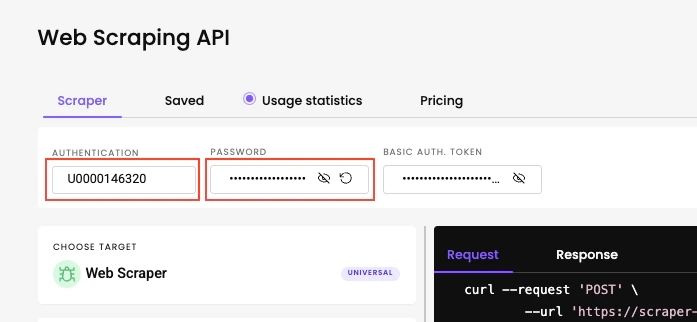 1. 克隆此仓库并安装依赖项
```shellscript Shell theme={null}
git clone [email protected]:Decodo/decodo-langchain-ts.git
cd decodo-langchain-ts
npm i
```
2. 运行任何示例代理
```shellscript Shell theme={null}
npm run example:agent-universal
npm run example:agent-google
npm run example:agent-amazon
```
一个简单的代理示例:
```javascript Node expandable wrap theme={null}
import dotenv from 'dotenv';
import { ChatOpenAI } from '@langchain/openai';
import { createReactAgent } from '@langchain/langgraph/prebuilt';
import { DecodoUniversalTool } from '@decodo/langchain-ts';
dotenv.config();
const main = async () => {
const username = process.env.SCRAPER_API_USERNAME!;
const password = process.env.SCRAPER_API_PASSWORD!;
const decodoUniversalTool = new DecodoUniversalTool({ username, password });
const model = new ChatOpenAI({
model: 'gpt-4o-mini',
});
const agent = createReactAgent({
llm: model,
tools: [decodoUniversalTool],
});
const result = await agent.invoke({
messages: [
{
role: 'user',
content: 'scrape the wikipedia NBA 2025 season page and tell me who won in 2025?',
},
],
});
console.log(result.messages[result.messages.length - 1].content);
};
if (require.main === module) {
main();
}
```
所有工具都接受一个 DecodoConfig 对象:
```javascript Node theme={null}
type DecodoConfig = {
username: string; // 您的 Web Advanced 产品用户名
password: string; // 您的 Web Advanced 产品密码
};
```
## 参数
**网页抓取:**
| 参数 | 必需 | 描述 |
| ---------- | -- | ------------------------------------------------------------------------------ |
| `url` | ✅ | 网站 URL |
| `geo` | | 结果所依赖的地理位置。[了解更多](https://help.decodo.com/docs/web-scraping-api-localisation)。 |
| `JsRender` | | 设置为 `true` 时,启用 JavaScript 渲染 |
| `markdown` | | 设置为 `true` 时,返回 markdown 响应 |
**Google 搜索:**
| 参数 | 必需 | 描述 |
| ---------- | -- | ------------------------------------------------------------------------------ |
| `query` | ✅ | 搜索查询 |
| `parse` | | 设置为 `true` 时自动解析结果 |
| `geo` | | 结果所依赖的地理位置。[了解更多](https://help.decodo.com/docs/web-scraping-api-localisation)。 |
| `JsRender` | | 设置为 `true` 时,启用 JavaScript 渲染。 |
**Amazon 搜索:**
| 参数 | 必需 | 描述 |
| ---------- | -- | -------------------------------------------------------------------------------------- |
| `query` | ✅ | 搜索查询 |
| `parse` | | 设置为 `true` 时自动解析结果 |
| `geo` | | 结果所依赖的地理位置。[了解更多](https://help.decodo.com/docs/web-scraping-api-amazon-geo-parameter)。 |
| `JsRender` | | 设置为 `true` 时,启用 JavaScript 渲染。 |
**Reddit 抓取:**
| 参数 | 必需 | 描述 |
| ------- | -- | ----------------------------------------------------------------------------- |
| `url` | ✅ | Reddit 子版块 URL |
| `geo` | | 结果所依赖的地理位置。[了解更多](https://help.decodo.com/docs/web-scraping-api-localisation) |
| `parse` | | 设置为 `true` 时自动解析结果 |
***
需要帮助或只是想打个招呼?我们的支持团队全天候为您服务。 \
您也可以随时通过电子邮件 [support@decodo.com](mailto:support@decodo.com) 联系我们。
找不到您要找的内容?请求一篇文章! \
有反馈意见?分享您对我们如何改进的想法。
1. 克隆此仓库并安装依赖项
```shellscript Shell theme={null}
git clone [email protected]:Decodo/decodo-langchain-ts.git
cd decodo-langchain-ts
npm i
```
2. 运行任何示例代理
```shellscript Shell theme={null}
npm run example:agent-universal
npm run example:agent-google
npm run example:agent-amazon
```
一个简单的代理示例:
```javascript Node expandable wrap theme={null}
import dotenv from 'dotenv';
import { ChatOpenAI } from '@langchain/openai';
import { createReactAgent } from '@langchain/langgraph/prebuilt';
import { DecodoUniversalTool } from '@decodo/langchain-ts';
dotenv.config();
const main = async () => {
const username = process.env.SCRAPER_API_USERNAME!;
const password = process.env.SCRAPER_API_PASSWORD!;
const decodoUniversalTool = new DecodoUniversalTool({ username, password });
const model = new ChatOpenAI({
model: 'gpt-4o-mini',
});
const agent = createReactAgent({
llm: model,
tools: [decodoUniversalTool],
});
const result = await agent.invoke({
messages: [
{
role: 'user',
content: 'scrape the wikipedia NBA 2025 season page and tell me who won in 2025?',
},
],
});
console.log(result.messages[result.messages.length - 1].content);
};
if (require.main === module) {
main();
}
```
所有工具都接受一个 DecodoConfig 对象:
```javascript Node theme={null}
type DecodoConfig = {
username: string; // 您的 Web Advanced 产品用户名
password: string; // 您的 Web Advanced 产品密码
};
```
## 参数
**网页抓取:**
| 参数 | 必需 | 描述 |
| ---------- | -- | ------------------------------------------------------------------------------ |
| `url` | ✅ | 网站 URL |
| `geo` | | 结果所依赖的地理位置。[了解更多](https://help.decodo.com/docs/web-scraping-api-localisation)。 |
| `JsRender` | | 设置为 `true` 时,启用 JavaScript 渲染 |
| `markdown` | | 设置为 `true` 时,返回 markdown 响应 |
**Google 搜索:**
| 参数 | 必需 | 描述 |
| ---------- | -- | ------------------------------------------------------------------------------ |
| `query` | ✅ | 搜索查询 |
| `parse` | | 设置为 `true` 时自动解析结果 |
| `geo` | | 结果所依赖的地理位置。[了解更多](https://help.decodo.com/docs/web-scraping-api-localisation)。 |
| `JsRender` | | 设置为 `true` 时,启用 JavaScript 渲染。 |
**Amazon 搜索:**
| 参数 | 必需 | 描述 |
| ---------- | -- | -------------------------------------------------------------------------------------- |
| `query` | ✅ | 搜索查询 |
| `parse` | | 设置为 `true` 时自动解析结果 |
| `geo` | | 结果所依赖的地理位置。[了解更多](https://help.decodo.com/docs/web-scraping-api-amazon-geo-parameter)。 |
| `JsRender` | | 设置为 `true` 时,启用 JavaScript 渲染。 |
**Reddit 抓取:**
| 参数 | 必需 | 描述 |
| ------- | -- | ----------------------------------------------------------------------------- |
| `url` | ✅ | Reddit 子版块 URL |
| `geo` | | 结果所依赖的地理位置。[了解更多](https://help.decodo.com/docs/web-scraping-api-localisation) |
| `parse` | | 设置为 `true` 时自动解析结果 |
***
需要帮助或只是想打个招呼?我们的支持团队全天候为您服务。 \
您也可以随时通过电子邮件 [support@decodo.com](mailto:support@decodo.com) 联系我们。
找不到您要找的内容?请求一篇文章! \
有反馈意见?分享您对我们如何改进的想法。