> ## Documentation Index
> Fetch the complete documentation index at: https://help.decodo.com/llms.txt
> Use this file to discover all available pages before exploring further.
# 快速入门
> 动态住宅代理快速入门
### Decodo 代理使用端点
* 端点就像通往IP池的网关。
* 当您连接到端点时,您的流量会**自动**通过Decodo IP池中的随机IP地址进行路由。
* 住宅代理使用以下端点和端口进行随机请求:
```text theme={null}
gate.decodo.com:7000
```
* 以下是各种编程语言的一些基本请求示例:
```shellscript cURL theme={null}
curl -U 'USERNAME:PASSWORD' -x gate.decodo.com:7000 https://ip.decodo.com/
```
```python Python theme={null}
import requests
url = 'https://ip.decodo.com/json'
username = 'username'
password = 'password'
proxy = f"http://{username}:{password}@gate.decodo.com:7000"
result = requests.get(url, proxies = {
'http': proxy,
'https': proxy
})
print(result.text)
```
```javascript Node theme={null}
const axios = require('axios');
const { HttpsProxyAgent } = require('https-proxy-agent');
const url = 'https://ip.decodo.com/json';
const proxyAgent = new HttpsProxyAgent(
'http://username:[email protected]:7000');
axios
.get(url, {
httpsAgent: proxyAgent,
})
.then((response) => {
console.log(response.data);
});
```
```php PHP theme={null}
### 控制您的连接
* 您可以通过更改端点和端口或添加参数来控制IP选择,使其更加具体。
* 继续阅读以获取有关指定和生成更多示例的分步指南,或查看我们的[**位置**](https://help.decodo.com/docs/cn/residential-proxy-endpoints-and-ports/)和[**高级参数**](https://help.decodo.com/docs/cn/residential-proxy-advanced-parameters/)文章以获得更深入的了解。
***
## 身份验证
1. 首先,导航到仪表板上的[**住宅 → 代理设置**](https://dashboard.decodo.com/residential-proxies/proxy-setup)页面,查找身份验证部分。
* 您会看到您的第一个代理用户和密码已自动创建。
2. 接下来,选择您的代理**身份验证方法**。
* 这可以是您的**白名单IP**地址或您的**代理用户**之一。
 ### 其他身份验证选项
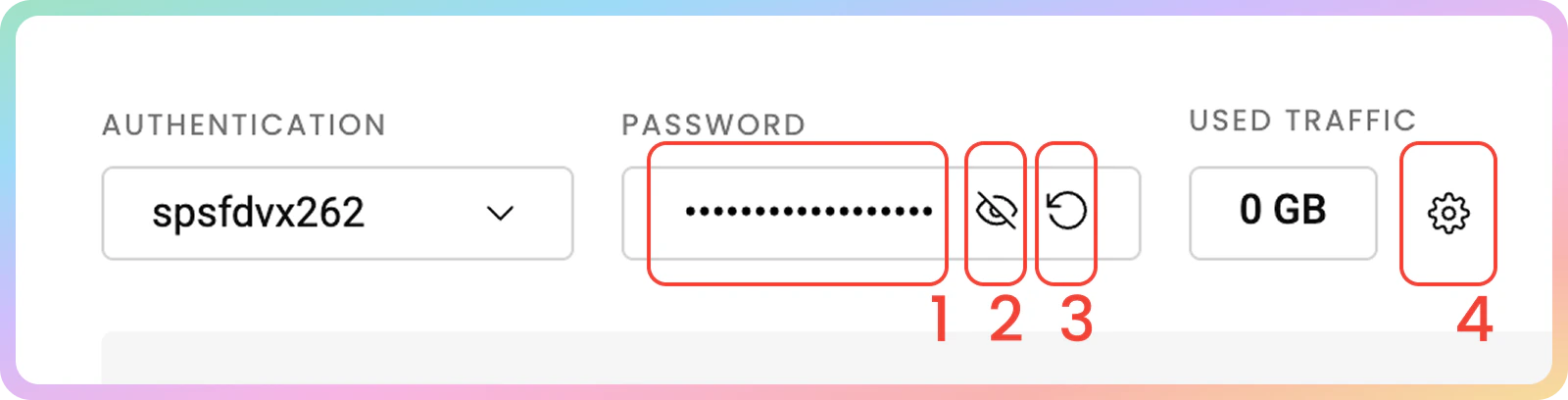
1. 您可以通过点击密码来**复制**它
2. 要查看密码,请点击**眼睛**图标。
3. 您可以通过点击**箭头图标**并选择**确认**来生成新密码。
4. 在这里,您还可以查看每个代理用户的**已用流量**并**添加流量限制**,或检查白名单IP的已用流量总和。
* 您可以在**身份验证**选项卡中进一步管理您的凭据。有关更多详细信息,请查看[**身份验证方法**](https://help.decodo.com/docs/cn/residential-proxy-authentication-methods)文章。
### 其他身份验证选项
1. 您可以通过点击密码来**复制**它
2. 要查看密码,请点击**眼睛**图标。
3. 您可以通过点击**箭头图标**并选择**确认**来生成新密码。
4. 在这里,您还可以查看每个代理用户的**已用流量**并**添加流量限制**,或检查白名单IP的已用流量总和。
* 您可以在**身份验证**选项卡中进一步管理您的凭据。有关更多详细信息,请查看[**身份验证方法**](https://help.decodo.com/docs/cn/residential-proxy-authentication-methods)文章。
 ## 代理设置
在仪表板的住宅代理设置部分,选择各种参数将生成您可以轻松复制到应用程序、工具或代码中的示例。
1. 在[**住宅 → 住宅 → 代理设置**](https://dashboard.decodo.com/residential-proxies/proxy-setup)页面上,在身份验证方法下方找到参数选择部分。
## 代理设置
在仪表板的住宅代理设置部分,选择各种参数将生成您可以轻松复制到应用程序、工具或代码中的示例。
1. 在[**住宅 → 住宅 → 代理设置**](https://dashboard.decodo.com/residential-proxies/proxy-setup)页面上,在身份验证方法下方找到参数选择部分。
 ### 位置
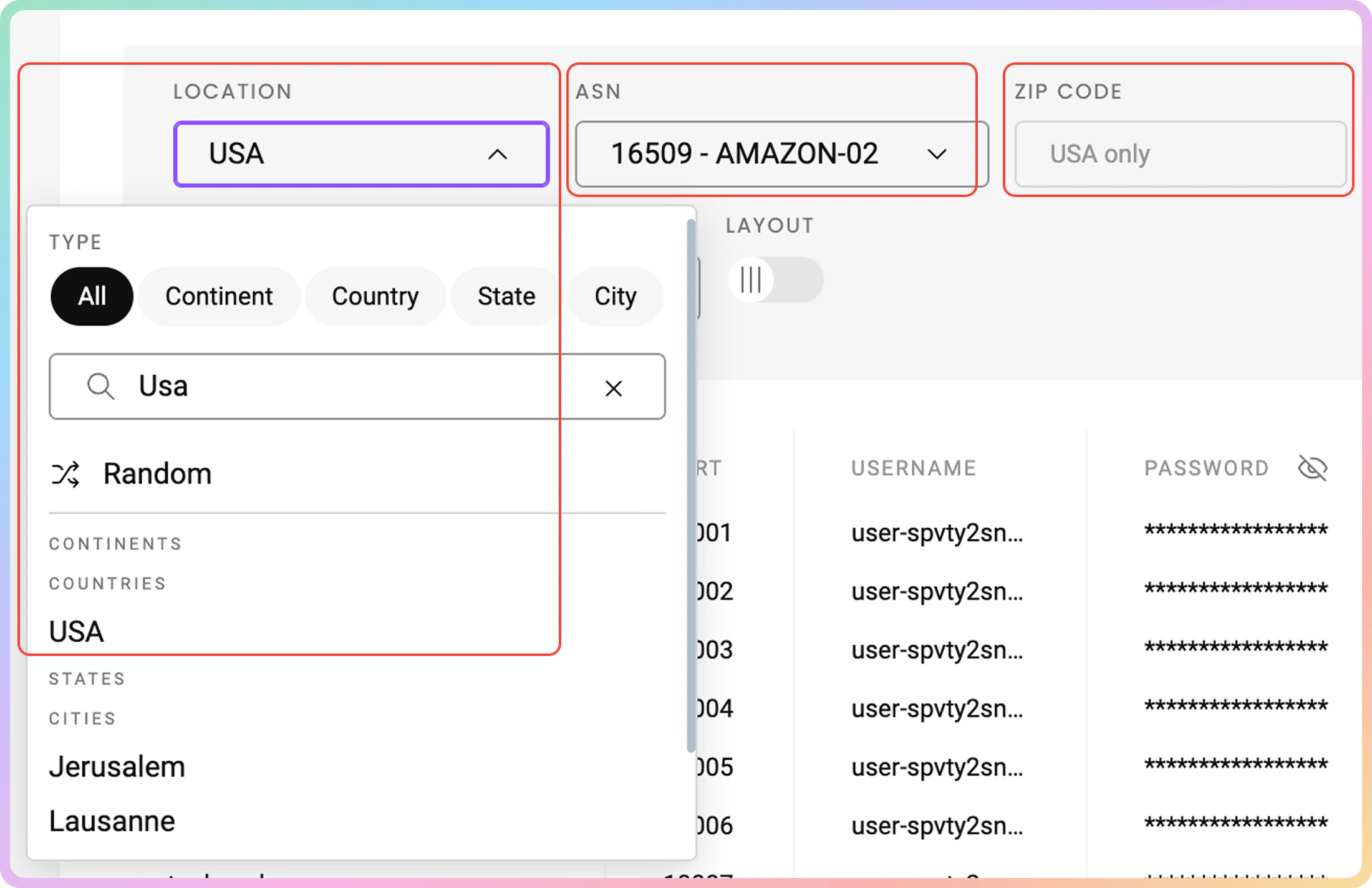
2. 首先,选择代理的[**位置**](https://help.decodo.com/docs/cn/residential-proxy-endpoints-and-ports)。
### `邮政编码`定位
* 仅在选择\*\*`美国`\*\*`国家`时可用;不支持`大陆`、`州`或`城市`选项。
### `ASN`定位
* 选择**国家**后,您可以指定`ASN`。
* 您必须在**城市**、**州**、**大陆**或\*\*`邮政编码`**定位与**`ASN`\*\*定位之间进行选择,因为它们不能同时使用。
* 在[**这里**](https://help.decodo.com/docs/cn/residential-proxy-user-pass-requests#asn-targeting)了解更多信息。
### 位置
2. 首先,选择代理的[**位置**](https://help.decodo.com/docs/cn/residential-proxy-endpoints-and-ports)。
### `邮政编码`定位
* 仅在选择\*\*`美国`\*\*`国家`时可用;不支持`大陆`、`州`或`城市`选项。
### `ASN`定位
* 选择**国家**后,您可以指定`ASN`。
* 您必须在**城市**、**州**、**大陆**或\*\*`邮政编码`**定位与**`ASN`\*\*定位之间进行选择,因为它们不能同时使用。
* 在[**这里**](https://help.decodo.com/docs/cn/residential-proxy-user-pass-requests#asn-targeting)了解更多信息。
 ### 会话类型
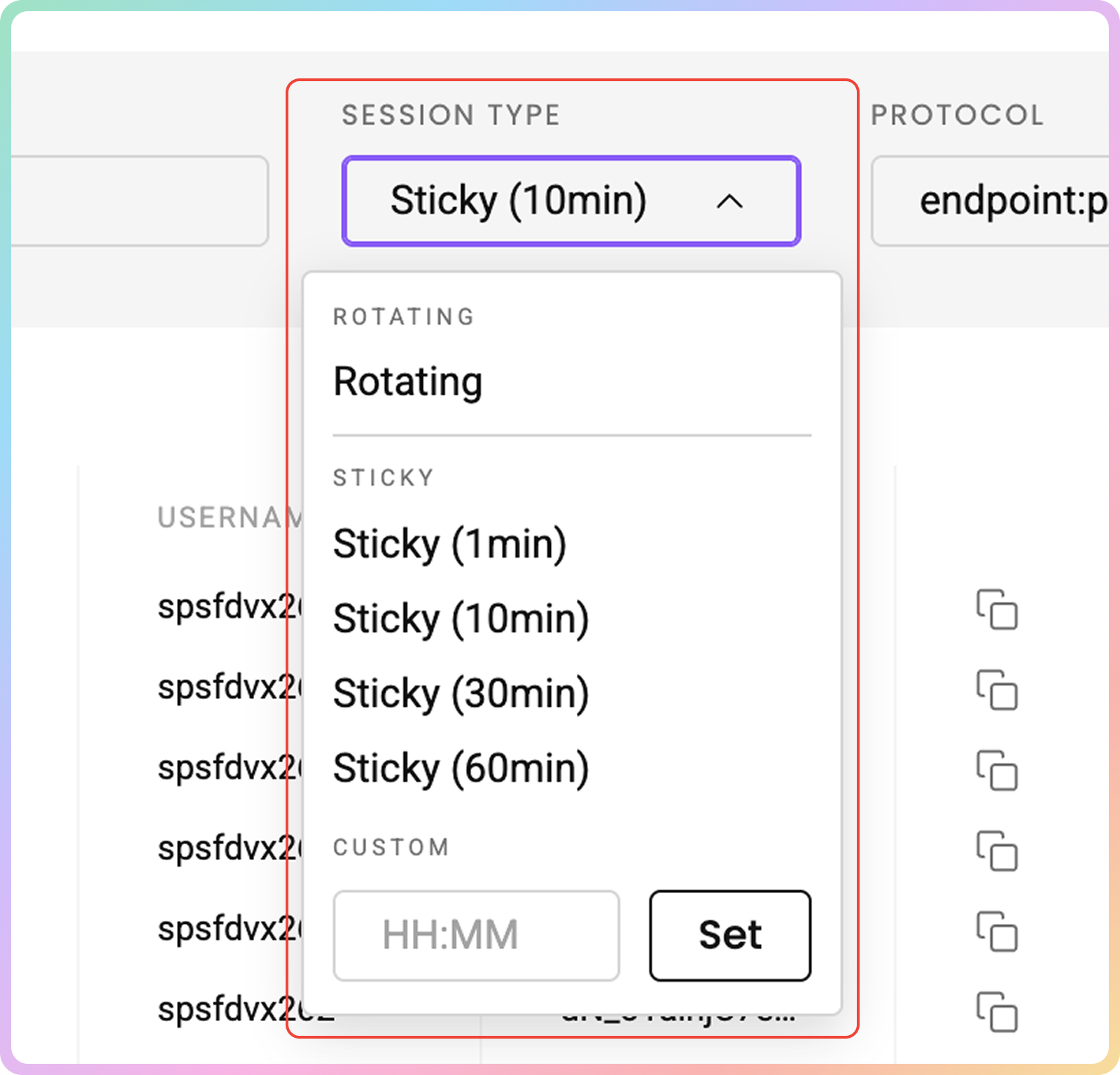
3. 之后,选择您首选的[**会话类型**](https://help.decodo.com/docs/cn/residential-proxy-session-types):**轮换**或**粘性**。
### 粘性会话
* 使用粘性会话,您的IP将保持不变,直到会话过期。
⚠️ 但是,会话时间越长,由于末端的住宅设备离线,**IP在您指定的时间之前轮换**的机会就越大。
* 对于\*\*`用户:密码`**和**`白名单IP`**身份验证方法,可以从仪表板的下拉菜单中选择或指定最长**24小时\*\*的会话。
* 但是,**白名单IP** [**会话控制选项**](https://help.decodo.com/docs/cn/residential-proxy-whitelisted-ip-requests#sticky-session)仅支持`HTTPS`协议。
### 会话类型
3. 之后,选择您首选的[**会话类型**](https://help.decodo.com/docs/cn/residential-proxy-session-types):**轮换**或**粘性**。
### 粘性会话
* 使用粘性会话,您的IP将保持不变,直到会话过期。
⚠️ 但是,会话时间越长,由于末端的住宅设备离线,**IP在您指定的时间之前轮换**的机会就越大。
* 对于\*\*`用户:密码`**和**`白名单IP`**身份验证方法,可以从仪表板的下拉菜单中选择或指定最长**24小时\*\*的会话。
* 但是,**白名单IP** [**会话控制选项**](https://help.decodo.com/docs/cn/residential-proxy-whitelisted-ip-requests#sticky-session)仅支持`HTTPS`协议。
 ### 协议
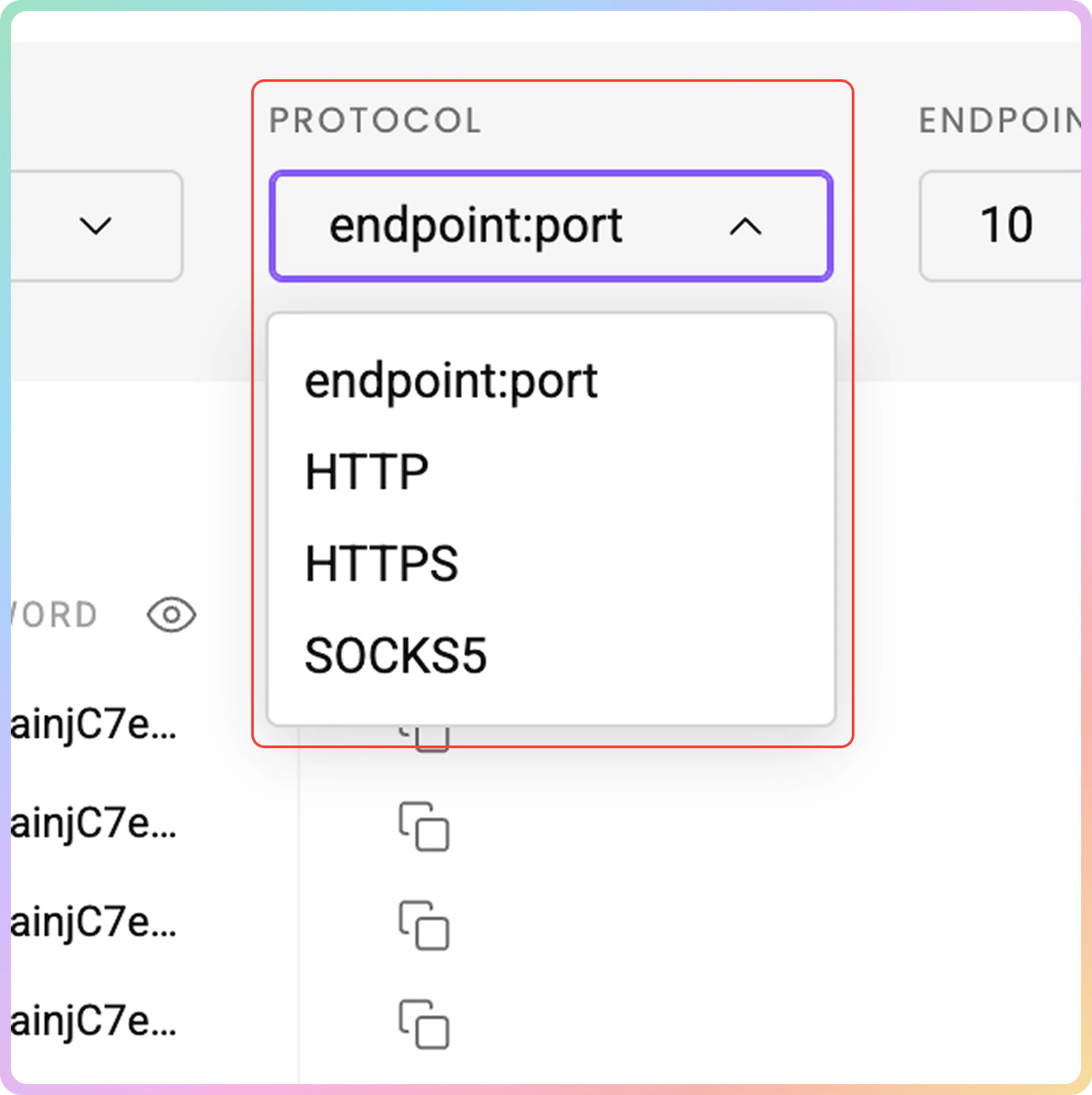
4. 最后,选择[**协议**](https://help.decodo.com/docs/cn/residential-proxy-protocols)格式。可用选项包括`端点:端口`、`HTTP`、`HTTPS`和`SOCKS5`。
### `SOCKS5`国家端点和工具支持
* `SOCKS5` [**需要高级参数**](https://help.decodo.com/docs/cn/residential-proxy-protocols#socks5)来定位**特定位置**。
* 要在**工具**中获取粘性`SOCKS5`代理,您必须使用`session`参数,否则即使使用`sessionduration`参数,代理也会始终轮换。
### 协议
4. 最后,选择[**协议**](https://help.decodo.com/docs/cn/residential-proxy-protocols)格式。可用选项包括`端点:端口`、`HTTP`、`HTTPS`和`SOCKS5`。
### `SOCKS5`国家端点和工具支持
* `SOCKS5` [**需要高级参数**](https://help.decodo.com/docs/cn/residential-proxy-protocols#socks5)来定位**特定位置**。
* 要在**工具**中获取粘性`SOCKS5`代理,您必须使用`session`参数,否则即使使用`sessionduration`参数,代理也会始终轮换。
 ## 代理列表示例
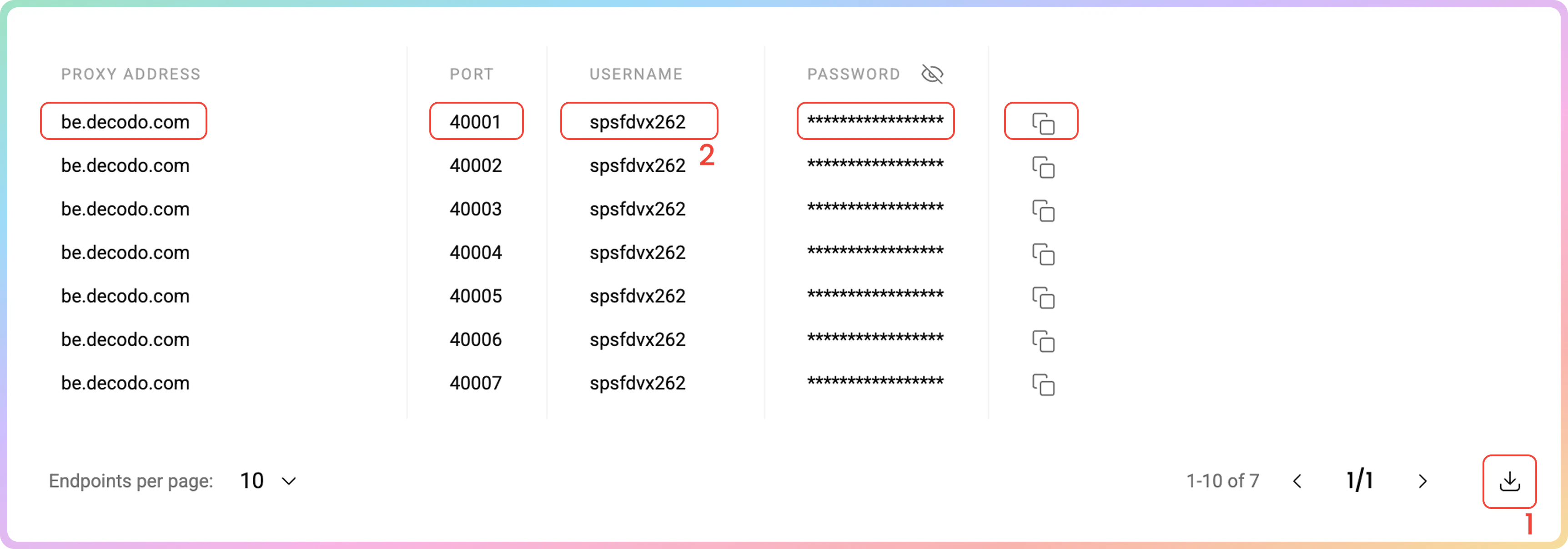
在代理设置部分完成设置后,您将看到根据您的选择生成的端点和端口的**代理列表**。
1. 只需将其**复制**到剪贴板,或**下载**创建的代理列表的`.csv`或`.txt`文件。
2. 或者,**复制**生成参数的单个元素,例如**代理地址**、**端口**、**用户名**和**密码**,或复制整个示例字符串。
## 代理列表示例
在代理设置部分完成设置后,您将看到根据您的选择生成的端点和端口的**代理列表**。
1. 只需将其**复制**到剪贴板,或**下载**创建的代理列表的`.csv`或`.txt`文件。
2. 或者,**复制**生成参数的单个元素,例如**代理地址**、**端口**、**用户名**和**密码**,或复制整个示例字符串。
 ### 端点列表控制
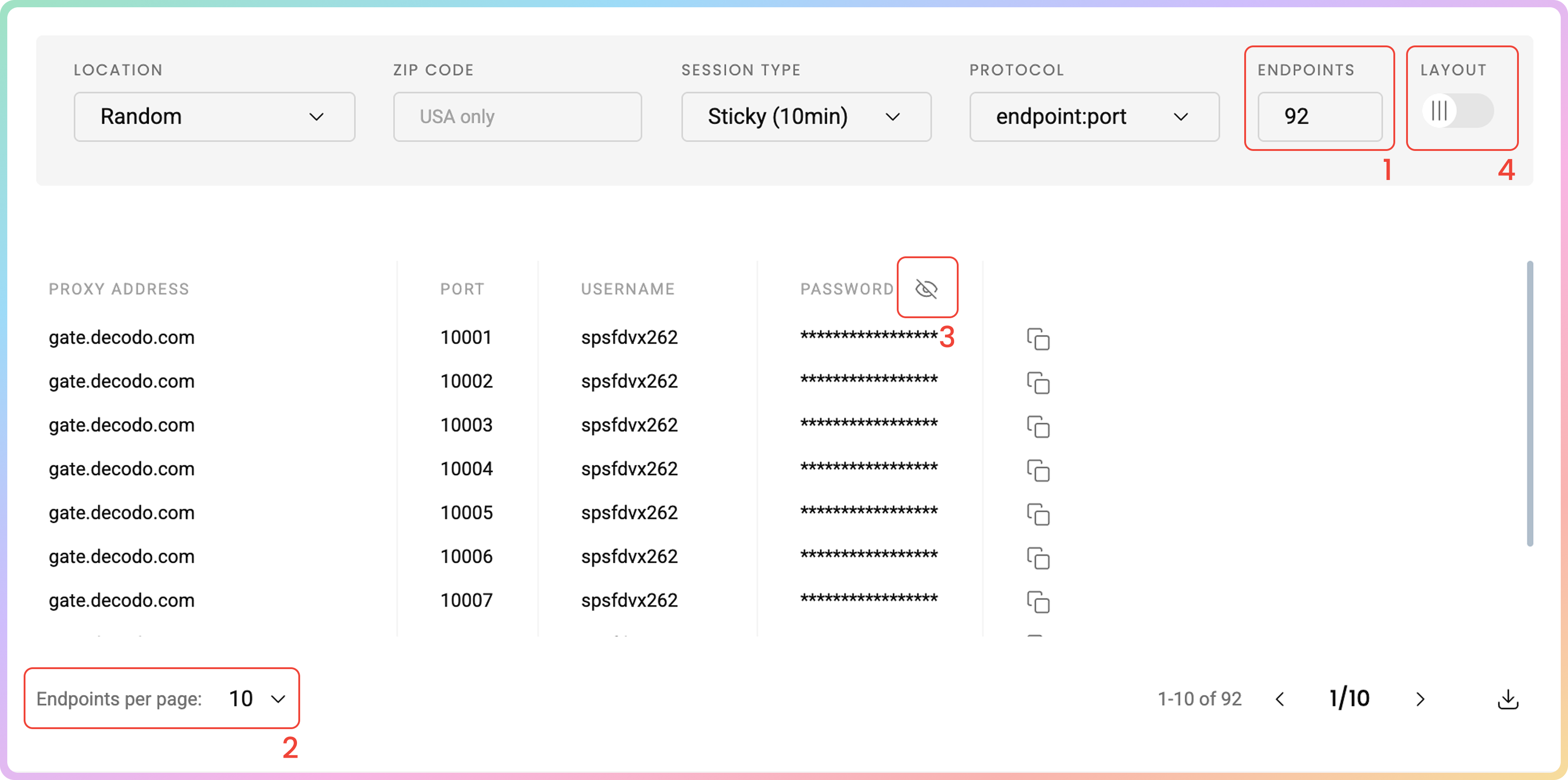
1. 您可以设置生成端点的**数量**。
2. 以及您希望**每页**显示多少个(`10`、`25`、`50`或`100`)。
3. 通过点击**眼睛**图标隐藏您的密码。这不会影响复制和粘贴功能。
4. 点击**布局**下右上角的**切换视图**以显示整个参数字符串。
### 端点列表控制
1. 您可以设置生成端点的**数量**。
2. 以及您希望**每页**显示多少个(`10`、`25`、`50`或`100`)。
3. 通过点击**眼睛**图标隐藏您的密码。这不会影响复制和粘贴功能。
4. 点击**布局**下右上角的**切换视图**以显示整个参数字符串。
 ## 代码示例
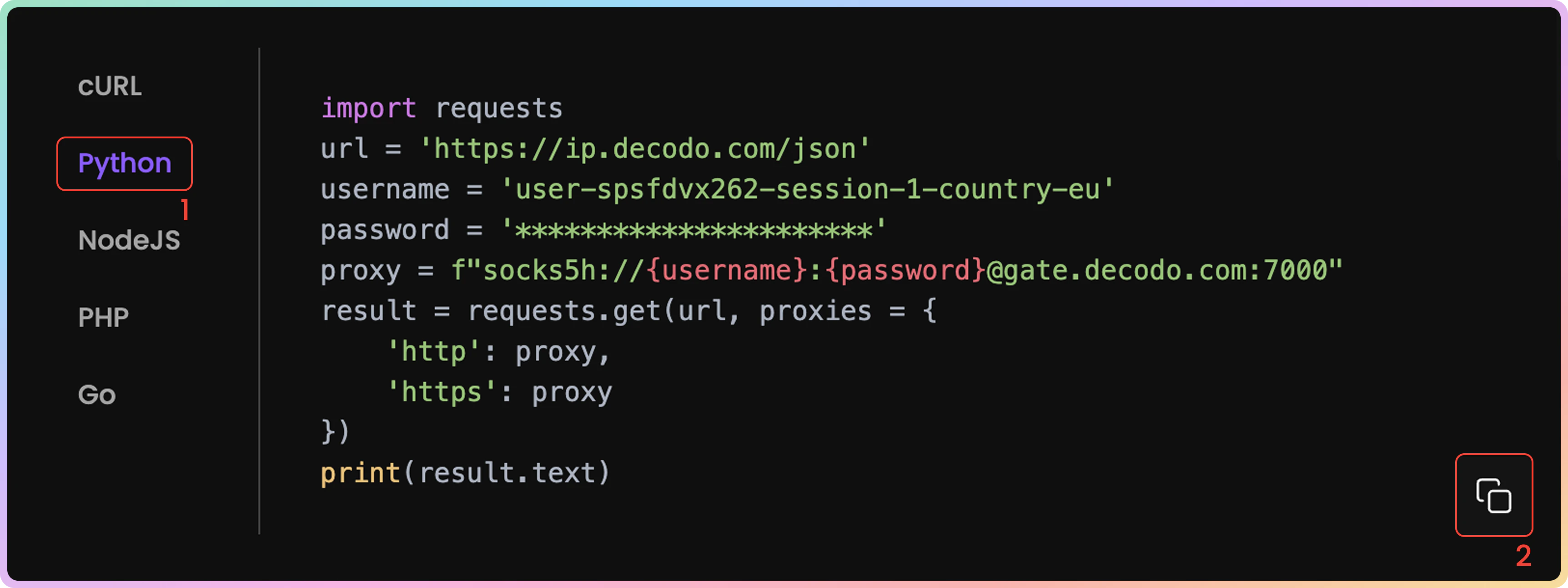
在项目中使用代理之前,确认代理是否正常运行非常重要。代理设置仪表板底部根据您之前的选择生成的**代码示例**允许您快速测试代理是否正确连接并显示您的新IP地址。
1. 您可以选择任何可用的语言:`cURL`、`Python`、`NodeJS`、`PHP`或`GO`。
2. 通过点击右下角的**复制**来复制预配置的代码示例。
3. 在您的环境中粘贴并运行代码。
4. 响应将显示代理IP地址和位置信息,确认您的代理正常工作。
* 如果您在响应中看到代理的IP地址(而不是您的实际IP),恭喜!您的代理已成功配置并可以使用。
## 代码示例
在项目中使用代理之前,确认代理是否正常运行非常重要。代理设置仪表板底部根据您之前的选择生成的**代码示例**允许您快速测试代理是否正确连接并显示您的新IP地址。
1. 您可以选择任何可用的语言:`cURL`、`Python`、`NodeJS`、`PHP`或`GO`。
2. 通过点击右下角的**复制**来复制预配置的代码示例。
3. 在您的环境中粘贴并运行代码。
4. 响应将显示代理IP地址和位置信息,确认您的代理正常工作。
* 如果您在响应中看到代理的IP地址(而不是您的实际IP),恭喜!您的代理已成功配置并可以使用。
 ## 集成指南
生成端点和端口后,您可以将它们应用于任何应用程序或工具,立即开始使用代理。
### Decodo工具
* 或者,您可以使用专用的Decodo工具——适用于[**Chrome**](https://help.decodo.com/docs/cn/decodo-chrome-extension#/)和[**Firefox**](https://help.decodo.com/docs/cn/decodo-firefox-extension#/)的**Decodo扩展**。
### 集成指南
* 在[**集成概述**](https://help.decodo.com/docs/cn/proxy-integrations-overview)部分查看最受欢迎的第三方工具指南。
### GitHub
* 有关任何**高级代码示例**和**中间件**,请访问我们的[**GitHub**](https://github.com/decodo/decodo)页面。
## 统计数据
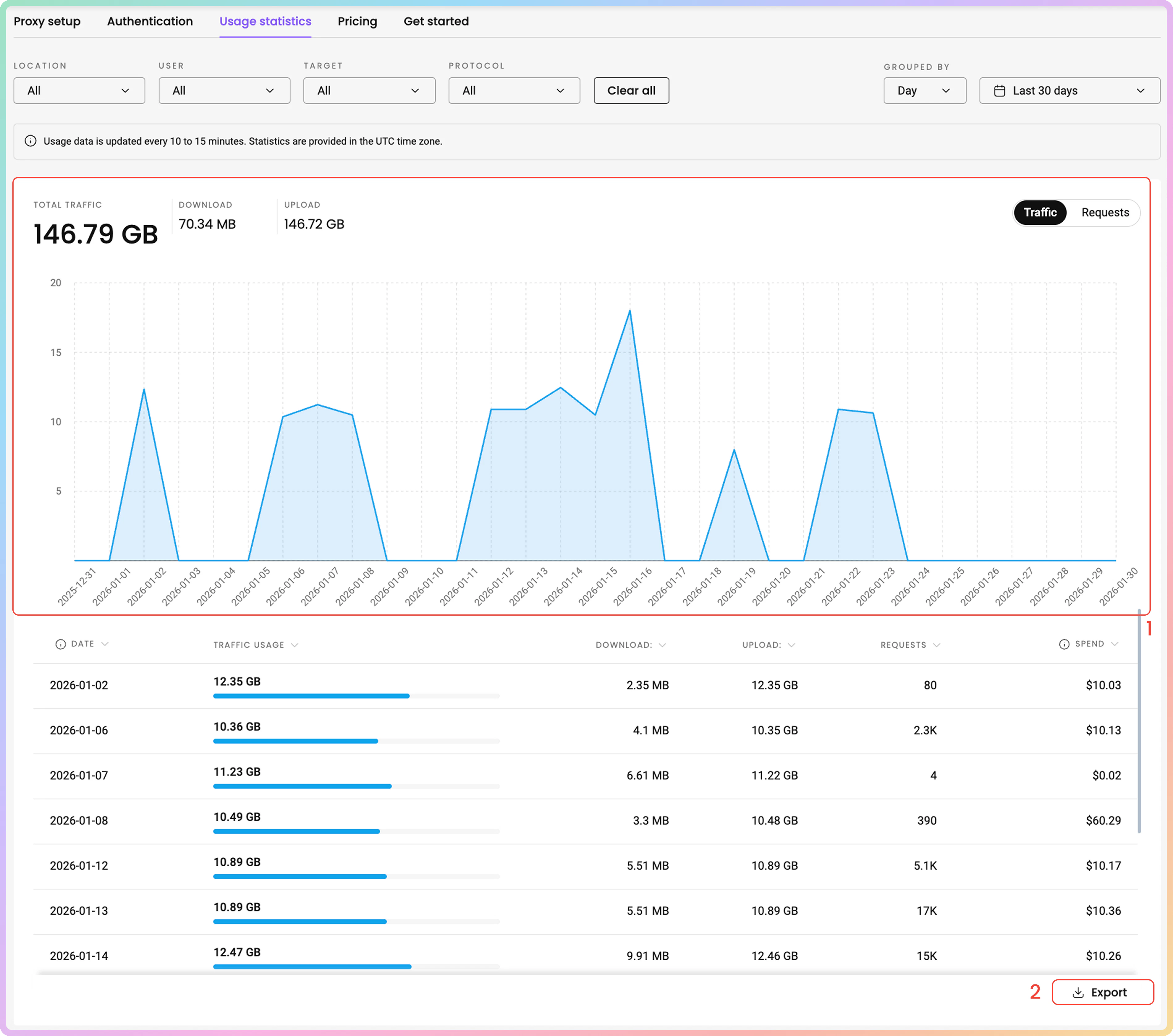
要跟踪住宅代理使用情况,请导航到[**住宅 → 住宅 → 使用统计**](https://dashboard.decodo.com/residential-proxies/statistics)部分。
1. 在这里,您可以查看按**位置**、**用户**、**目标**、**协议**排序的**流量**或**请求**使用情况的**图表**,并选择**时间段**。
2. 以`.CSV`、`.TXT`或`.JSON`格式导出**原始**或**表格数据**。
* 所有日期均为`UTC`。流量历史记录最多限制为`180`天。
## 集成指南
生成端点和端口后,您可以将它们应用于任何应用程序或工具,立即开始使用代理。
### Decodo工具
* 或者,您可以使用专用的Decodo工具——适用于[**Chrome**](https://help.decodo.com/docs/cn/decodo-chrome-extension#/)和[**Firefox**](https://help.decodo.com/docs/cn/decodo-firefox-extension#/)的**Decodo扩展**。
### 集成指南
* 在[**集成概述**](https://help.decodo.com/docs/cn/proxy-integrations-overview)部分查看最受欢迎的第三方工具指南。
### GitHub
* 有关任何**高级代码示例**和**中间件**,请访问我们的[**GitHub**](https://github.com/decodo/decodo)页面。
## 统计数据
要跟踪住宅代理使用情况,请导航到[**住宅 → 住宅 → 使用统计**](https://dashboard.decodo.com/residential-proxies/statistics)部分。
1. 在这里,您可以查看按**位置**、**用户**、**目标**、**协议**排序的**流量**或**请求**使用情况的**图表**,并选择**时间段**。
2. 以`.CSV`、`.TXT`或`.JSON`格式导出**原始**或**表格数据**。
* 所有日期均为`UTC`。流量历史记录最多限制为`180`天。
 ### 热门目标、国家和用户
* 下面,您可以在专用部分中看到更详细的信息:
* **热门目标**:目标、流量、下载、上传、请求、支出(与流量相关的总成本)。
* **热门国家**:国家、流量、下载、上传、请求、支出。
* **热门用户**:用户、流量、下载、上传、请求、支出。
[**这里**](https://help.decodo.com/docs/cn/residential-proxy-statistics)您可以更全面地了解**住宅使用统计**页面。
## 故障排除
如果您遇到任何问题,请参阅我们的[**故障排除**](https://help.decodo.com/docs/cn/proxy-troubleshooting#/)部分或直接联系我们的支持团队,我们提供**24/7**服务。
***
需要帮助或只是想打个招呼?我们的支持团队全天候为您服务。 \
您也可以随时通过电子邮件 [support@decodo.com](mailto:support@decodo.com) 联系我们。
找不到您要找的内容?请求一篇文章! \
有反馈意见?分享您对我们如何改进的想法。
### 热门目标、国家和用户
* 下面,您可以在专用部分中看到更详细的信息:
* **热门目标**:目标、流量、下载、上传、请求、支出(与流量相关的总成本)。
* **热门国家**:国家、流量、下载、上传、请求、支出。
* **热门用户**:用户、流量、下载、上传、请求、支出。
[**这里**](https://help.decodo.com/docs/cn/residential-proxy-statistics)您可以更全面地了解**住宅使用统计**页面。
## 故障排除
如果您遇到任何问题,请参阅我们的[**故障排除**](https://help.decodo.com/docs/cn/proxy-troubleshooting#/)部分或直接联系我们的支持团队,我们提供**24/7**服务。
***
需要帮助或只是想打个招呼?我们的支持团队全天候为您服务。 \
您也可以随时通过电子邮件 [support@decodo.com](mailto:support@decodo.com) 联系我们。
找不到您要找的内容?请求一篇文章! \
有反馈意见?分享您对我们如何改进的想法。