> ## Documentation Index
> Fetch the complete documentation index at: https://help.decodo.com/llms.txt
> Use this file to discover all available pages before exploring further.
# 浏览器操作
> 网页抓取 API 浏览器操作
抓取器 API 支持在检索所需结果之前执行多种浏览器操作。
## 操作
### `click`
| 名称 | 参数 | 描述 |
| ------- | ------------------------------------------- | -------------------- |
| `click` | 选择器:`type`:"xpath"/"css"/"text" `value`:字符串 | 对指定元素执行点击操作并等待设定的秒数。 |
**示例:**
```json JSON theme={null}
{
"target": "universal",
"url": "https://www.yahoo.com/",
"browser_actions": [
{
"type": "click",
"selector": {
"type": "xpath",
"value": "//button"
}
}
]
}
```
### `input`
| 名称 | 参数 | 描述 |
| ------- | ----------------------------------------------------------- | ---------------- |
| `input` | 选择器:\*`type`:"xpath"/"css"/"text" \*`value`:字符串 `value`:字符串 | 将文本插入页面上的指定输入元素。 |
**示例:**
```json JSON theme={null}
{
"target": "universal",
"url": "https://www.yahoo.com/",
"browser_actions": [
{
"type": "input",
"selector": {
"type": "xpath",
"value": "//input"
},
"value": "Hello world"
}
]
}
```
### `scroll`
| 名称 | 参数 | 描述 |
| -------- | ------------- | -------------- |
| `scroll` | `x`:整数 `y`:整数 | 将页面内容滚动指定的像素数。 |
**示例:**
```json JSON theme={null}
{
"target": "universal",
"url": "https://www.yahoo.com/",
"browser_actions": [
{
"type": "scroll",
"x": "0",
"y": "300"
}
]
}
```
### `scroll_to_bottom`
| 名称 | 参数 | 描述 |
| ------------------ | -------------- | -------------- |
| `scroll_to_bottom` | `timeout_s`:整数 | 在设定的秒数内向下滚动页面。 |
**示例:**
```json JSON theme={null}
{
"target": "universal",
"url": "https://www.yahoo.com/",
"browser_actions": [
{
"type": "scroll_to_bottom",
"timeout_s": 5
}
]
}
```
### `wait`
| 名称 | 参数 | 描述 |
| ------ | ---------------- | -------- |
| `wait` | `wait_time_s`:整数 | 暂停指定的秒数。 |
**示例:**
```json JSON theme={null}
{
"target": "universal",
"url": "https://www.yahoo.com/",
"browser_actions": [
{
"type": "wait",
"wait_time_s": 5
}
]
}
```
### `wait_for_element`
| 名称 | 参数 | 描述 |
| ------------------ | -------------------------------------------------------------- | ------------ |
| `wait_for_element` | 选择器:\*`type`:"xpath"/"css"/"text" \*`value`:字符串 `timeout_s`:整数 | 等待指定时长以加载元素。 |
**示例:**
```json JSON theme={null}
{
"target": "universal",
"url": "https://www.yahoo.com/",
"browser_actions": [
{
"type": "wait_for_element",
"selector": {
"type": "css",
"value": ".submit-button"
},
"timeout_s": 5
}
]
}
```
### `fetch_resource`
如果与其他指令一起使用,`fetch_resource` 应作为最后一个操作。
| 名称 | 参数 | 描述 |
| ---------------- | ---------------------------------------- | ---------------------------- |
| `fetch_resource` | `filter`:正则表达式 `on_error`:"error"/"skip" | 检索与指定模式匹配的第一个 Fetch 或 XHR 资源 |
**示例:**
```json JSON theme={null}
{
"target": "universal",
"url": "https://www.yahoo.com/",
"browser_actions": [
{
"type": "fetch_resource",
"filter": "https://api.example.com/products/*",
"on_error": "error"
}
]
}
```
## 通用参数
适用于上述所有操作的参数
### `type`
| 名称 | 描述 |
| ------ | ---------- |
| `type` | 使用的浏览器操作类型 |
### `timeout_s`
| 名称 | 描述 |
| ----------- | ---------------- |
| `timeout_s` | 最多等待多少秒直到操作执行终止。 |
### `wait_time_s`
| 名称 | 描述 |
| ------------- | ------------ |
| `wait_time_s` | 明确用于执行操作的秒数。 |
### `on_error`
| 名称 | 描述 |
| ---------- | ------------------------------------------------ |
| `on_error` | 指示操作失败时的处理方式:"error":停止执行浏览器操作。"skip":继续执行下一个操作。 |
## 获取网络请求
如果网站通过获取 `JSON` 对象来填充内容,您可以只抓取网络请求,从而避免处理 `HTML`。为此,您可以使用 `fetch_resource` 浏览器操作,如下所示。
`fetch_resource` 不能与任何其他指令组合使用,只能单独请求使用。
例如,当加载 yahoo.com 并打开网络选项卡时,我们可以看到正在加载一个 `exp.json` 文件:
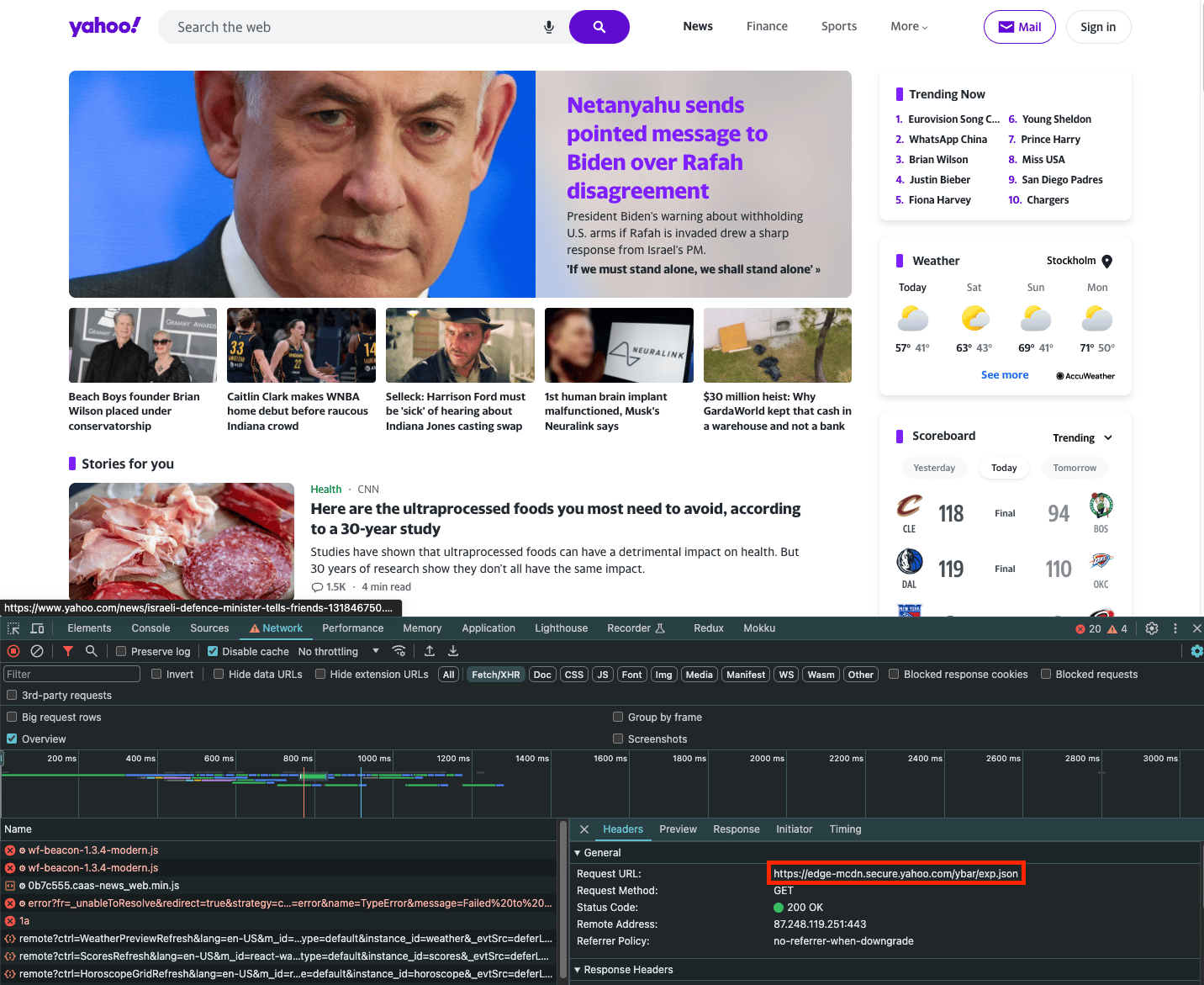 如果您只想抓取此请求的内容,可以使用 `fetch_resource` 浏览器操作。请注意,`filter` 是与文件名匹配的正则表达式:
```json Payload theme={null}
{
"target": "universal",
"url": "https://www.yahoo.com/",
"browser_actions": [
{
"type": "fetch_resource",
"filter": "/ybar/exp"
}
]
}
```
结果:
```json Payload theme={null}
{
"results": [
{
"content": "{\n \"expCount\":5,\n \"selection\":\"individual\",\n ... }",
"status_code": 200,
"url": "https://example.com/api/product/1",
"task_id": "7131940420107377665",
"created_at": "2023-11-19 09:46:41",
"updated_at": "2023-11-19 09:47:08"
}
]
}
```
***
需要帮助或只是想打个招呼?我们的支持团队全天候为您服务。 \
您也可以随时通过电子邮件 [support@decodo.com](mailto:support@decodo.com) 联系我们。
找不到您要找的内容?请求一篇文章! \
有反馈意见?分享您对我们如何改进的想法。
如果您只想抓取此请求的内容,可以使用 `fetch_resource` 浏览器操作。请注意,`filter` 是与文件名匹配的正则表达式:
```json Payload theme={null}
{
"target": "universal",
"url": "https://www.yahoo.com/",
"browser_actions": [
{
"type": "fetch_resource",
"filter": "/ybar/exp"
}
]
}
```
结果:
```json Payload theme={null}
{
"results": [
{
"content": "{\n \"expCount\":5,\n \"selection\":\"individual\",\n ... }",
"status_code": 200,
"url": "https://example.com/api/product/1",
"task_id": "7131940420107377665",
"created_at": "2023-11-19 09:46:41",
"updated_at": "2023-11-19 09:47:08"
}
]
}
```
***
需要帮助或只是想打个招呼?我们的支持团队全天候为您服务。 \
您也可以随时通过电子邮件 [support@decodo.com](mailto:support@decodo.com) 联系我们。
找不到您要找的内容?请求一篇文章! \
有反馈意见?分享您对我们如何改进的想法。