> ## Documentation Index
> Fetch the complete documentation index at: https://help.decodo.com/llms.txt
> Use this file to discover all available pages before exploring further.
# 快速开始
> 网页抓取 API 快速开始
Decodo 网页抓取 API 是一个全面的数据收集解决方案,适用于电子商务市场、搜索引擎结果页面、社交媒体平台和各种其他网站。
## 获取 API 凭证
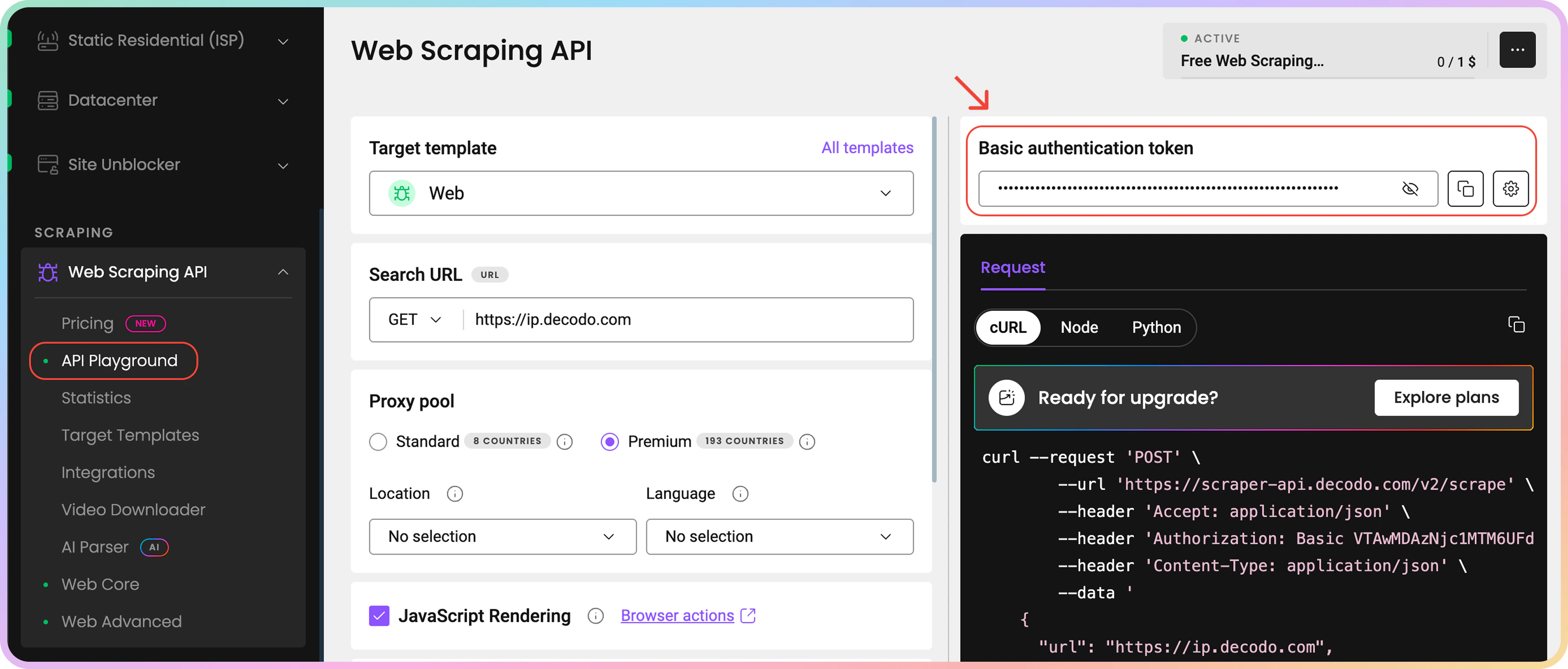
首先创建一个账户以获取您的 API 凭证。登录到仪表板后,购买免费试用或订阅(在[**这里**](https://help.decodo.com/docs/cn/web-scraping-api-introduction)查找更多定价信息)。然后导航到 API Playground 以检索您的 API Token 或用户名和密码。
 ## 第一个请求
使用简单的请求测试您的设置:
```shellscript cURL theme={null}
# update 'TOKEN VALUE' with your authorization token
curl --request 'POST' \
--url 'https://scraper-api.decodo.com/v2/scrape' \
--header 'Accept: application/json' \
--header 'Authorization: Basic TOKEN VALUE' \
--header 'Content-Type: application/json' \
--data '
{
"url": "https://ip.decodo.com"
}
'
```
不要忘记使用您的令牌更新 Authorization 部分。
您应该收到一个 HTML 响应;位置将是随机的,可能与示例不同:
```json JSON expandable theme={null}
{
"results": [
{
"content": "{\n \"browser\": {\n \"name\": \"Firefox\",\n \"version\": \"123.0\"\n },\n \"platform\": {\n \"name\": \"Windows\",\n \"os\": \"Windows 10\",\n \"type\": \"desktop\"\n },\n \"engine\": {\n \"name\": \"Gecko\",\n \"version\": \"20100101\"\n },\n \"isp\": {\n \"isp\": \"Cogent Communications\",\n \"asn\": 174,\n \"domain\": \"\",\n \"organization\": \"Cogent Communications\"\n },\n \"city\": {\n \"name\": \"New York\",\n \"code\": \"NY\",\n \"state\": \"New York\",\n \"time_zone\": \"America/New_York\",\n \"zip_code\": \"10118\",\n \"latitude\": 40.7126,\n \"longitude\": -74.0066\n },\n \"proxy\": {\n \"ip\": \"149.115.134.88\"\n },\n \"country\": {\n \"code\": \"US\",\n \"name\": \"United States\",\n \"continent\": \"North America\"\n }\n}\n",
"headers": {
"content-length": "813",
"content-type": "application/json",
"date": "Wed, 28 Jan 2026 14:06:35 GMT",
"server": "nginx"
},
"cookies": [],
"status_code": 200,
"task_id": "7422278918918391809",
"created_at": "2026-01-28 14:06:33",
"updated_at": "2026-01-28 14:06:35"
}
]
}
```
## 了解更多
我们的 API 提供许多您可能感兴趣的功能。以下是一些主要主题。
支持三种**集成类型**:
* 同步(实时)请求,在[**这里**](https://help.decodo.com/docs/cn/web-scraping-api-real-time-requests)阅读更多。
* 异步请求,在[**这里**](https://help.decodo.com/docs/cn/web-scraping-api-asynchronous-requests)阅读更多。
* 批量请求,在[**这里**](https://help.decodo.com/docs/cn/web-scraping-api-asynchronous-requests#queue-multiple-tasks)阅读更多。
我们支持许多**参数**,如 JS 渲染、浏览器操作、设备类型等。在[**这里**](https://help.decodo.com/docs/cn/web-scraping-api-parameters)阅读。
查看我们为 Google、Amazon、ChatGPT 等提供的大量**目标模板**,在[**这里**](https://help.decodo.com/docs/cn/web-scraping-api-targets)阅读。
***
需要帮助或只是想打个招呼?我们的支持团队全天候为您服务。 \
您也可以随时通过电子邮件 [support@decodo.com](mailto:support@decodo.com) 联系我们。
找不到您要找的内容?请求一篇文章! \
有反馈意见?分享您对我们如何改进的想法。
## 第一个请求
使用简单的请求测试您的设置:
```shellscript cURL theme={null}
# update 'TOKEN VALUE' with your authorization token
curl --request 'POST' \
--url 'https://scraper-api.decodo.com/v2/scrape' \
--header 'Accept: application/json' \
--header 'Authorization: Basic TOKEN VALUE' \
--header 'Content-Type: application/json' \
--data '
{
"url": "https://ip.decodo.com"
}
'
```
不要忘记使用您的令牌更新 Authorization 部分。
您应该收到一个 HTML 响应;位置将是随机的,可能与示例不同:
```json JSON expandable theme={null}
{
"results": [
{
"content": "{\n \"browser\": {\n \"name\": \"Firefox\",\n \"version\": \"123.0\"\n },\n \"platform\": {\n \"name\": \"Windows\",\n \"os\": \"Windows 10\",\n \"type\": \"desktop\"\n },\n \"engine\": {\n \"name\": \"Gecko\",\n \"version\": \"20100101\"\n },\n \"isp\": {\n \"isp\": \"Cogent Communications\",\n \"asn\": 174,\n \"domain\": \"\",\n \"organization\": \"Cogent Communications\"\n },\n \"city\": {\n \"name\": \"New York\",\n \"code\": \"NY\",\n \"state\": \"New York\",\n \"time_zone\": \"America/New_York\",\n \"zip_code\": \"10118\",\n \"latitude\": 40.7126,\n \"longitude\": -74.0066\n },\n \"proxy\": {\n \"ip\": \"149.115.134.88\"\n },\n \"country\": {\n \"code\": \"US\",\n \"name\": \"United States\",\n \"continent\": \"North America\"\n }\n}\n",
"headers": {
"content-length": "813",
"content-type": "application/json",
"date": "Wed, 28 Jan 2026 14:06:35 GMT",
"server": "nginx"
},
"cookies": [],
"status_code": 200,
"task_id": "7422278918918391809",
"created_at": "2026-01-28 14:06:33",
"updated_at": "2026-01-28 14:06:35"
}
]
}
```
## 了解更多
我们的 API 提供许多您可能感兴趣的功能。以下是一些主要主题。
支持三种**集成类型**:
* 同步(实时)请求,在[**这里**](https://help.decodo.com/docs/cn/web-scraping-api-real-time-requests)阅读更多。
* 异步请求,在[**这里**](https://help.decodo.com/docs/cn/web-scraping-api-asynchronous-requests)阅读更多。
* 批量请求,在[**这里**](https://help.decodo.com/docs/cn/web-scraping-api-asynchronous-requests#queue-multiple-tasks)阅读更多。
我们支持许多**参数**,如 JS 渲染、浏览器操作、设备类型等。在[**这里**](https://help.decodo.com/docs/cn/web-scraping-api-parameters)阅读。
查看我们为 Google、Amazon、ChatGPT 等提供的大量**目标模板**,在[**这里**](https://help.decodo.com/docs/cn/web-scraping-api-targets)阅读。
***
需要帮助或只是想打个招呼?我们的支持团队全天候为您服务。 \
您也可以随时通过电子邮件 [support@decodo.com](mailto:support@decodo.com) 联系我们。
找不到您要找的内容?请求一篇文章! \
有反馈意见?分享您对我们如何改进的想法。