> ## Documentation Index
> Fetch the complete documentation index at: https://help.decodo.com/llms.txt
> Use this file to discover all available pages before exploring further.
# Dolphin Anty Proxy Setup Guide
> Dolphin Anty is an anti-detect browser for multi-account management.
## Getting Started
Before proceeding, ensure you have:
* No other VPN or proxy active.
* The **proxy endpoint** and **port** (e.g., `us.decodo.com:10101`).
* Your **proxy username** and **password** (or a **whitelisted IP** set).
**Proxy Guides**
Learn how to find **proxy details** in your dashboard for each proxy type [**here**](https://help.decodo.com/docs/proxy-quick-start-guides).
## Proxy Setup
First, [**create**](https://dolphin-anty.com/panel/#/auth/registration) an account, and [**download**](https://dolphin-anty.com/download/) Dolphin Anty.
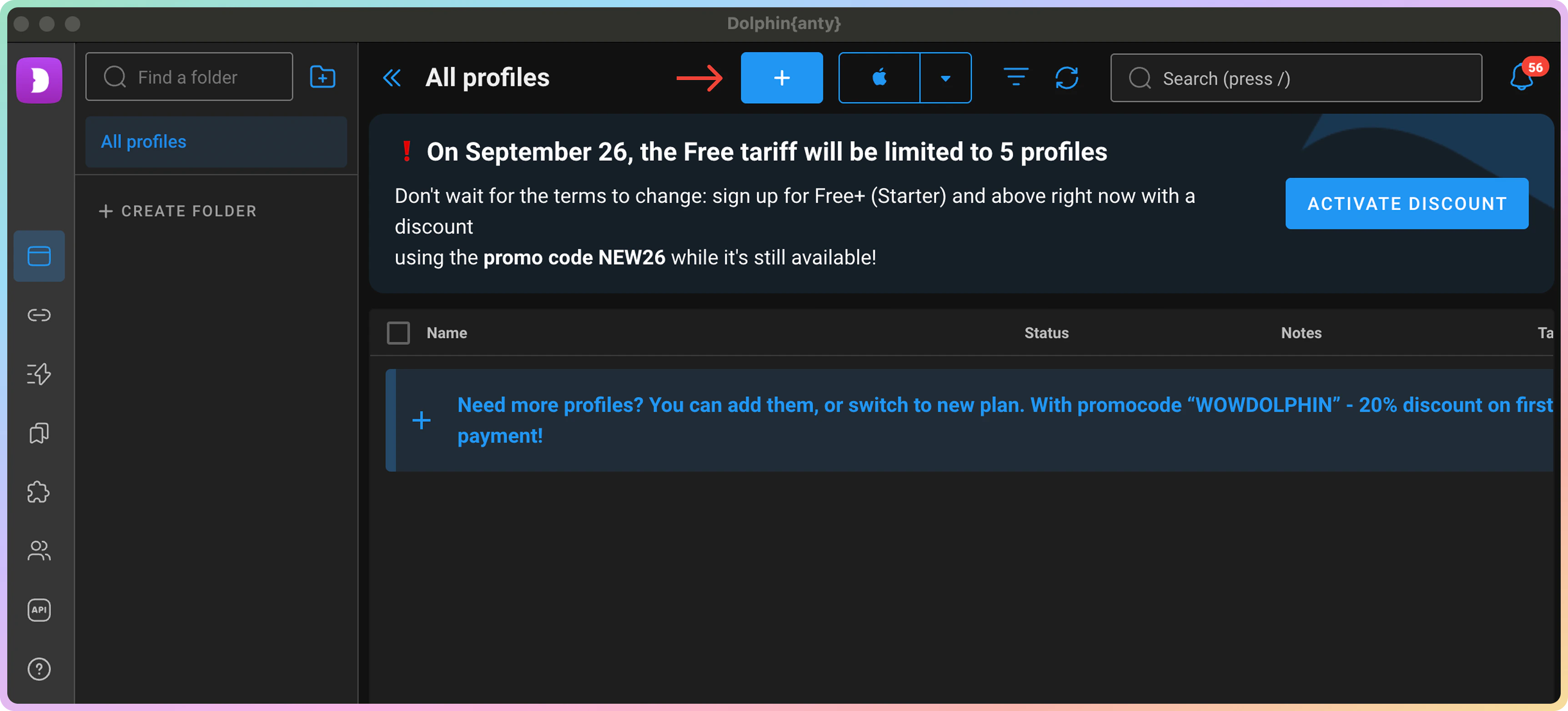
Launch the app and click `+` (Create Profile button).
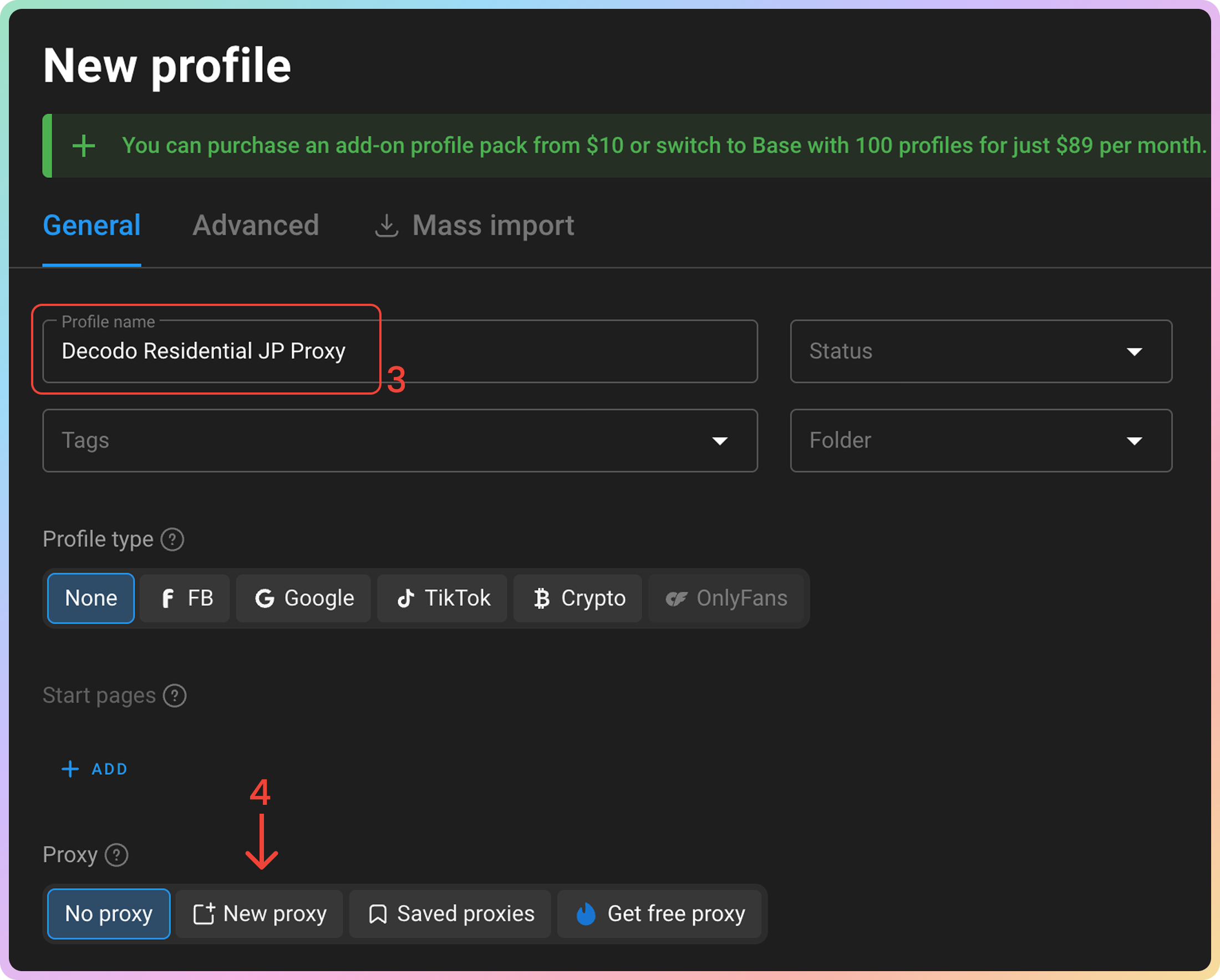
 **Name** your browser profile.
Click **New proxy**.
**Name** your browser profile.
Click **New proxy**.
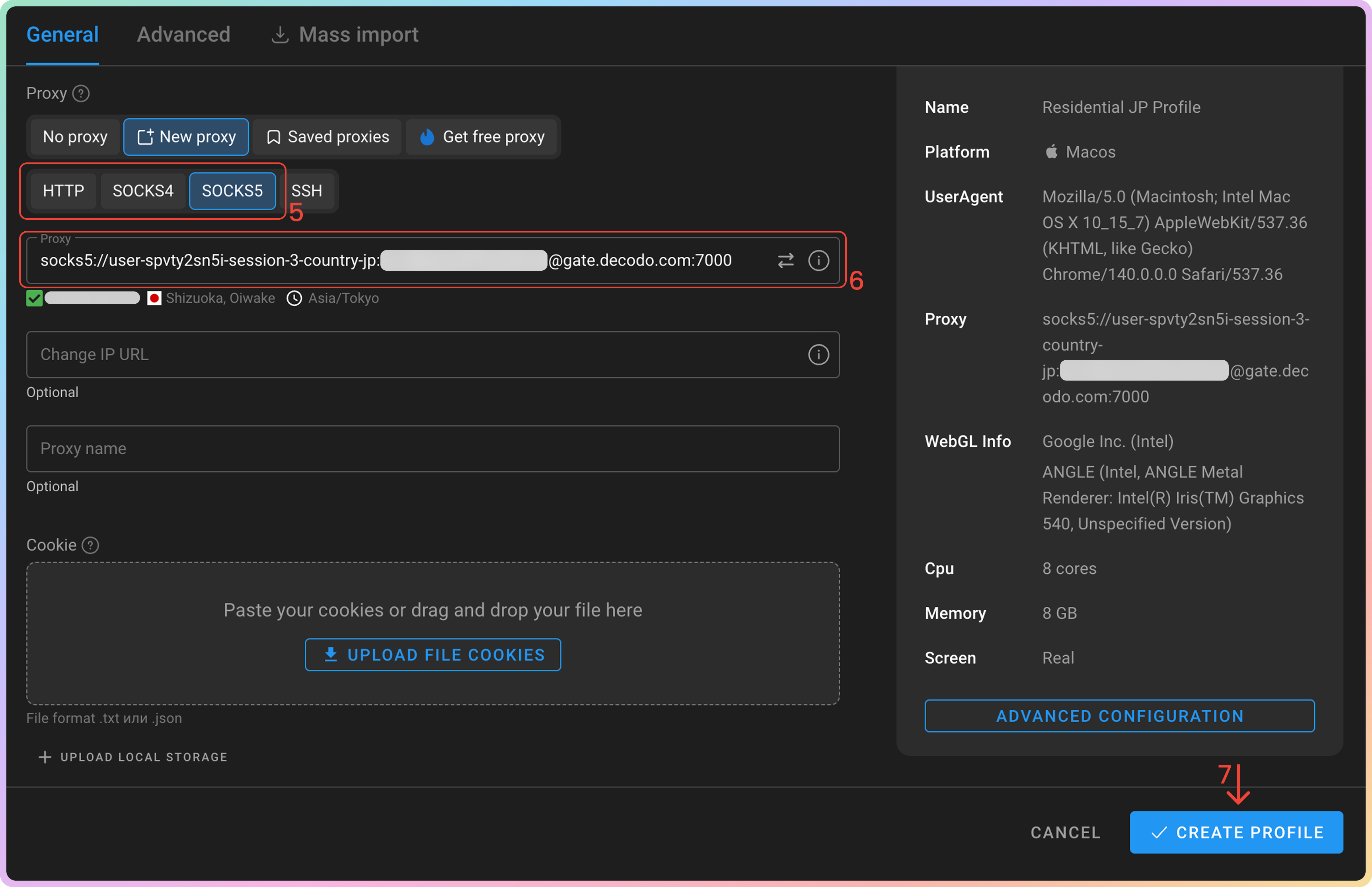
 Select `HTTP` or `SOCKS5`.
Fill in the proxy and authentication field:
* **Proxy** (e.g.,`jp.decodo.com:30001:username:password`; `socks5h://user-username-session-1-country-jp:[email protected]:7000`)
Click **CREATE PROFILE**.
Select `HTTP` or `SOCKS5`.
Fill in the proxy and authentication field:
* **Proxy** (e.g.,`jp.decodo.com:30001:username:password`; `socks5h://user-username-session-1-country-jp:[email protected]:7000`)
Click **CREATE PROFILE**.
 In the **All profiles** section, click **Start** next to your new profile to open it.
 ### Verify the Connection
* Visit [**ip.decodo.com**](https://ip.decodo.com/). If successful, your IP address will display the location of the proxy.
***
## Common Issues
### Blocklist
⚠️ Please be aware that we [**restrict access to some websites**](https://decodo.com/faq/general/do-you-have-any-blocked-sites).
### `SOCKS5`
**Residential and Mobile Proxy Support Limitations**
The `gate.decodo.com` **endpoint** and the `7000` **port** must be used to utilize `SOCKS5` Residential or Mobile proxies. **Country** endpoints, such as `us.decodo.com`, will not function!
You can target specific locations instead by specifying the location in your username using **advanced** **parameters**:
* e.g.: `user-username-country-us` will connect to the **USA** pool.
To get a **sticky** `SOCKS5` Residential or Mobile proxy in a **tool**, you must use a `session` **parameter**. Otherwise, the proxy will always rotate even with a set `sessionduration` parameter.
* e.g.: `user-username-session-abc123-sessionduration-30` will connect to the same session.
* The **session ID** name can be defined by any string of your choice.
Learn more in our **advanced** **parameter** guides for [**Residential**](https://help.decodo.com/docs/residential-proxy-advanced-parameters/) and [**Mobile**](https://help.decodo.com/docs/mobile-proxy-advanced-parameters/) proxies.
### Direct IP
If you buy an IP list, you can specify which IPs to connect to using the **direct** `ip` parameter in the proxy username: `user-username-ip-x.x.x.x`
* Supported products: **DC Pay/IP**, **Dedicated DC**, **ISP Pay/IP**, **Dedicated ISP** plans.
* Products that offer access to the full proxy pool, such as residential proxies, do not support this parameter.
* Decodo proxies don't support an `IP:PORT` format by default.
* You must use the **endpoint** rotator format (e.g., `us.decodo.com:10101`).
* If necessary, try the workaround [**here**](https://help.decodo.com/docs/how-to-get-ip-port-format#/), but it only works temporarily before requiring another setup update.
### Troubleshooting
If you experience any other issues, check out our main [**troubleshooting**](https://help.decodo.com/docs/proxy-troubleshooting) section.
***
Need help or just want to say hello? Our support is available 24/7. \
You can also reach us anytime via email at [support@decodo.com](mailto:support@decodo.com).
Can't find what you're looking for? Request an article! \
Have feedback? Share your thoughts on how we can improve.
### Verify the Connection
* Visit [**ip.decodo.com**](https://ip.decodo.com/). If successful, your IP address will display the location of the proxy.
***
## Common Issues
### Blocklist
⚠️ Please be aware that we [**restrict access to some websites**](https://decodo.com/faq/general/do-you-have-any-blocked-sites).
### `SOCKS5`
**Residential and Mobile Proxy Support Limitations**
The `gate.decodo.com` **endpoint** and the `7000` **port** must be used to utilize `SOCKS5` Residential or Mobile proxies. **Country** endpoints, such as `us.decodo.com`, will not function!
You can target specific locations instead by specifying the location in your username using **advanced** **parameters**:
* e.g.: `user-username-country-us` will connect to the **USA** pool.
To get a **sticky** `SOCKS5` Residential or Mobile proxy in a **tool**, you must use a `session` **parameter**. Otherwise, the proxy will always rotate even with a set `sessionduration` parameter.
* e.g.: `user-username-session-abc123-sessionduration-30` will connect to the same session.
* The **session ID** name can be defined by any string of your choice.
Learn more in our **advanced** **parameter** guides for [**Residential**](https://help.decodo.com/docs/residential-proxy-advanced-parameters/) and [**Mobile**](https://help.decodo.com/docs/mobile-proxy-advanced-parameters/) proxies.
### Direct IP
If you buy an IP list, you can specify which IPs to connect to using the **direct** `ip` parameter in the proxy username: `user-username-ip-x.x.x.x`
* Supported products: **DC Pay/IP**, **Dedicated DC**, **ISP Pay/IP**, **Dedicated ISP** plans.
* Products that offer access to the full proxy pool, such as residential proxies, do not support this parameter.
* Decodo proxies don't support an `IP:PORT` format by default.
* You must use the **endpoint** rotator format (e.g., `us.decodo.com:10101`).
* If necessary, try the workaround [**here**](https://help.decodo.com/docs/how-to-get-ip-port-format#/), but it only works temporarily before requiring another setup update.
### Troubleshooting
If you experience any other issues, check out our main [**troubleshooting**](https://help.decodo.com/docs/proxy-troubleshooting) section.
***
Need help or just want to say hello? Our support is available 24/7. \
You can also reach us anytime via email at [support@decodo.com](mailto:support@decodo.com).
Can't find what you're looking for? Request an article! \
Have feedback? Share your thoughts on how we can improve.