> ## Documentation Index
> Fetch the complete documentation index at: https://help.decodo.com/llms.txt
> Use this file to discover all available pages before exploring further.
# Quick Start
> Free Proxies Quick Start
Free Proxies must be **activated** before you can use them.
Activation requires a **registered** account with a **verified email address**.
1. Navigate to the [**Free Proxies**](https://dashboard.decodo.com/free-proxies/proxy-setup) section on your dashboard.
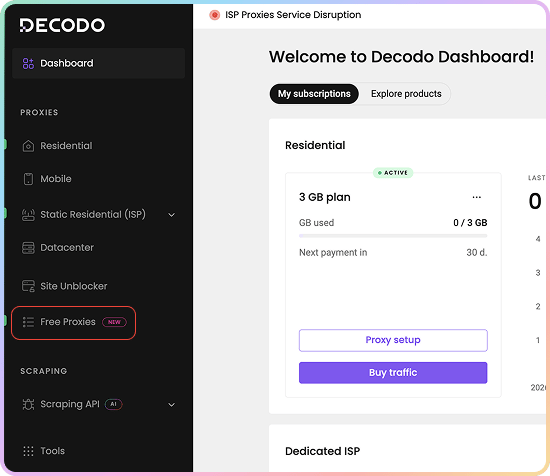 2. Click **Try free proxies**.
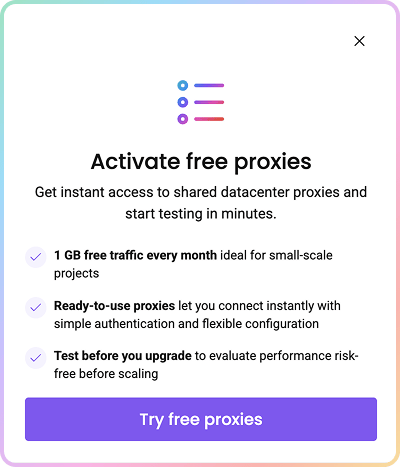 Once activated, your free monthly subscription and proxy user are created automatically, and your **10 IP list** is assigned.
### Decodo Proxies Use Endpoints
* Endpoints are like gateways to IP pools.
* When you connect to an endpoint, your traffic is **automatically** routed through a random IP address from the Decodo IP pool.
* Free Proxies use the following endpoint:
```text theme={null}
dc.decodo.com:10001
```
* Here are a few basic request examples in various programming languages:
```shellscript cURL theme={null}
curl -U "USERNAME:PASSWORD" -x "dc.decodo.com:10001" "https://ip.decodo.com/json?provider=IPinfo"
```
```python Python theme={null}
import requests
url = 'https://ip.decodo.com/json'
username = 'USERNAME'
password = 'PASSWORD'
proxy = f"http://{username}:{password}@dc.decodo.com:10001"
result = requests.get(url, proxies = {
'http': proxy,
'https': proxy
})
print(result.text)
```
```javascript Node theme={null}
const axios = require('axios');
const { HttpsProxyAgent } = require('https-proxy-agent');
const url = 'https://ip.decodo.com/json';
const proxyAgent = new HttpsProxyAgent(
'http://username:password@dc.decodo.com:10001');
axios
.get(url, {
httpsAgent: proxyAgent,
})
.then((response) => {
console.log(response.data);
});
```
```php PHP theme={null}
```
```go Go theme={null}
package main
import (
"log"
"net/http"
"net/url"
)
func main() {
proxyUrl, err := url.Parse("http://username:password@dc.decodo.com:10001")
if err != nil {
log.Fatalln(err)
}
client := &http.Client{
Transport: &http.Transport{Proxy: http.ProxyURL(proxyUrl)},
}
req, err := http.NewRequest("GET", "https://ip.decodo.com/json", nil)
if err != nil {
log.Println(err)
}
res, err := client.Do(req)
log.Println(res)
if err != nil {
log.Println(err)
}
}
```
```java Java theme={null}
import java.net.*;
import java.io.*;
import java.util.Scanner;
public class ProxyTest
{
public static void main(String[] args) throws Exception
{
InetSocketAddress proxyAddress = new InetSocketAddress("dc.decodo.com", 10001); // Set proxy IP/port.
Proxy proxy = new Proxy(Proxy.Type.HTTP, proxyAddress);
URL url = new URI("https://ip.decodo.com/").toURL(); //enter target URL
Authenticator authenticator = new Authenticator() {
public PasswordAuthentication getPasswordAuthentication() {
return (new PasswordAuthentication("username","password".toCharArray())); //enter credentials
}
};
Authenticator.setDefault(authenticator);
URLConnection urlConnection = url.openConnection(proxy);
//Scanner to view output
Scanner scanner = new Scanner(urlConnection.getInputStream());
System.out.println(scanner.nextLine());
scanner.close();
}
}
```
### Control Your Connection
* Each IP has its own port, so switching IPs is as simple as switching ports.
* You can also make requests more specific by adding a `country` parameter. Free Proxy IPs are located in the **USA**.
* Keep reading for a step-by-step walkthrough, or check out the [**Advanced Parameters**](https://help.decodo.com/docs/free-proxy-advanced-parameters) article for an in-depth look.
## Authentication
Free Proxies support **username and password** authentication **only**. IP whitelisting is not available.
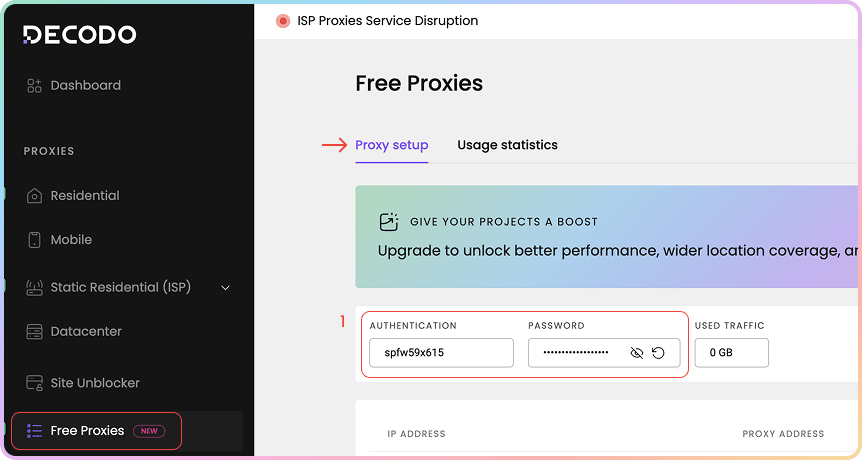
1. Navigate to the [**Free Proxies → Proxy setup**](https://dashboard.decodo.com/free-proxies/proxy-setup) page on your dashboard and look for the proxy authentication and password fields.
* You’ll see that your proxy user and password are created automatically.
Once activated, your free monthly subscription and proxy user are created automatically, and your **10 IP list** is assigned.
### Decodo Proxies Use Endpoints
* Endpoints are like gateways to IP pools.
* When you connect to an endpoint, your traffic is **automatically** routed through a random IP address from the Decodo IP pool.
* Free Proxies use the following endpoint:
```text theme={null}
dc.decodo.com:10001
```
* Here are a few basic request examples in various programming languages:
```shellscript cURL theme={null}
curl -U "USERNAME:PASSWORD" -x "dc.decodo.com:10001" "https://ip.decodo.com/json?provider=IPinfo"
```
```python Python theme={null}
import requests
url = 'https://ip.decodo.com/json'
username = 'USERNAME'
password = 'PASSWORD'
proxy = f"http://{username}:{password}@dc.decodo.com:10001"
result = requests.get(url, proxies = {
'http': proxy,
'https': proxy
})
print(result.text)
```
```javascript Node theme={null}
const axios = require('axios');
const { HttpsProxyAgent } = require('https-proxy-agent');
const url = 'https://ip.decodo.com/json';
const proxyAgent = new HttpsProxyAgent(
'http://username:password@dc.decodo.com:10001');
axios
.get(url, {
httpsAgent: proxyAgent,
})
.then((response) => {
console.log(response.data);
});
```
```php PHP theme={null}
```
```go Go theme={null}
package main
import (
"log"
"net/http"
"net/url"
)
func main() {
proxyUrl, err := url.Parse("http://username:password@dc.decodo.com:10001")
if err != nil {
log.Fatalln(err)
}
client := &http.Client{
Transport: &http.Transport{Proxy: http.ProxyURL(proxyUrl)},
}
req, err := http.NewRequest("GET", "https://ip.decodo.com/json", nil)
if err != nil {
log.Println(err)
}
res, err := client.Do(req)
log.Println(res)
if err != nil {
log.Println(err)
}
}
```
```java Java theme={null}
import java.net.*;
import java.io.*;
import java.util.Scanner;
public class ProxyTest
{
public static void main(String[] args) throws Exception
{
InetSocketAddress proxyAddress = new InetSocketAddress("dc.decodo.com", 10001); // Set proxy IP/port.
Proxy proxy = new Proxy(Proxy.Type.HTTP, proxyAddress);
URL url = new URI("https://ip.decodo.com/").toURL(); //enter target URL
Authenticator authenticator = new Authenticator() {
public PasswordAuthentication getPasswordAuthentication() {
return (new PasswordAuthentication("username","password".toCharArray())); //enter credentials
}
};
Authenticator.setDefault(authenticator);
URLConnection urlConnection = url.openConnection(proxy);
//Scanner to view output
Scanner scanner = new Scanner(urlConnection.getInputStream());
System.out.println(scanner.nextLine());
scanner.close();
}
}
```
### Control Your Connection
* Each IP has its own port, so switching IPs is as simple as switching ports.
* You can also make requests more specific by adding a `country` parameter. Free Proxy IPs are located in the **USA**.
* Keep reading for a step-by-step walkthrough, or check out the [**Advanced Parameters**](https://help.decodo.com/docs/free-proxy-advanced-parameters) article for an in-depth look.
## Authentication
Free Proxies support **username and password** authentication **only**. IP whitelisting is not available.
1. Navigate to the [**Free Proxies → Proxy setup**](https://dashboard.decodo.com/free-proxies/proxy-setup) page on your dashboard and look for the proxy authentication and password fields.
* You’ll see that your proxy user and password are created automatically.
 ### Additional Authentication Options
1. You may **copy** your password by clicking on it.
2. To see the password, click the **eye** icon.
3. You can generate a new password by clicking the **arrow icon** and choosing **Confirm**.
4. Here, you can also see your **used traffic** against your monthly limit.
* For more details, check out the [Authentication Methods](https://help.decodo.com/docs/free-proxy-authentication-methods) article.
### Additional Authentication Options
1. You may **copy** your password by clicking on it.
2. To see the password, click the **eye** icon.
3. You can generate a new password by clicking the **arrow icon** and choosing **Confirm**.
4. Here, you can also see your **used traffic** against your monthly limit.
* For more details, check out the [Authentication Methods](https://help.decodo.com/docs/free-proxy-authentication-methods) article.
.png?fit=max&auto=format&n=eHnaKujrgx580g2h&q=85&s=358626d771c548a39fb8aa1b23a0b62f) ## Proxy setup
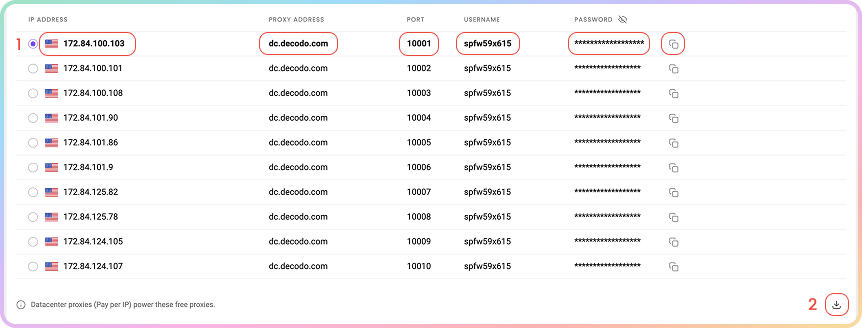
Everything for Free Proxies lives on a single dashboard page. Below your authentication details, you'll find your ready-to-use **proxy list**: your 10 assigned IPs, each with its host, port, username, and password.
**Datacenter proxies (Pay per IP) power your Free Proxies**, which means you get the same reliable infrastructure as our paid Datacenter product on a free plan.
1. **Copy** any single element - **IP address**, **Proxy address**, **Port**, **Username**, or **Password** - by clicking it, or copy the whole row.
2. **Download** the full list as a `.csv` or `.txt` file using the download icon below the table.
## Proxy setup
Everything for Free Proxies lives on a single dashboard page. Below your authentication details, you'll find your ready-to-use **proxy list**: your 10 assigned IPs, each with its host, port, username, and password.
**Datacenter proxies (Pay per IP) power your Free Proxies**, which means you get the same reliable infrastructure as our paid Datacenter product on a free plan.
1. **Copy** any single element - **IP address**, **Proxy address**, **Port**, **Username**, or **Password** - by clicking it, or copy the whole row.
2. **Download** the full list as a `.csv` or `.txt` file using the download icon below the table.
 ### Location
* Free Proxy IPs are located in the **USA** only, so there is **no location selector**.
* If you pass the `country` parameter in your request, it is honored - Free Proxy IPs resolve to `us`.
See the [**Advanced Parameters**](https://help.decodo.com/docs/free-proxy-advanced-parameters) article for backconnect proxy examples.
### IPs & Ports
* Your plan provides **10 fixed IPs** that **do not rotate**. The same 10 IPs remain assigned to you indefinitely.
* Each IP is reachable on its own dedicated port, `10001` through `10010`. To target a specific IP, connect to its port.
* If you prefer to rotate on every request within the 10 IP list, use the rotating port `10000`.
### Protocol
* Free Proxies work over **HTTP** by default.
* **HTTPS** and **SOCKS5** also work at the request level, though you would have to specify the protocol explicitly in the tool you're using to connect with the proxies.
## Code Examples
It's important to confirm your proxy is operational before using it in your projects. The **code examples** at the bottom of your Proxy Setup dashboard let you quickly test whether your proxy is connecting correctly and displaying your new IP address.
1. Select any of the available languages: `cURL`, `Python`, `NodeJS`, `PHP`, or `GO`.
2. Copy the pre-configured code example by clicking **Copy** in the bottom right corner.
3. Paste and run the code in your environment.
4. The response will show the proxy IP address and location information, confirming your proxy is working properly.
* If you see the proxy's IP address (not your actual IP) in the response, congratulations! Your proxy is successfully configured and ready to use.
### Location
* Free Proxy IPs are located in the **USA** only, so there is **no location selector**.
* If you pass the `country` parameter in your request, it is honored - Free Proxy IPs resolve to `us`.
See the [**Advanced Parameters**](https://help.decodo.com/docs/free-proxy-advanced-parameters) article for backconnect proxy examples.
### IPs & Ports
* Your plan provides **10 fixed IPs** that **do not rotate**. The same 10 IPs remain assigned to you indefinitely.
* Each IP is reachable on its own dedicated port, `10001` through `10010`. To target a specific IP, connect to its port.
* If you prefer to rotate on every request within the 10 IP list, use the rotating port `10000`.
### Protocol
* Free Proxies work over **HTTP** by default.
* **HTTPS** and **SOCKS5** also work at the request level, though you would have to specify the protocol explicitly in the tool you're using to connect with the proxies.
## Code Examples
It's important to confirm your proxy is operational before using it in your projects. The **code examples** at the bottom of your Proxy Setup dashboard let you quickly test whether your proxy is connecting correctly and displaying your new IP address.
1. Select any of the available languages: `cURL`, `Python`, `NodeJS`, `PHP`, or `GO`.
2. Copy the pre-configured code example by clicking **Copy** in the bottom right corner.
3. Paste and run the code in your environment.
4. The response will show the proxy IP address and location information, confirming your proxy is working properly.
* If you see the proxy's IP address (not your actual IP) in the response, congratulations! Your proxy is successfully configured and ready to use.
.png?fit=max&auto=format&n=eHnaKujrgx580g2h&q=85&s=eac25a4b169b4c5203fcda6e6092269e) ## Integration Guides
Once you generate the endpoints and ports, you can apply them to any application or tool to start using proxies instantly.
### Decodo Tools
* Alternatively, you can use a dedicated Decodo tool — the **Decodo Extension** for [**Chrome**](https://help.decodo.com/docs/decodo-chrome-extension#/) and [**Firefox**](https://help.decodo.com/docs/decodo-firefox-extension#/).
### Integration Guides
* Check out the most popular 3rd party tool guides in the [**Integrations overview**](https://help.decodo.com/docs/proxy-integrations-overview) section.
### GitHub
* For any **advanced code samples** and **middleware,** please visit our [**GitHub**](https://github.com/decodo/decodo) page.
## Statistics
To track Free Proxies usage, navigate to the [**Free Proxies → Usage statistics**](https://dashboard.decodo.com/free-proxies/statistics?) section.
1. Here, you can view a **Graph** of **traffic** or **request** usage sorted by **Target** and choose the **time period**.
2. Export **raw** or **table data** in `.CSV`, `.TXT`, or `.JSON` formats.
* All dates are in `UTC`. Traffic history is limited to `180` days maximum.
## Integration Guides
Once you generate the endpoints and ports, you can apply them to any application or tool to start using proxies instantly.
### Decodo Tools
* Alternatively, you can use a dedicated Decodo tool — the **Decodo Extension** for [**Chrome**](https://help.decodo.com/docs/decodo-chrome-extension#/) and [**Firefox**](https://help.decodo.com/docs/decodo-firefox-extension#/).
### Integration Guides
* Check out the most popular 3rd party tool guides in the [**Integrations overview**](https://help.decodo.com/docs/proxy-integrations-overview) section.
### GitHub
* For any **advanced code samples** and **middleware,** please visit our [**GitHub**](https://github.com/decodo/decodo) page.
## Statistics
To track Free Proxies usage, navigate to the [**Free Proxies → Usage statistics**](https://dashboard.decodo.com/free-proxies/statistics?) section.
1. Here, you can view a **Graph** of **traffic** or **request** usage sorted by **Target** and choose the **time period**.
2. Export **raw** or **table data** in `.CSV`, `.TXT`, or `.JSON` formats.
* All dates are in `UTC`. Traffic history is limited to `180` days maximum.
.png?fit=max&auto=format&n=eHnaKujrgx580g2h&q=85&s=39a091a5b135854fb55c40fb9e39ff68) ### **Top Targets, Countries, Users, and IPs**
* Below, you can see even more detailed information in dedicated sections:
* **Top Targets**: No., Target, Traffic, Requests.
* **Top Countries**: Country, Traffic, Requests.
* **Top Users**: User, Traffic, Requests.
* **Top IPs**: No., IP, Traffic, Requests.
[**Here**](https://help.decodo.com/docs/free-proxy-statistics) you can find a more comprehensive look at the **Free Proxies Usage statistics** page.
## Troubleshooting
If you are experiencing any issues, please refer to our [**troubleshooting**](https://help.decodo.com/docs/proxy-troubleshooting#/) section or contact our support team directly, which is available **24/7**.
***
Need help or just want to say hello? Our support is available 24/7. \
You can also reach us anytime via email at [support@decodo.com](mailto:support@decodo.com).
Can't find what you're looking for? Request an article! \
Have feedback? Share your thoughts on how we can improve.
### **Top Targets, Countries, Users, and IPs**
* Below, you can see even more detailed information in dedicated sections:
* **Top Targets**: No., Target, Traffic, Requests.
* **Top Countries**: Country, Traffic, Requests.
* **Top Users**: User, Traffic, Requests.
* **Top IPs**: No., IP, Traffic, Requests.
[**Here**](https://help.decodo.com/docs/free-proxy-statistics) you can find a more comprehensive look at the **Free Proxies Usage statistics** page.
## Troubleshooting
If you are experiencing any issues, please refer to our [**troubleshooting**](https://help.decodo.com/docs/proxy-troubleshooting#/) section or contact our support team directly, which is available **24/7**.
***
Need help or just want to say hello? Our support is available 24/7. \
You can also reach us anytime via email at [support@decodo.com](mailto:support@decodo.com).
Can't find what you're looking for? Request an article! \
Have feedback? Share your thoughts on how we can improve.