> ## Documentation Index
> Fetch the complete documentation index at: https://help.decodo.com/llms.txt
> Use this file to discover all available pages before exploring further.
# User:pass Requests
> ISP Pay/IP Proxy Advanced Parameter Usage via User:Pass Authentication
When using **backconnect**, the endpoint proxy **server** remains the same: `isp.decodo.com`
For **static** connection sessions, the proxy **port** is any number within the following range: `10001`-`63000`
If you're using port numbers that exceed the total IP count you've purchased with your plan, the ports will iterate through your existing IPs.
For **rotating** connection sessions, the proxy **port** is: `10000`
The `cURL` code will be shown in the examples below. You may try them out on your machine.
***
## `Username:Password`
### Username And Password Parameter
To use a proxy username and password, please be aware that your username line will **always** start with `user-` followed by your proxy username.
An example of a **rotating proxy** using a proxy username and password to return you an IP address from a random location:
```shellscript cURL theme={null}
curl -U "user-username:password" -x "isp.decodo.com:10000" "https://ip.decodo.com/json?provider=IPinfo"
```
Replace `username` and `password` with your credentials and run the command in your **Terminal** or **Command Prompt**.
You will see the IP address that has been assigned to you for this particular request, as well as the information on that IP address, including its location, in the output.
***
## Direct IP Targeting
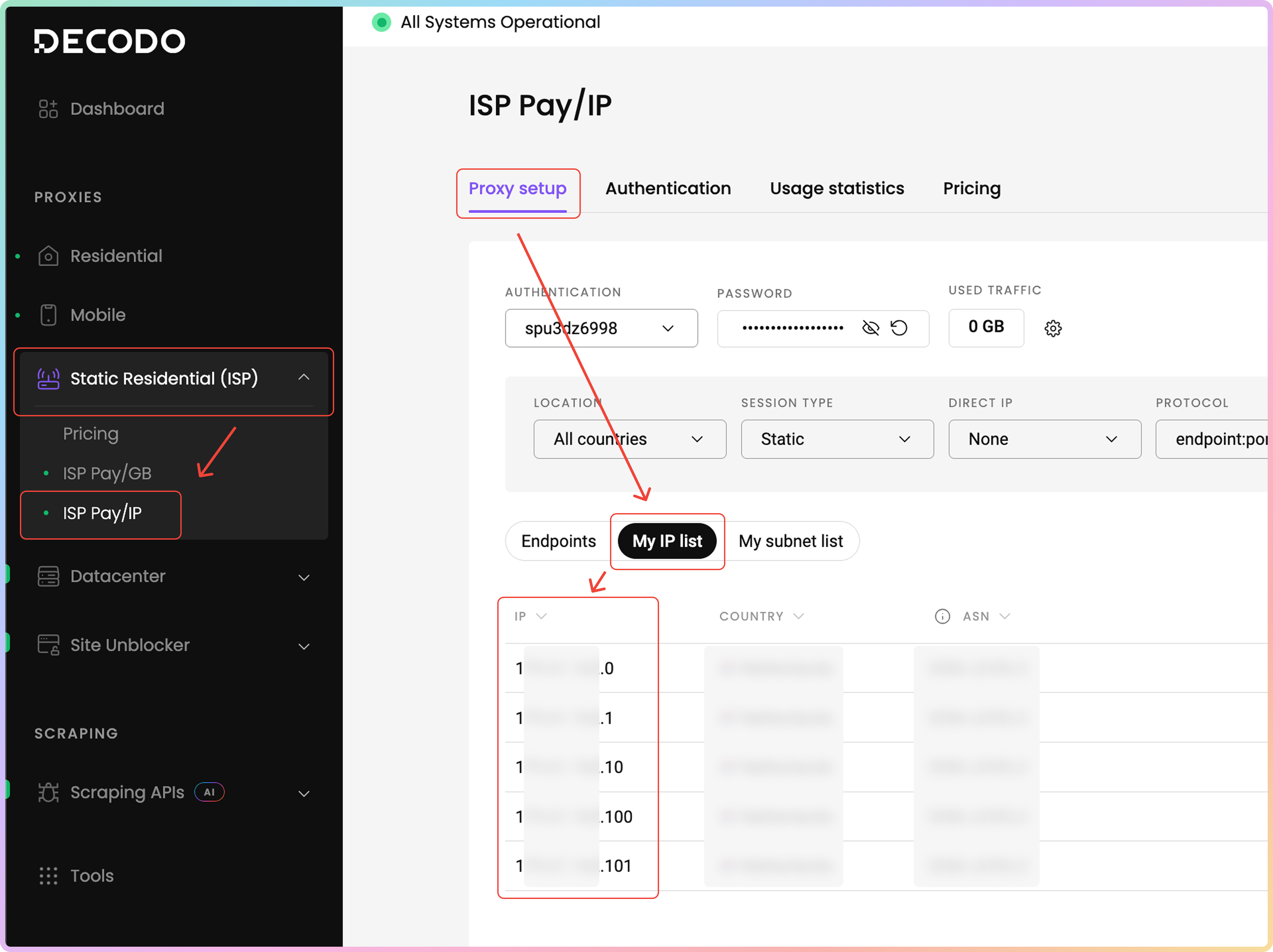
It's possible to target specific IP addresses as a parameter from the proxy IP list you've purchased. To find your proxy IPs, navigate to the [**Static Residential → ISP Pay/IP → Proxy setup**](https://dashboard.decodo.com/shared-isp-proxies/proxy-setup) dashboard page. Then, click on the **My IP list** tab. In the table below, you will find the **IP addresses** you've purchased, their **country** of origin, and the **ASN**.
Keep in mind that some IPs listed may not have an associated ASN.
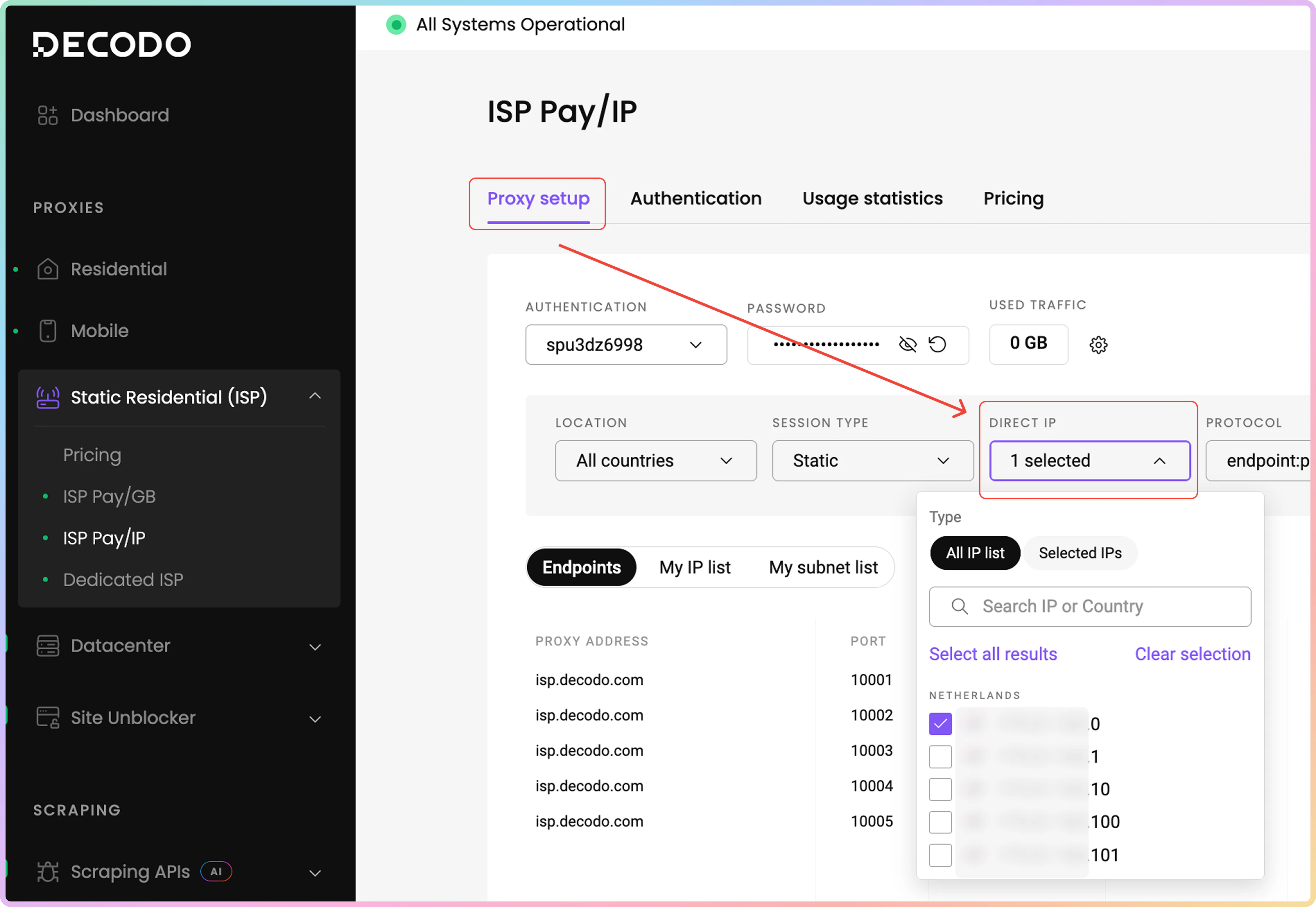
 If you wish to generate an **endpoint list**, which you can then export, or a **request example** with a specific IP address, in the same **Proxy setup** page, click on the **Direct IP** field and in the dropdown menu, and check your preferred proxy IP address. There, you can select all IPs or use the search bar to find a specific IP.
 Example of a **static proxy** that returns a **specific IP address**. The proxy IP remains unspecified.
```shellscript cURL theme={null}
curl -U "user-username-ip-x.x.x.x:password" -x "isp.decodo.com:10001" "https://ip.decodo.com/json?provider=IPinfo"
```
***
## Country Targeting
If IPs from a specific country are needed, then modify the username to include the `country-xx` parameter. Use two-letter Alpha-2 codes. There is a full list of them [**here**](https://www.iban.com/country-codes).
[**Here**](https://help.decodo.com/docs/isp-pay-per-ip-proxy-locations) is the full list of available locations for purchase with ISP Pay/IP proxies.
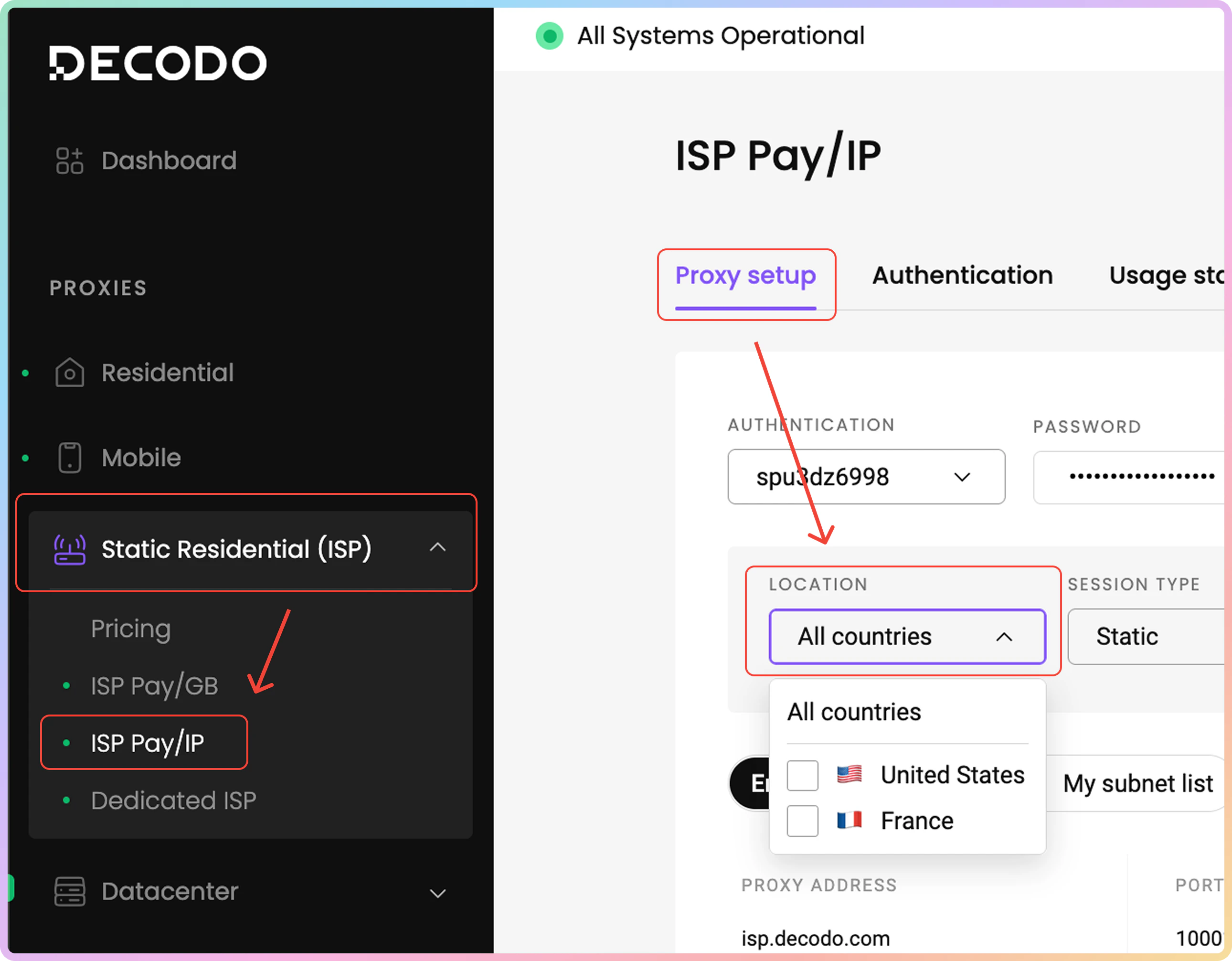
To find the countries of the IPs, head over to the [**Static Residential → ISP Pay/IP → Proxy setup**](https://dashboard.decodo.com/shared-isp-proxies/proxy-setup) dashboard page. Click on the **Location** field, and in the dropdown menu, feel free to select one or all of the countries.
**Note** that you will only be able to target the countries from which you've **purchased** the proxy IPs.
Example of a **static proxy** that returns a **specific IP address**. The proxy IP remains unspecified.
```shellscript cURL theme={null}
curl -U "user-username-ip-x.x.x.x:password" -x "isp.decodo.com:10001" "https://ip.decodo.com/json?provider=IPinfo"
```
***
## Country Targeting
If IPs from a specific country are needed, then modify the username to include the `country-xx` parameter. Use two-letter Alpha-2 codes. There is a full list of them [**here**](https://www.iban.com/country-codes).
[**Here**](https://help.decodo.com/docs/isp-pay-per-ip-proxy-locations) is the full list of available locations for purchase with ISP Pay/IP proxies.
To find the countries of the IPs, head over to the [**Static Residential → ISP Pay/IP → Proxy setup**](https://dashboard.decodo.com/shared-isp-proxies/proxy-setup) dashboard page. Click on the **Location** field, and in the dropdown menu, feel free to select one or all of the countries.
**Note** that you will only be able to target the countries from which you've **purchased** the proxy IPs.
 Example of a **rotating proxy** that returns IPs from the US:
```shellscript cURL theme={null}
curl -U "user-username-country-us:password" -x "isp.decodo.com:10000" "https://ip.decodo.com/json?provider=IPinfo"
```
Example of a **static proxy** that returns an IP from Italy:
```shellscript cURL theme={null}
curl -U "user-username-country-it:password" -x "isp.decodo.com:10001" "https://ip.decodo.com/json?provider=IPinfo"
```
***
### City, State and ASN parameter
* You must choose between city targeting, state targeting and ASN targeting, as they can’t be used simultaneously.
## City Targeting
Add a `city-xxxx` parameter to the username to specify a city within a country.
It's used in conjunction with the `country` parameter and is not standalone.
If the city name consists of multiple words, then use underscores.
Example of a **rotating proxy** that returns IPs from New York City:
```shellscript cURL theme={null}
curl -U "user-username-country-us-city-new_york:password" -x "isp.decodo.com:10000" "https://ip.decodo.com/json?provider=IPinfo"
```
Example of a **static proxy** that returns an IP from Rome:
```shellscript cURL theme={null}
curl -U "user-username-country-it-city-rome:password" -x "isp.decodo.com:10001" "https://ip.decodo.com/json?provider=IPinfo"
```
***
## State Targeting
Adding the `state-xxxxx` to your username will allow for state targeting. Only US states are currently supported.
Example of a **rotating proxy** that returns IPs from the state of New York:
```shellscript cURL theme={null}
curl -U "user-username-country-us-state-new_york:password" -x "isp.decodo.com:10000" "https://ip.decodo.com/json?provider=IPinfo"
```
Example of a **static proxy** that returns an IP from the state of California:
```shellscript cURL theme={null}
curl -U "user-username-country-us-state-california:password" -x "isp.decodo.com:10001" "https://ip.decodo.com/json?provider=IPinfo"
```
***
## ASN Targeting
Adding the `asn-xxxx` parameter will allow you to target IPs from a specific carrier.
Example of a **rotating proxy** that returns IPs from the carrier AT\&T:
```shellscript cURL theme={null}
curl -U "user-username-asn-20057:password" -x "isp.decodo.com:10000" "https://ip.decodo.com/json?provider=IPinfo"
```
Example of a **static proxy** that returns an IP from the carrier Astound:
```shellscript cURL theme={null}
curl -U "user-username-asn-6079:password" -x "isp.decodo.com:10001" "https://ip.decodo.com/json?provider=IPinfo"
```
***
Need help or just want to say hello? Our support is available 24/7. \
You can also reach us anytime via email at [support@decodo.com](mailto:support@decodo.com).
Can't find what you're looking for? Request an article! \
Have feedback? Share your thoughts on how we can improve.
Example of a **rotating proxy** that returns IPs from the US:
```shellscript cURL theme={null}
curl -U "user-username-country-us:password" -x "isp.decodo.com:10000" "https://ip.decodo.com/json?provider=IPinfo"
```
Example of a **static proxy** that returns an IP from Italy:
```shellscript cURL theme={null}
curl -U "user-username-country-it:password" -x "isp.decodo.com:10001" "https://ip.decodo.com/json?provider=IPinfo"
```
***
### City, State and ASN parameter
* You must choose between city targeting, state targeting and ASN targeting, as they can’t be used simultaneously.
## City Targeting
Add a `city-xxxx` parameter to the username to specify a city within a country.
It's used in conjunction with the `country` parameter and is not standalone.
If the city name consists of multiple words, then use underscores.
Example of a **rotating proxy** that returns IPs from New York City:
```shellscript cURL theme={null}
curl -U "user-username-country-us-city-new_york:password" -x "isp.decodo.com:10000" "https://ip.decodo.com/json?provider=IPinfo"
```
Example of a **static proxy** that returns an IP from Rome:
```shellscript cURL theme={null}
curl -U "user-username-country-it-city-rome:password" -x "isp.decodo.com:10001" "https://ip.decodo.com/json?provider=IPinfo"
```
***
## State Targeting
Adding the `state-xxxxx` to your username will allow for state targeting. Only US states are currently supported.
Example of a **rotating proxy** that returns IPs from the state of New York:
```shellscript cURL theme={null}
curl -U "user-username-country-us-state-new_york:password" -x "isp.decodo.com:10000" "https://ip.decodo.com/json?provider=IPinfo"
```
Example of a **static proxy** that returns an IP from the state of California:
```shellscript cURL theme={null}
curl -U "user-username-country-us-state-california:password" -x "isp.decodo.com:10001" "https://ip.decodo.com/json?provider=IPinfo"
```
***
## ASN Targeting
Adding the `asn-xxxx` parameter will allow you to target IPs from a specific carrier.
Example of a **rotating proxy** that returns IPs from the carrier AT\&T:
```shellscript cURL theme={null}
curl -U "user-username-asn-20057:password" -x "isp.decodo.com:10000" "https://ip.decodo.com/json?provider=IPinfo"
```
Example of a **static proxy** that returns an IP from the carrier Astound:
```shellscript cURL theme={null}
curl -U "user-username-asn-6079:password" -x "isp.decodo.com:10001" "https://ip.decodo.com/json?provider=IPinfo"
```
***
Need help or just want to say hello? Our support is available 24/7. \
You can also reach us anytime via email at [support@decodo.com](mailto:support@decodo.com).
Can't find what you're looking for? Request an article! \
Have feedback? Share your thoughts on how we can improve.