> ## Documentation Index
> Fetch the complete documentation index at: https://help.decodo.com/llms.txt
> Use this file to discover all available pages before exploring further.
# n8n
> Web Scraping API node on n8n
[n8n](https://n8n.io/) is a [fair-code licensed](https://docs.n8n.io/reference/license/) workflow automation platform that lets you connect apps, APIs, and services to build automated workflows with minimal effort.
Decodo node provides an n8n integration for Decodo's Web Scraping API, a powerful web scraping tool that automatically bypasses blocks and bot protection to extract data from any target URL. It's designed for developers and startups looking to automate data collection workflows from platforms like Google, eCommerce sites, and job boards
Decodo n8n node integration is available with any [**Web Scraping API plan**](https://dashboard.decodo.com/register?page=scrapers/pricing?plan=907849)**.**
More information can be found on GitHub [here](https://github.com/Decodo/n8n-nodes-decodo).
## Features
* **Easy integration**. Plug the Decodo's n8n node into existing workflows to start scraping with minimal setup.
* **Bypassing CAPTCHAs, rate-limits, and IP bans**. Automatic handling of common anti-bot defenses.
* **Geo-targeting**. Request region-specific results from websites that restrict content based on location.
* **Rotating proxy support to avoid IP bans**. Built-in proxy rotation to keep requests distributed and persistent.
* **Structured data output**. Get results in JSON or Markdown formats for easy readability and further analysis.
## Installation
Decodo is an official node integrated into n8n. To use it, simply:
1. Open the nodes panel.
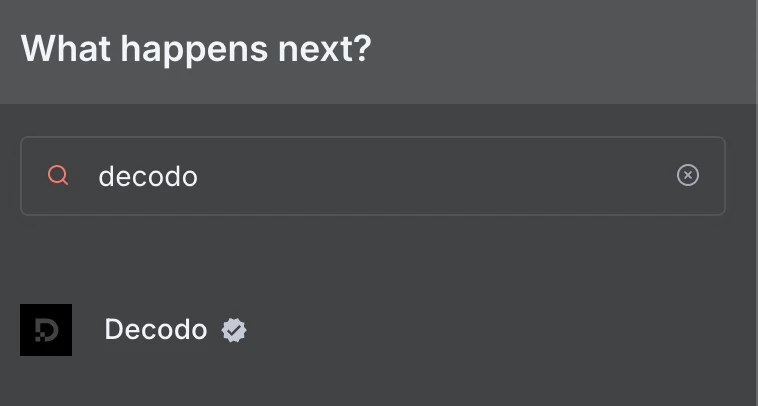
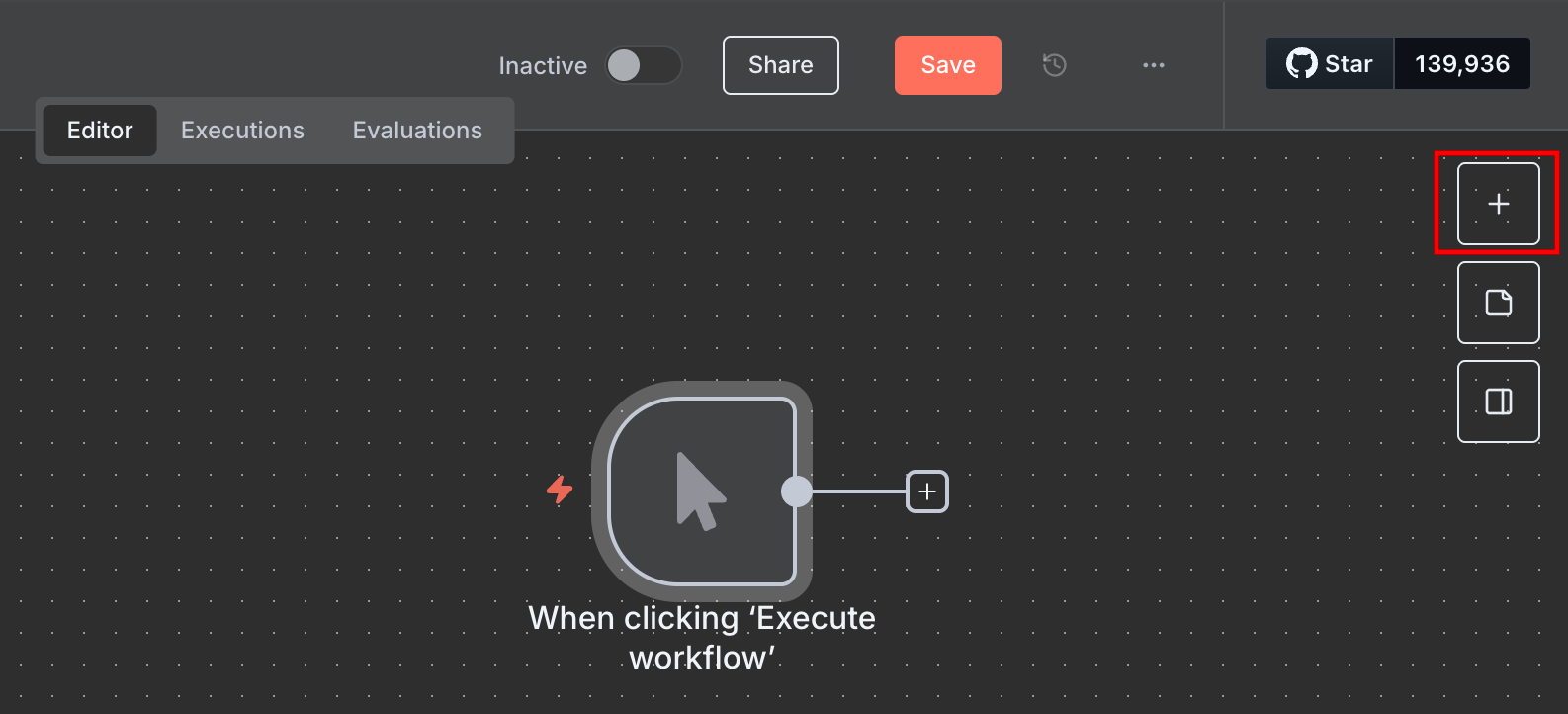 2. Search for "Decodo" to find the node.
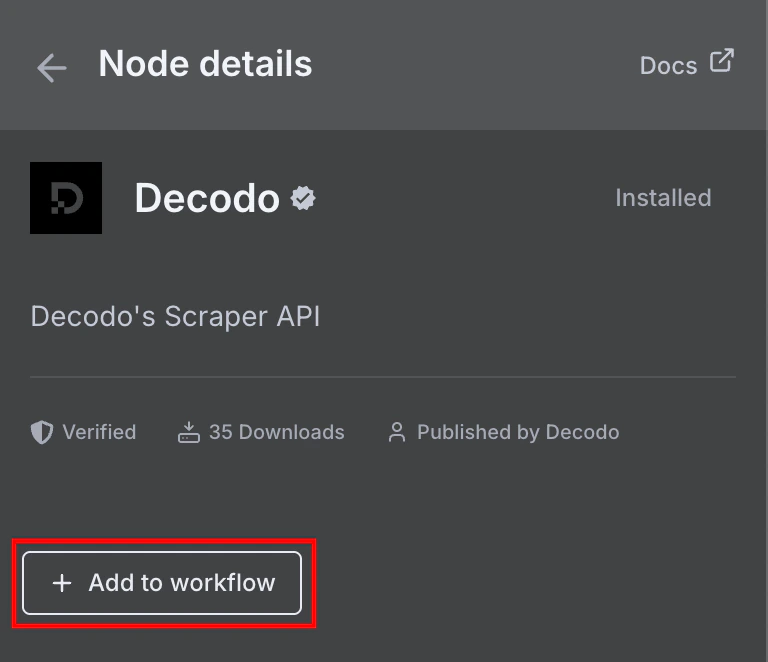
 3. Click\*\* + Add to workflow.\*\*
 ### Obtaining a Decodo account
The node requires a[ Decodo Web Scraping API Advanced plan](https://decodo.com/scraping).
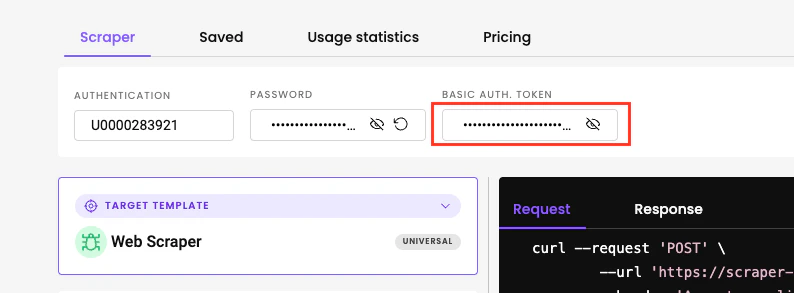
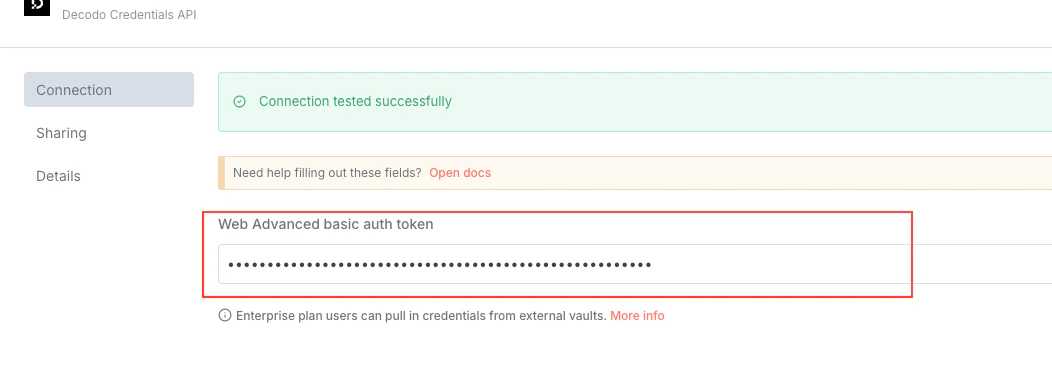
Once you have a plan activated, take a note of your generated authentication token from the [Web Scraping API page](https://dashboard.decodo.com/web-scraping-api/scraper):
### Obtaining a Decodo account
The node requires a[ Decodo Web Scraping API Advanced plan](https://decodo.com/scraping).
Once you have a plan activated, take a note of your generated authentication token from the [Web Scraping API page](https://dashboard.decodo.com/web-scraping-api/scraper):
 ### Setting up credentials on n8n
1. Open the credentials window on n8n.
### Setting up credentials on n8n
1. Open the credentials window on n8n.
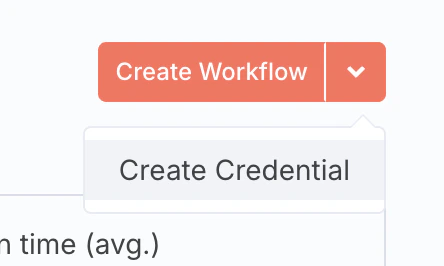
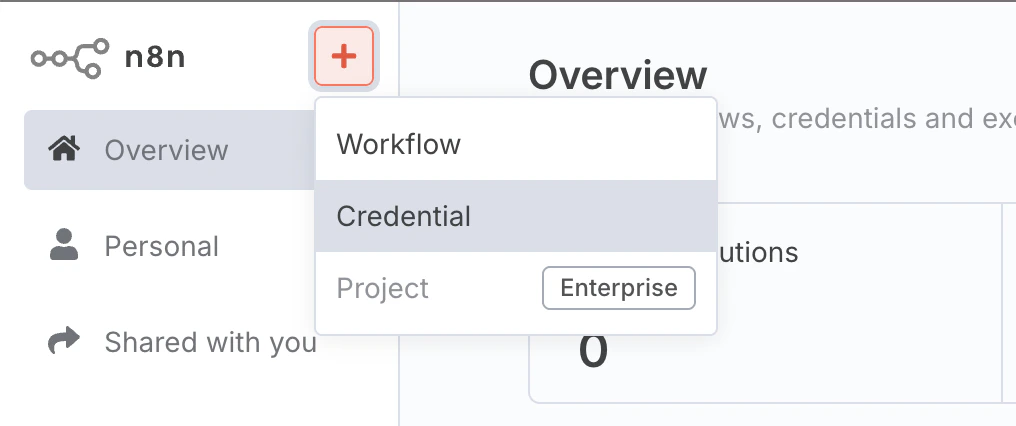 2. Create a new credential.
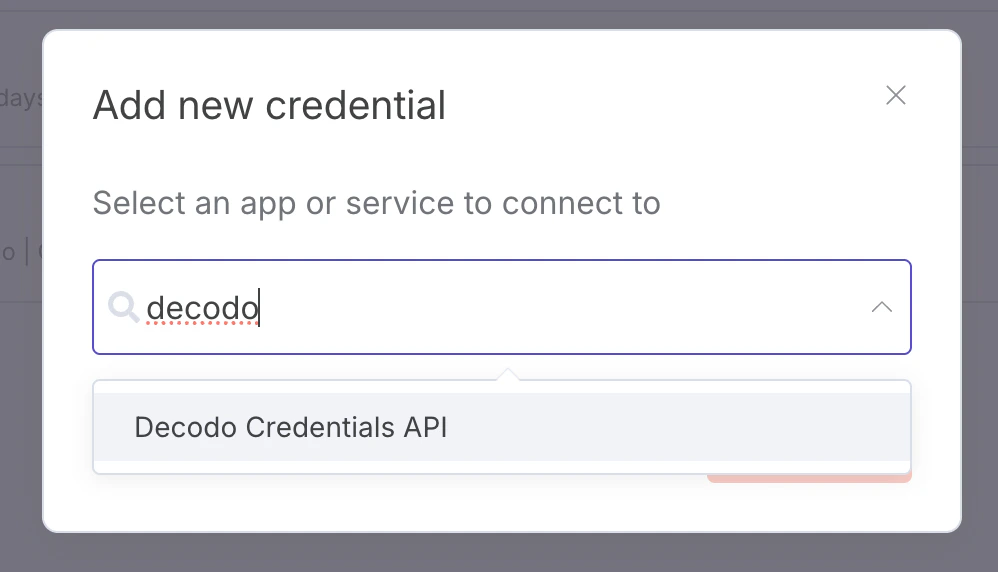
 3. Find the Decodo Credentials API.
 4. Enter your authentication token.
 ## Using the node
The node can be used in 2 ways - as an individual HTTP request node, or a tool for an AI agent.
### Individual node
To use the Decodo node by itself, connect it to an existing workflow. Once you add it, you can set the target URL and Geolocation.
## Using the node
The node can be used in 2 ways - as an individual HTTP request node, or a tool for an AI agent.
### Individual node
To use the Decodo node by itself, connect it to an existing workflow. Once you add it, you can set the target URL and Geolocation.
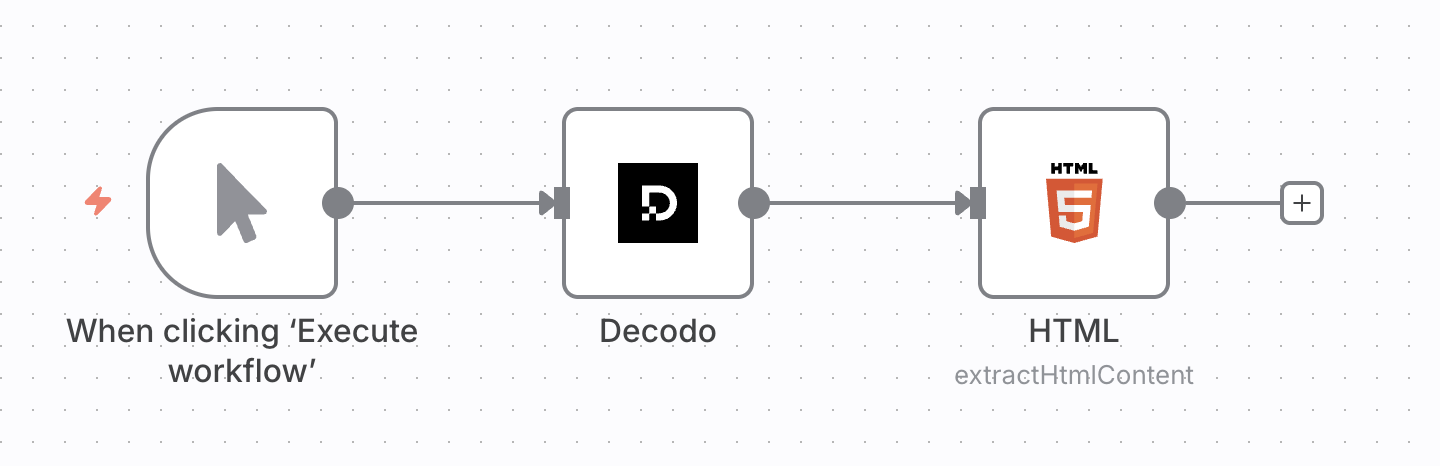
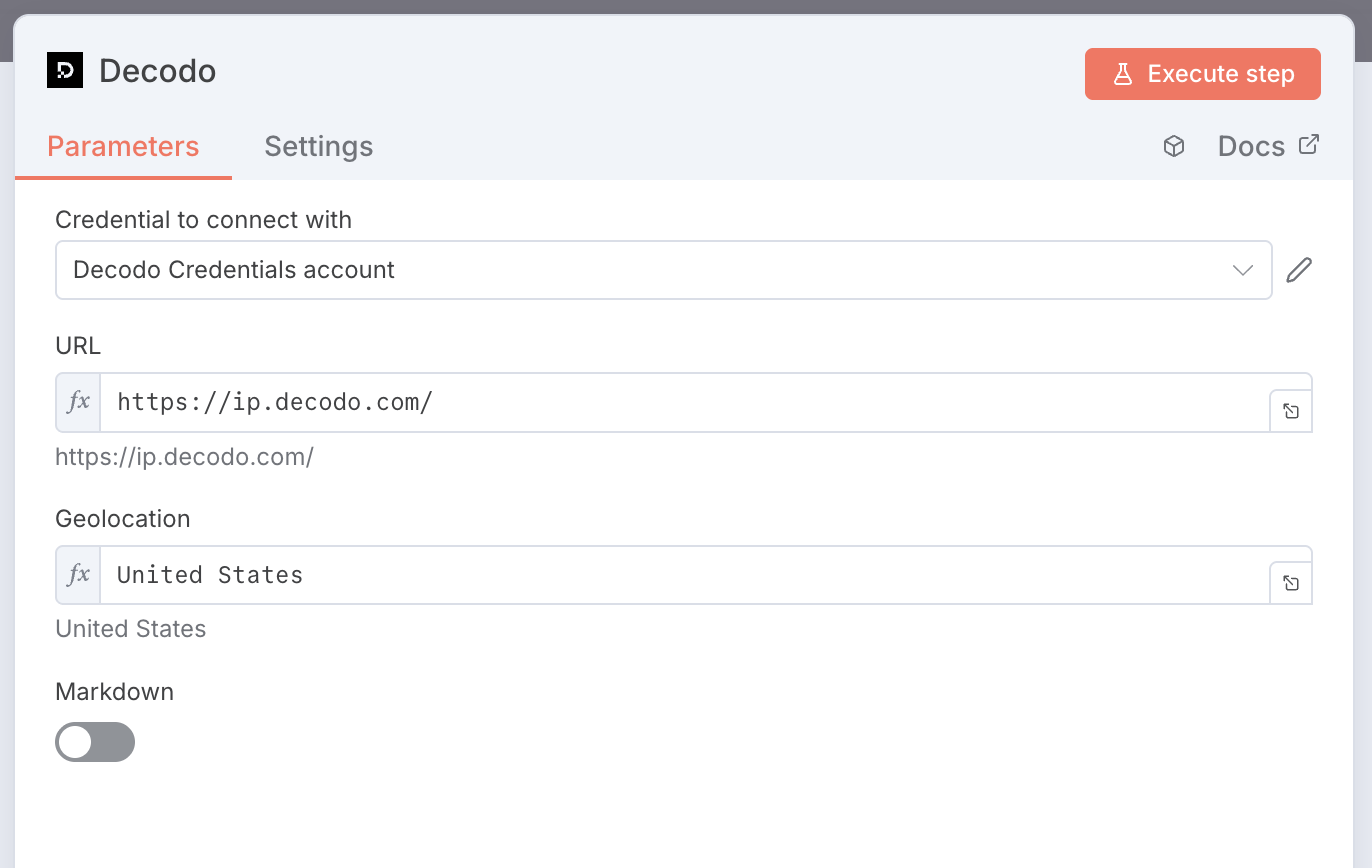 The node requests the target URL through a proxy in the chosen location, scrapes the page, and returns the response for use by downstream nodes, such as the HTML node to extract content. Below is an example setup:
 ### AI Agent tool
You can connect the Decodo node to the AI Agent node as a tool. You don't need to modify anything inside the node. Here's what a simple setup would look like:
### AI Agent tool
You can connect the Decodo node to the AI Agent node as a tool. You don't need to modify anything inside the node. Here's what a simple setup would look like:
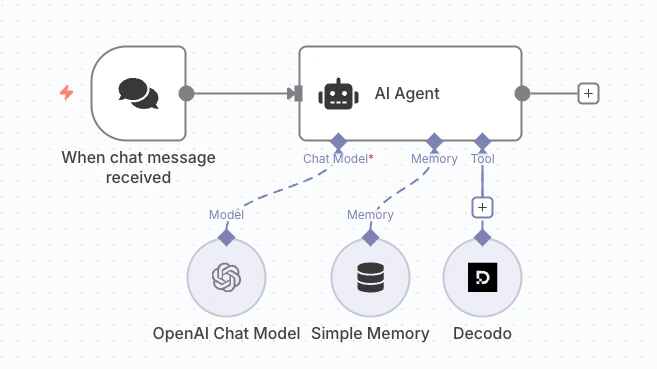 With this setup, you can prompt the agent to scrape a website in order to extract information. The prompt must be detailed and specific to return the best results.
#### Bad prompt example
If your AI model does not have access to the most recent web information, the following question may fail:
> who won NBA in 2025?
#### Good prompt example
The question is more likely to be answered by updating the prompt with an instruction to scrape a reliable source:
> scrape wikipedia and tell me who won NBA in 2025
## Parameters
When used as an AI tool, the following parameters are inferred automatically from messages:
| Parameter | Description | Example prompt |
| ---------- | ------------------------------------------------------------------------------------------------------------------------------ | ------------------------------------------------------------------------------------------------------------------ |
| `url` | The target URL to scrape | Scrape Wikipedia and tell me the article of the day. |
| `geo` | The geographical location on which the result depends. [Read more](https://help.decodo.com/docs/web-scraping-api-localisation) | Scrape [https://ip.decodo.com/json](https://ip.decodo.com/json) and tell me what city the request originated from. |
| `markdown` | If set to result is in markdown format, otherwise result is in HTML format | Scrape [https://ip.decodo.com/json](https://ip.decodo.com/json) and return result in markdown format. |
If used as an individual node, these parameters can be manually configured by double-clicking on the node.
## Compatibility
Node has been developed and tested with:
* Node.js v22.17.0
* n8n nodes API version 1
* n8n-workflow v1.82.0
***
Need help or just want to say hello? Our support is available 24/7. \
You can also reach us anytime via email at [support@decodo.com](mailto:support@decodo.com).
Can't find what you're looking for? Request an article! \
Have feedback? Share your thoughts on how we can improve.
With this setup, you can prompt the agent to scrape a website in order to extract information. The prompt must be detailed and specific to return the best results.
#### Bad prompt example
If your AI model does not have access to the most recent web information, the following question may fail:
> who won NBA in 2025?
#### Good prompt example
The question is more likely to be answered by updating the prompt with an instruction to scrape a reliable source:
> scrape wikipedia and tell me who won NBA in 2025
## Parameters
When used as an AI tool, the following parameters are inferred automatically from messages:
| Parameter | Description | Example prompt |
| ---------- | ------------------------------------------------------------------------------------------------------------------------------ | ------------------------------------------------------------------------------------------------------------------ |
| `url` | The target URL to scrape | Scrape Wikipedia and tell me the article of the day. |
| `geo` | The geographical location on which the result depends. [Read more](https://help.decodo.com/docs/web-scraping-api-localisation) | Scrape [https://ip.decodo.com/json](https://ip.decodo.com/json) and tell me what city the request originated from. |
| `markdown` | If set to result is in markdown format, otherwise result is in HTML format | Scrape [https://ip.decodo.com/json](https://ip.decodo.com/json) and return result in markdown format. |
If used as an individual node, these parameters can be manually configured by double-clicking on the node.
## Compatibility
Node has been developed and tested with:
* Node.js v22.17.0
* n8n nodes API version 1
* n8n-workflow v1.82.0
***
Need help or just want to say hello? Our support is available 24/7. \
You can also reach us anytime via email at [support@decodo.com](mailto:support@decodo.com).
Can't find what you're looking for? Request an article! \
Have feedback? Share your thoughts on how we can improve.