> ## Documentation Index
> Fetch the complete documentation index at: https://help.decodo.com/llms.txt
> Use this file to discover all available pages before exploring further.
# Session Types
> Decodo residential proxy sticky and rotating sessions explained. Sticky sessions hold an IP for a set duration; rotating sessions assign a new IP per request.
## Sticky Port
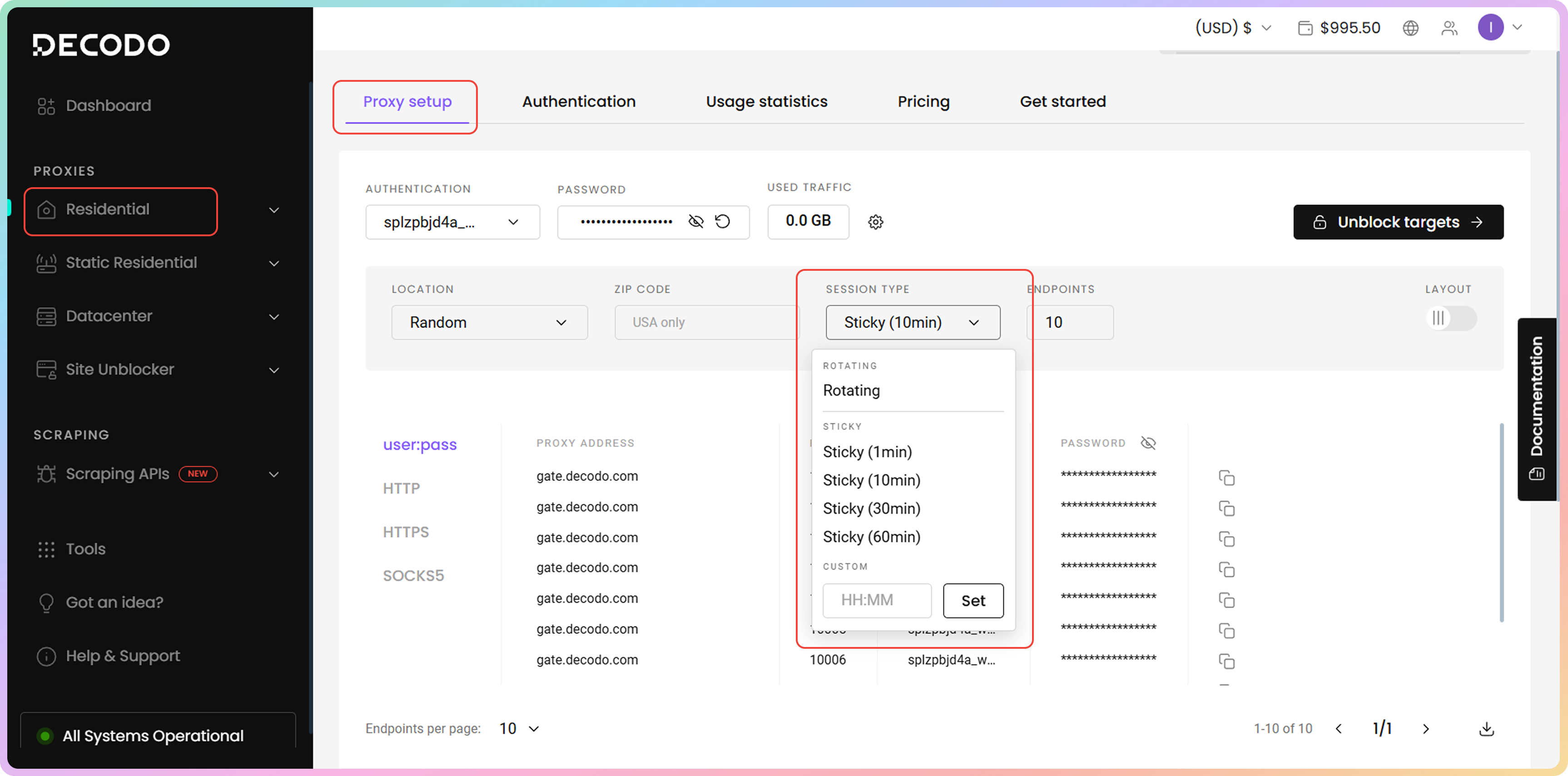
To select a sticky **Session type**, navigate to the [**Proxy setup**](https://dashboard.decodo.com/residential-proxies/proxy-setup) section and use the drop-down menu.
Once you establish the first connection with a sticky port, the IP address will remain the same for the specified duration, regardless of the number of requests made.
The **residential** endpoint has four options in the dashboard drop-down menu: **1**, **10**, **30**, or **60** minutes. You can also manually specify a custom duration of up to **24 hours**.
* You can change the **port** or the **session ID** to rotate the IP prematurely.
 ### Custom Sticky Session
You can manually set a custom sticky session duration with any **integer** value between **1** and **1440** by using the `sessionduration` parameter. You can find out more on the [**Custom Sticky Sessions**](https://help.decodo.com/docs/residential-proxy-custom-sticky-sessions#/) page.
### Premature Rotation
The longer the session you have, the more chances there are that **the IP will rotate before** your specified time due to the residential device at the end going offline.
***
## Rotating Port
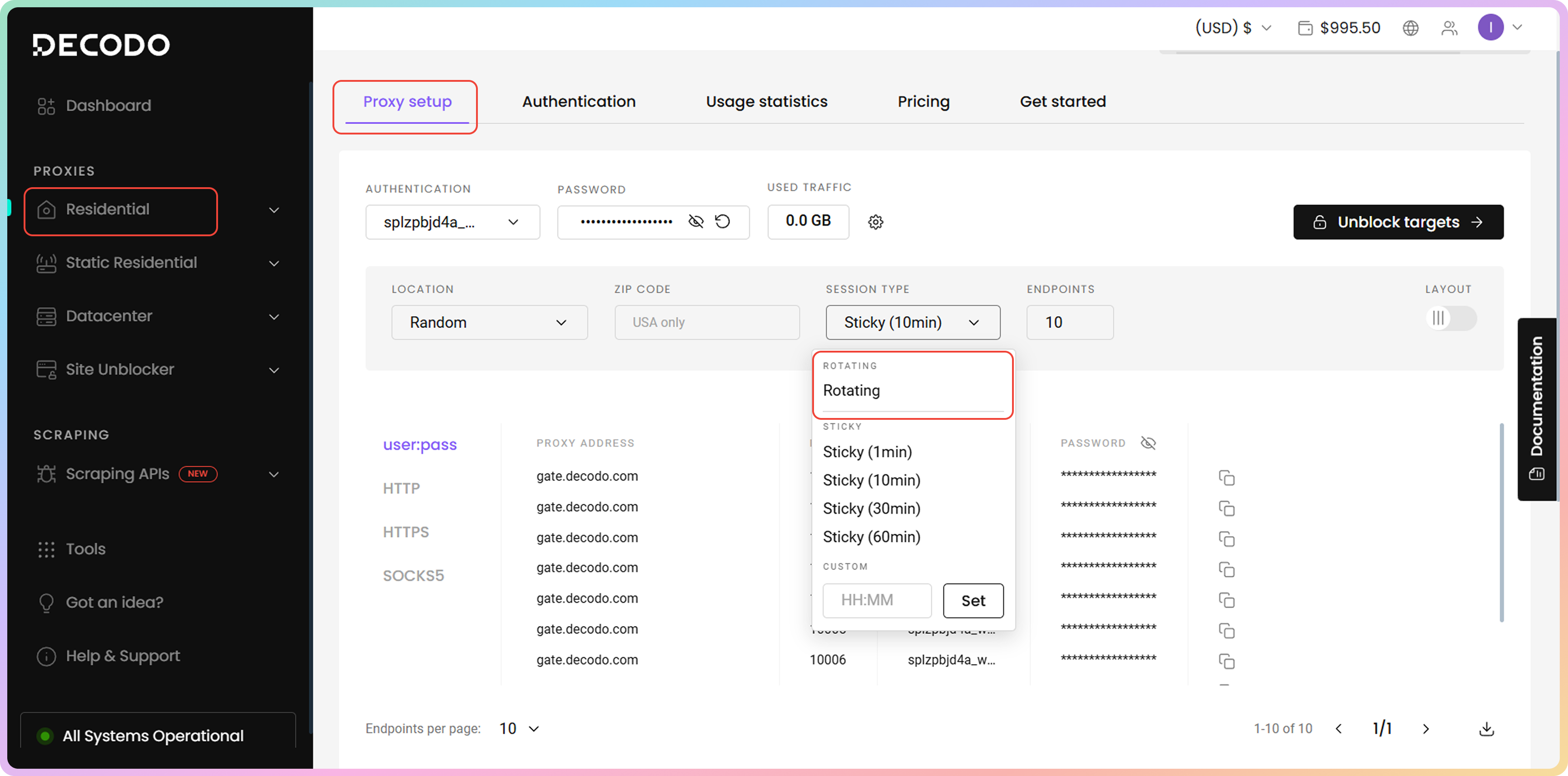
To select a rotating **Session type**, navigate to the [**Proxy Setup**](https://dashboard.decodo.com/residential-proxies/proxy-setup) section and use the drop-down menu.
If you select the **Rotating** port, the endpoint will rotate the IP on every proxy request.
* A new proxy IP is assigned every time you load the same page or a different one.
### Custom Sticky Session
You can manually set a custom sticky session duration with any **integer** value between **1** and **1440** by using the `sessionduration` parameter. You can find out more on the [**Custom Sticky Sessions**](https://help.decodo.com/docs/residential-proxy-custom-sticky-sessions#/) page.
### Premature Rotation
The longer the session you have, the more chances there are that **the IP will rotate before** your specified time due to the residential device at the end going offline.
***
## Rotating Port
To select a rotating **Session type**, navigate to the [**Proxy Setup**](https://dashboard.decodo.com/residential-proxies/proxy-setup) section and use the drop-down menu.
If you select the **Rotating** port, the endpoint will rotate the IP on every proxy request.
* A new proxy IP is assigned every time you load the same page or a different one.
 ***
Need help or just want to say hello? Our support is available 24/7. \
You can also reach us anytime via email at [support@decodo.com](mailto:support@decodo.com).
Can't find what you're looking for? Request an article! \
Have feedback? Share your thoughts on how we can improve.
***
Need help or just want to say hello? Our support is available 24/7. \
You can also reach us anytime via email at [support@decodo.com](mailto:support@decodo.com).
Can't find what you're looking for? Request an article! \
Have feedback? Share your thoughts on how we can improve.