> ## Documentation Index
> Fetch the complete documentation index at: https://help.decodo.com/llms.txt
> Use this file to discover all available pages before exploring further.
# Video downloader
> Download videos into your storage
The Decodo Video downloader (`target: youtube_video`) can be used to download and save specified Youtube videos into the s3 compatible storage.
To get access, please [Contact our sales team](https://decodo.com/scraping#contact-sales)
## youtube\_video
* The `youtube_video` target only supports [asynchronous](https://help.decodo.com/docs/web-scraping-api-asynchronous-requests#/) and [batch](https://help.decodo.com/docs/web-scraping-api-asynchronous-requests#/) integrations.
* Batch `youtube_video` requests are limited to 100 video per request.
* Downloading is supported for videos of 12 hours or less.
* The download time is limited to 10 hour.
Download a **YouTube video** into an Amazon S3-compatible storage location.
| Parameter | Type | Required | Description | Default | Example |
| ------------ | ------ | -------- | ---------------------------------------------------------------------------------------------------------------------- | ------------- | -------------------------------------- |
| `target` | string | ✅ | Required to select YouTube download. | | `youtube_video` |
| `query` | string | ✅ | YouTube video ID. | | `dFu9aKJoqGg` |
| `upload_url` | string | ✅ | The URL to a S3-compatible storage location. | | `https://:@` |
| `media` | string | | Select between `video` without sound, `audio`, or `audio_video` for both. | `audio_video` | |
| `quality` | string | | Quality of video or audio. Valid options: `best`, `worst`, `144`, `360`, `480`, `720`, `1080`, `1440`, `2160`, `4320`. | `720` | |
```shellscript cURL theme={null}
# update 'TOKEN VALUE' with your authorization token
curl --request 'POST' \
--url 'https://scraper-api.decodo.com/v2/task' \
--header 'Accept: application/json' \
--header 'Authorization: Basic TOKEN VALUE' \
--header 'Content-Type: application/json' \
--data '
{
"target": "youtube_video",
"query": "PFRn5zKJTD8",
"upload_url": "https://storage_username:[email protected]/video-folder"
}
'
```
## Delivery to S3
You can download videos straight into your S3 bucket by providing a number of arguments through the `upload_url` parameter. In the steps below, we will upload a sample video into a new bucket.
If you have the option, we recommend creating a new bucket for video downloads. That said, the following steps will also work on an existing bucket.
In order to start downloading videos:
1. Create a new S3 bucket with default setup and permissions.
2. [Create a new IAM user](https://docs.aws.amazon.com/IAM/latest/UserGuide/id_users_create.html).
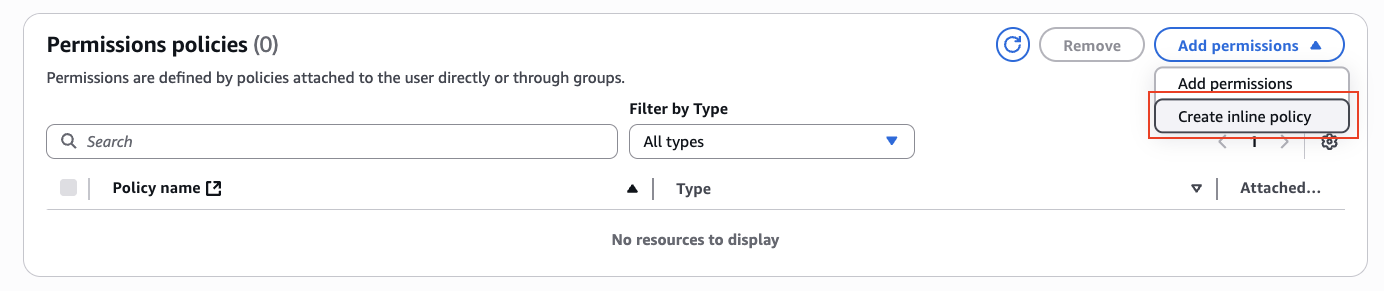
3. Attach the `PutObject` permission for your bucket on the IAM user:
1. Add an inline policy:
 2. Under Service, select S3.
3. Under Actions:
1. The following permissions need to be added to the bucket:
* `GetBucketLocation`
2. The following permissions need to be added to the folder of the bucket:
* `PutObject`
* `PutObjectAcl`
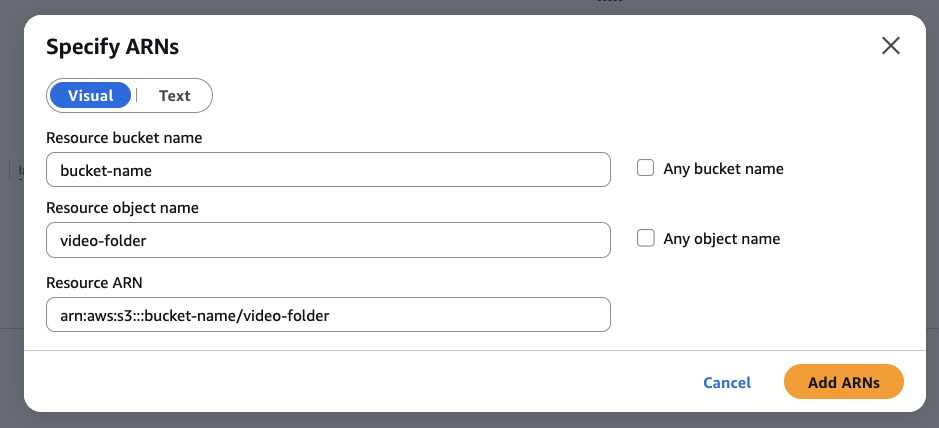
4. Under Resources, select Specific, click on Add ARN, add your bucket name and your video folder name:
2. Under Service, select S3.
3. Under Actions:
1. The following permissions need to be added to the bucket:
* `GetBucketLocation`
2. The following permissions need to be added to the folder of the bucket:
* `PutObject`
* `PutObjectAcl`
4. Under Resources, select Specific, click on Add ARN, add your bucket name and your video folder name:
 5. Your final policy statement should look like this:
```text theme={null}
{
"Version": "2012-10-17",
"Statement": [
{
"Sid": "Statement01",
"Effect": "Allow",
"Action": "s3:GetBucketLocation"
"Resource": "arn:aws:s3:::your-bucket"
},
{
"Sid": "Statement02",
"Effect": "Allow",
"Action": [
"s3:PutObject",
"s3:PutObjectAcl"
],
"Resource": "arn:aws:s3:::your-bucket/*"
}
]
}
```
4. [Generate an access key and secret](https://docs.aws.amazon.com/keyspaces/latest/devguide/create.keypair.html) for that user.
1. When asked for a use case, select Other.
The access key sent to Scraper API cannot include any non URI-escaped characters that may conflict with the `upload_url` parameter, such as `/` or `@`. If your key generated by AWS includes such characters, please regenerate your key.
5. Call Scraper API with the following sample parameters:
```text theme={null}
{
"target": "youtube_video",
"query": "PFRn5zKJTD8",
"upload_url": "https://access_key:[email protected]/video-folder"
}
```
Things to note:
* `access_key` and `access_secret` are generated from step 4.
* `us-west-2` is used as a sample region, your AWS region may be different.
* A `/video-folder` must be provided.
## S3-compatible Providers
Below are a number of S3-compatible providers that will also work with this target out of the box:
* [MinIO](https://min.io)
* [Wasabi](https://wasabi.com)
* [DigitalOcean Spaces](https://www.digitalocean.com/products/spaces)
* [Backblaze B2](https://www.backblaze.com/b2/cloud-storage.html)
* [Scaleway Object Storage](https://www.scaleway.com/en/object-storage/)
* [Linode Object Storage](https://www.linode.com/products/object-storage/)
* [IBM Cloud Object Storage](https://www.ibm.com/cloud/object-storage)
* [Oracle Cloud Object Storage](https://www.oracle.com/cloud/storage/object-storage.html)
* [Hetzner Cloud Storage](https://www.hetzner.com/storage)
## Sample Request
```shellscript cURL theme={null}
# update 'TOKEN VALUE' with your authorization token
curl --request 'POST' \
--url 'https://scraper-api.decodo.com/v2/task' \
--header 'Accept: application/json' \
--header 'Authorization: Basic Authentication Token' \
--header 'Content-Type: application/json' \
--data '
{
"target": "youtube_video",
"query": "PFRn5zKJTD8",
"upload_url": "https://storage_username:[email protected]/video-folder"
}
'
```
A successfully queued job will return a response similar to this:
```text theme={null}
{
"target": "youtube_video",
"query": "PFRn5zKJTD8",
"page_from": 1,
"limit": 10,
"geo": null,
"device_type": "desktop",
"headless": null,
"parse": false,
"locale": null,
"domain": "com",
"output_schema": null,
"created_at": "2025-07-01 11:09:53",
"id": "7345770621134969857",
"status": "pending",
"content_encoding": "utf-8",
"updated_at": "2025-07-01 11:09:53",
"force_headers": false,
"force_cookies": false,
"headers_cookies_policy": false,
"media": "audio_video",
"quality": "720"
}
```
## Accessing geo-restricted videos
Scraper API attempts to automatically pick the best location from where to download geo-restricted videos. However, YouTube videos do not expose information about what geolocation a given video is restricted to, therefore, Scraper API may fail after a fixed number of attempts. Manually retrying the scraping request may be required.
## Monitoring progress
The status of a queued video download can be checked through`https://scraper-api.decodo.com/v3/task/{task_id}/results `endpoint (you can find id in the body of the response after the task has been created):
* HTTP status code 204 indicates that the download is still processing.
* HTTP status code 200 indicates that the download has finished and an attempt to upload to your storage direction has been made. If video was not uploaded `status_code` in the response will provide reasoning:
| **Status code** | **Description** |
| :-------------- | :-------------------------------- |
| 11201 | Video is deleted |
| 11202 | Video is unavailable |
| 11203 | Video is private |
| 11204 | Video is geo-restricted |
| 11205 | Video is live now |
| 11206 | Video is age-restricted |
| 11207 | Video is for channel members only |
| 11208 | Video requires YouTube premium |
| 11209 | Video is either live or too long |
| 11210 | Video is too long |
| 11211 | Sign in is required |
Scraper API does not currently support:
* Showing download progress (completed/remaining percent)
* Indicating when uploading to `upload_url` fails (invalid credentials, bucket not found, etc.)
Requests are still charged even if the upload to `upload_url` fails - we recommend testing with small videos first.
***
Need help or just want to say hello? Our support is available 24/7. \
You can also reach us anytime via email at [support@decodo.com](mailto:support@decodo.com).
Can't find what you're looking for? Request an article! \
Have feedback? Share your thoughts on how we can improve.
5. Your final policy statement should look like this:
```text theme={null}
{
"Version": "2012-10-17",
"Statement": [
{
"Sid": "Statement01",
"Effect": "Allow",
"Action": "s3:GetBucketLocation"
"Resource": "arn:aws:s3:::your-bucket"
},
{
"Sid": "Statement02",
"Effect": "Allow",
"Action": [
"s3:PutObject",
"s3:PutObjectAcl"
],
"Resource": "arn:aws:s3:::your-bucket/*"
}
]
}
```
4. [Generate an access key and secret](https://docs.aws.amazon.com/keyspaces/latest/devguide/create.keypair.html) for that user.
1. When asked for a use case, select Other.
The access key sent to Scraper API cannot include any non URI-escaped characters that may conflict with the `upload_url` parameter, such as `/` or `@`. If your key generated by AWS includes such characters, please regenerate your key.
5. Call Scraper API with the following sample parameters:
```text theme={null}
{
"target": "youtube_video",
"query": "PFRn5zKJTD8",
"upload_url": "https://access_key:[email protected]/video-folder"
}
```
Things to note:
* `access_key` and `access_secret` are generated from step 4.
* `us-west-2` is used as a sample region, your AWS region may be different.
* A `/video-folder` must be provided.
## S3-compatible Providers
Below are a number of S3-compatible providers that will also work with this target out of the box:
* [MinIO](https://min.io)
* [Wasabi](https://wasabi.com)
* [DigitalOcean Spaces](https://www.digitalocean.com/products/spaces)
* [Backblaze B2](https://www.backblaze.com/b2/cloud-storage.html)
* [Scaleway Object Storage](https://www.scaleway.com/en/object-storage/)
* [Linode Object Storage](https://www.linode.com/products/object-storage/)
* [IBM Cloud Object Storage](https://www.ibm.com/cloud/object-storage)
* [Oracle Cloud Object Storage](https://www.oracle.com/cloud/storage/object-storage.html)
* [Hetzner Cloud Storage](https://www.hetzner.com/storage)
## Sample Request
```shellscript cURL theme={null}
# update 'TOKEN VALUE' with your authorization token
curl --request 'POST' \
--url 'https://scraper-api.decodo.com/v2/task' \
--header 'Accept: application/json' \
--header 'Authorization: Basic Authentication Token' \
--header 'Content-Type: application/json' \
--data '
{
"target": "youtube_video",
"query": "PFRn5zKJTD8",
"upload_url": "https://storage_username:[email protected]/video-folder"
}
'
```
A successfully queued job will return a response similar to this:
```text theme={null}
{
"target": "youtube_video",
"query": "PFRn5zKJTD8",
"page_from": 1,
"limit": 10,
"geo": null,
"device_type": "desktop",
"headless": null,
"parse": false,
"locale": null,
"domain": "com",
"output_schema": null,
"created_at": "2025-07-01 11:09:53",
"id": "7345770621134969857",
"status": "pending",
"content_encoding": "utf-8",
"updated_at": "2025-07-01 11:09:53",
"force_headers": false,
"force_cookies": false,
"headers_cookies_policy": false,
"media": "audio_video",
"quality": "720"
}
```
## Accessing geo-restricted videos
Scraper API attempts to automatically pick the best location from where to download geo-restricted videos. However, YouTube videos do not expose information about what geolocation a given video is restricted to, therefore, Scraper API may fail after a fixed number of attempts. Manually retrying the scraping request may be required.
## Monitoring progress
The status of a queued video download can be checked through`https://scraper-api.decodo.com/v3/task/{task_id}/results `endpoint (you can find id in the body of the response after the task has been created):
* HTTP status code 204 indicates that the download is still processing.
* HTTP status code 200 indicates that the download has finished and an attempt to upload to your storage direction has been made. If video was not uploaded `status_code` in the response will provide reasoning:
| **Status code** | **Description** |
| :-------------- | :-------------------------------- |
| 11201 | Video is deleted |
| 11202 | Video is unavailable |
| 11203 | Video is private |
| 11204 | Video is geo-restricted |
| 11205 | Video is live now |
| 11206 | Video is age-restricted |
| 11207 | Video is for channel members only |
| 11208 | Video requires YouTube premium |
| 11209 | Video is either live or too long |
| 11210 | Video is too long |
| 11211 | Sign in is required |
Scraper API does not currently support:
* Showing download progress (completed/remaining percent)
* Indicating when uploading to `upload_url` fails (invalid credentials, bucket not found, etc.)
Requests are still charged even if the upload to `upload_url` fails - we recommend testing with small videos first.
***
Need help or just want to say hello? Our support is available 24/7. \
You can also reach us anytime via email at [support@decodo.com](mailto:support@decodo.com).
Can't find what you're looking for? Request an article! \
Have feedback? Share your thoughts on how we can improve.