> ## Documentation Index
> Fetch the complete documentation index at: https://help.decodo.com/llms.txt
> Use this file to discover all available pages before exploring further.
# Browser Actions
> Automate in-page interactions before scraping: click, input, scroll, wait, wait_for_element, and fetch_resource with CSS, XPath, and text selectors.
Scraper APIs support performing a number of browser actions before retrieving a desired result.
## Actions
### `click`
| Name | Arguments | Description |
| ------- | ------------------------------------------------------ | -------------------------------------------------------------------------------- |
| `click` | Selectors: `type`:"xpath"/"css"/"text" `value`: string | Performs a click action on a specified element and waits a set count of seconds. |
**Example:**
```json JSON theme={null}
{
"target": "universal",
"url": "https://www.yahoo.com/",
"browser_actions": [
{
"type": "click",
"selector": {
"type": "xpath",
"value": "//button"
}
}
]
}
```
### `input`
| Name | Arguments | Description |
| ------- | --------------------------------------------------------------------------- | -------------------------------------------------------- |
| `input` | Selectors: \*`type`: "xpath"/"css"/"text" \*`value`: string `value`: string | Inserts text into a specified input element on the page. |
**Example:**
```json JSON theme={null}
{
"target": "universal",
"url": "https://www.yahoo.com/",
"browser_actions": [
{
"type": "input",
"selector": {
"type": "xpath",
"value": "//input"
},
"value": "Hello world"
}
]
}
```
### `scroll`
| Name | Arguments | Description |
| -------- | ------------------------- | ------------------------------------------------------------- |
| `scroll` | `x`: integer `y`: integer | Scrolls the content of a page a a specified number of pixels. |
**Example:**
```json JSON theme={null}
{
"target": "universal",
"url": "https://www.yahoo.com/",
"browser_actions": [
{
"type": "scroll",
"x": "0",
"y": "300"
}
]
}
```
### `scroll_to_bottom`
| Name | Arguments | Description |
| ------------------ | -------------------- | -------------------------------------------------- |
| `scroll_to_bottom` | `timeout_s`: integer | Scrolls down the page for a set amount of seconds. |
**Example:**
```json JSON theme={null}
{
"target": "universal",
"url": "https://www.yahoo.com/",
"browser_actions": [
{
"type": "scroll_to_bottom",
"timeout_s": 5
}
]
}
```
### `wait`
| Name | Arguments | Description |
| ------ | ---------------------- | ----------------------------------------- |
| `wait` | `wait_time_s`: integer | Pauses for a specified number of seconds. |
**Example:**
```json JSON theme={null}
{
"target": "universal",
"url": "https://www.yahoo.com/",
"browser_actions": [
{
"type": "wait",
"wait_time_s": 5
}
]
}
```
### `wait_for_element`
| Name | Arguments | Description |
| ------------------ | -------------------------------------------------------------------------------- | --------------------------------------------------- |
| `wait_for_element` | Selectors: \*`type`: "xpath"/"css"/"text" \*`value`: string `timeout_s`: integer | Waits for a specified duration for element to load. |
**Example:**
```json JSON theme={null}
{
"target": "universal",
"url": "https://www.yahoo.com/",
"browser_actions": [
{
"type": "wait_for_element",
"selector": {
"type": "css",
"value": ".submit-button"
},
"timeout_s": 5
}
]
}
```
### `fetch_resource`
`fetch_resource` cannot be combined with any other instructions and should be used with separate requests.
| Name | Arguments | Description |
| ---------------- | ----------------------------------------- | ---------------------------------------------------------------------------- |
| `fetch_resource` | `filter`: regex `on_error`:"error"/"skip" | Retrieves the first Fetch or XHR resource that matches the specified pattern |
**Example:**
```json JSON theme={null}
{
"target": "universal",
"url": "https://www.yahoo.com/",
"browser_actions": [
{
"type": "fetch_resource",
"filter": "https://api.example.com/products/*",
"on_error": "error"
}
]
}
```
## General Arguments
Arguments available for all actions above
### `type`
| Name | Description |
| ------ | --------------------------- |
| `type` | Type of browser action used |
### `timeout_s`
| Name | Description |
| ----------- | ---------------------------------------------------------------------------------------- |
| `timeout_s` | How much time in seconds to wait at max until the execution of the action is terminated. |
### `wait_time_s`
| Name | Description |
| ------------- | ----------------------------------------------------------------- |
| `wait_time_s` | How much time in seconds to use explicitly to execute the action. |
### `on_error`
| Name | Description |
| ---------- | --------------------------------------------------------------------------------------------------------------------------------------------- |
| `on_error` | Indicates what to do with actions in case they fail: "error": Stops the execution of browser actions. "skip": Continues with the next action. |
## Fetching a Network Request
If a website populates content by fetching a `JSON` object, you can scrape just the network request and thus avoid having to deal with `HTML` altogether. To do this, you can use the `fetch_resource` browser action, as shown below.
`fetch_resource` cannot be combined with any other instructions and can only be used with separate requests.
For example, when loading yahoo.com and opening the Network tab, we can see an `exp.json` file being loaded:
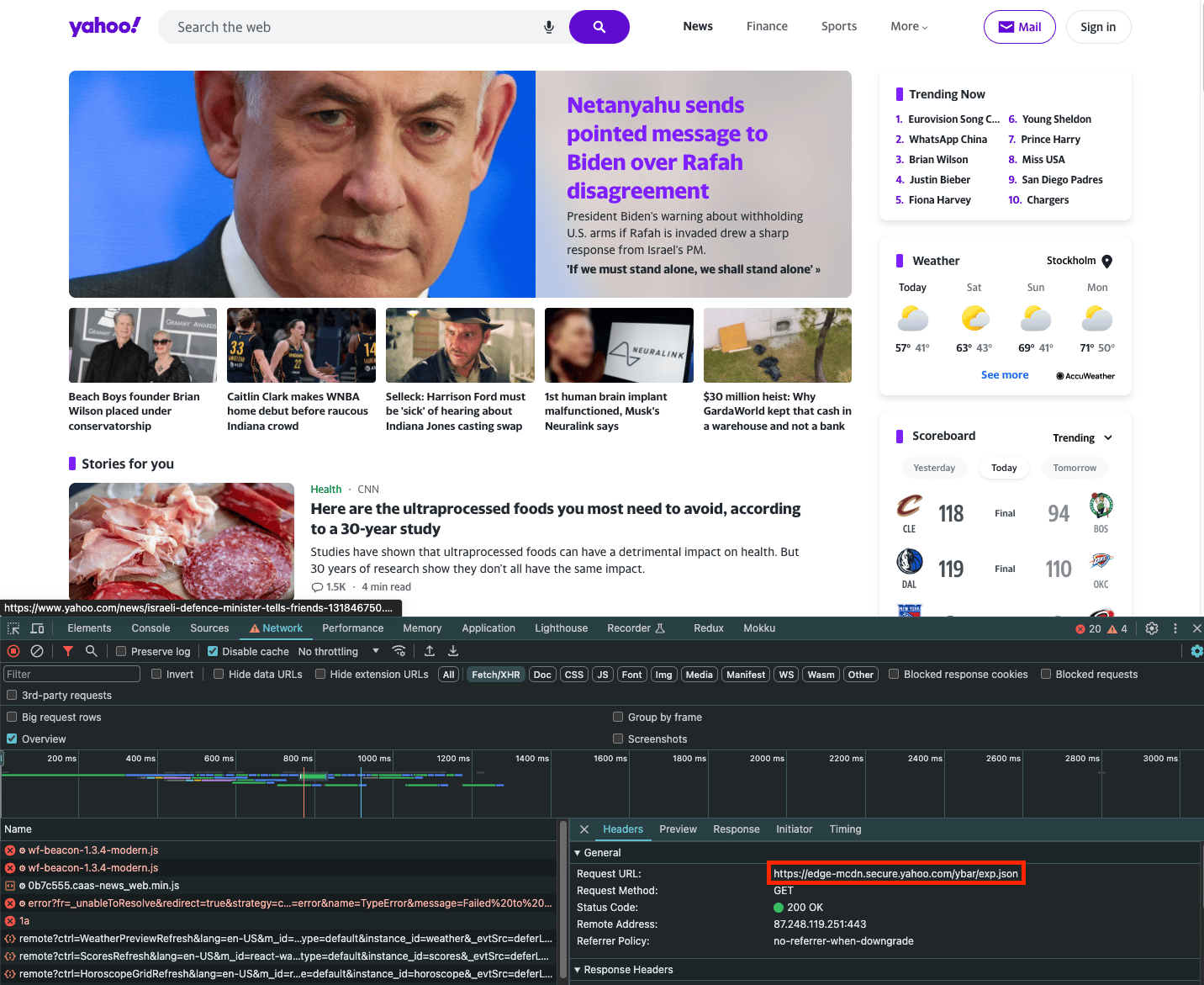 If you wish to scrape just the contents of this request, you can use the `fetch_resource` browser action. Note that `filter` is a regular expression that matches the filename:
```json Payload theme={null}
{
"target": "universal",
"url": "https://www.yahoo.com/",
"browser_actions": [
{
"type": "fetch_resource",
"filter": "/ybar/exp"
}
]
}
```
Results:
```json Payload theme={null}
{
"results": [
{
"content": "{\n \"expCount\":5,\n \"selection\":\"individual\",\n ... }",
"status_code": 200,
"url": "https://example.com/api/product/1",
"task_id": "7131940420107377665",
"created_at": "2023-11-19 09:46:41",
"updated_at": "2023-11-19 09:47:08"
}
]
}
```
***
Need help or just want to say hello? Our support is available 24/7. \
You can also reach us anytime via email at [support@decodo.com](mailto:support@decodo.com).
Can't find what you're looking for? Request an article! \
Have feedback? Share your thoughts on how we can improve.
If you wish to scrape just the contents of this request, you can use the `fetch_resource` browser action. Note that `filter` is a regular expression that matches the filename:
```json Payload theme={null}
{
"target": "universal",
"url": "https://www.yahoo.com/",
"browser_actions": [
{
"type": "fetch_resource",
"filter": "/ybar/exp"
}
]
}
```
Results:
```json Payload theme={null}
{
"results": [
{
"content": "{\n \"expCount\":5,\n \"selection\":\"individual\",\n ... }",
"status_code": 200,
"url": "https://example.com/api/product/1",
"task_id": "7131940420107377665",
"created_at": "2023-11-19 09:46:41",
"updated_at": "2023-11-19 09:47:08"
}
]
}
```
***
Need help or just want to say hello? Our support is available 24/7. \
You can also reach us anytime via email at [support@decodo.com](mailto:support@decodo.com).
Can't find what you're looking for? Request an article! \
Have feedback? Share your thoughts on how we can improve.