跳转到主要内容
抓取器 API 支持在检索所需结果之前执行多种浏览器操作。

操作

click

名称参数描述
click选择器:type:“xpath”/“css”/“text” value:字符串对指定元素执行点击操作并等待设定的秒数。
示例:
{
    "target": "universal",
    "url": "https://www.yahoo.com/",
    "browser_actions": [
        {
            "type": "click",
            "selector": {
              "type": "xpath",
              "value": "//button"
            }
        }
    ]
}

input

名称参数描述
input选择器:*type:“xpath”/“css”/“text” *value:字符串 value:字符串将文本插入页面上的指定输入元素。
示例:
{
    "target": "universal",
    "url": "https://www.yahoo.com/",
    "browser_actions": [
        {
            "type": "input",
            "selector": {
                "type": "xpath",
                "value": "//input"
            },
	"value": "Hello world"	
        }
    ]
}

scroll

名称参数描述
scrollx:整数 y:整数将页面内容滚动指定的像素数。
示例:
{
    "target": "universal",
    "url": "https://www.yahoo.com/",
    "browser_actions": [
        {
            "type": "scroll",
            "x": "0",
            "y": "300"
        }
    ]
}

scroll_to_bottom

名称参数描述
scroll_to_bottomtimeout_s:整数在设定的秒数内向下滚动页面。
示例:
{
    "target": "universal",
    "url": "https://www.yahoo.com/",
    "browser_actions": [
        {
            "type": "scroll_to_bottom",
            "timeout_s": 5
        }
    ]
}

wait

名称参数描述
waitwait_time_s:整数暂停指定的秒数。
示例:
{
    "target": "universal",
    "url": "https://www.yahoo.com/",
    "browser_actions": [
        {
            "type": "wait",
            "wait_time_s": 5
        }
    ]
}

wait_for_element

名称参数描述
wait_for_element选择器:*type:“xpath”/“css”/“text” *value:字符串 timeout_s:整数等待指定时长以加载元素。
示例:
{
    "target": "universal",
    "url": "https://www.yahoo.com/",
    "browser_actions": [
        {
            "type": "wait_for_element",
            "selector": {
                "type": "css",
                "value": ".submit-button"
            },
	"timeout_s": 5
        }
    ]
}

fetch_resource

fetch_resource 不能与任何其他指令组合使用,应该单独请求使用。
名称参数描述
fetch_resourcefilter:正则表达式 on_error:“error”/“skip”检索与指定模式匹配的第一个 Fetch 或 XHR 资源
示例:
{
    "target": "universal",
    "url": "https://www.yahoo.com/",
    "browser_actions": [
        {
            "type": "fetch_resource",
            "filter": "https://api.example.com/products/*",          
            "on_error": "error"
        }
    ]
}

通用参数

适用于上述所有操作的参数

type

名称描述
type使用的浏览器操作类型

timeout_s

名称描述
timeout_s最多等待多少秒直到操作执行终止。

wait_time_s

名称描述
wait_time_s明确用于执行操作的秒数。

on_error

名称描述
on_error指示操作失败时的处理方式:“error”:停止执行浏览器操作。“skip”:继续执行下一个操作。

获取网络请求

如果网站通过获取 JSON 对象来填充内容,您可以只抓取网络请求,从而避免处理 HTML。为此,您可以使用 fetch_resource 浏览器操作,如下所示。
fetch_resource 不能与任何其他指令组合使用,只能单独请求使用。
例如,当加载 yahoo.com 并打开网络选项卡时,我们可以看到正在加载一个 exp.json 文件:
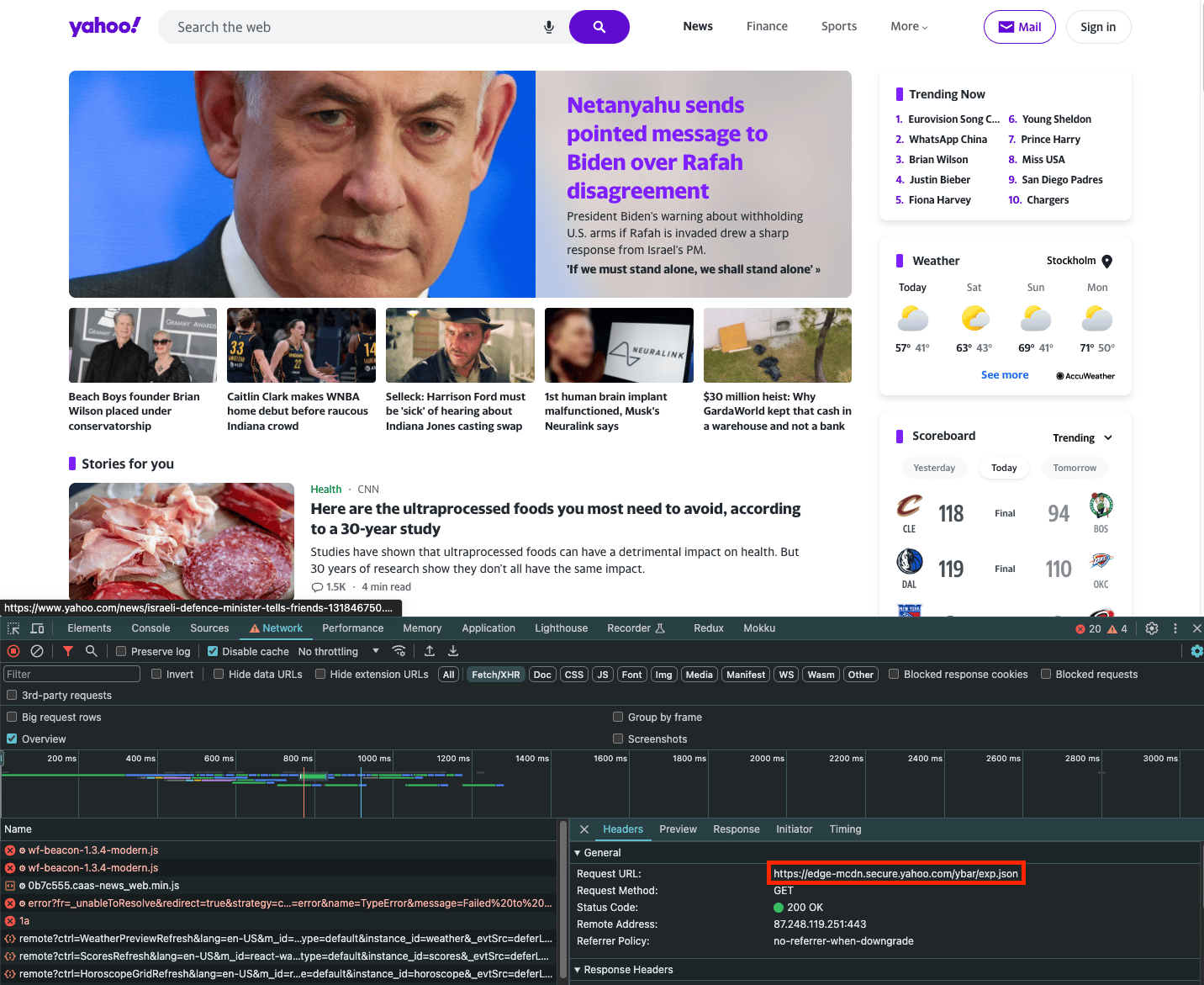
如果您只想抓取此请求的内容,可以使用 fetch_resource 浏览器操作。请注意,filter 是与文件名匹配的正则表达式:
{
    "target": "universal",
    "url": "https://www.yahoo.com/",
    "browser_actions": [
        {
            "type": "fetch_resource",
            "filter": "/ybar/exp"
        }
    ]
}
结果:
{
    "results": [
        {
            "content": "{\n    \"expCount\":5,\n    \"selection\":\"individual\",\n ... }",
            "status_code": 200,
            "url": "https://example.com/api/product/1",
            "task_id": "7131940420107377665",
            "created_at": "2023-11-19 09:46:41",
            "updated_at": "2023-11-19 09:47:08"
        }
    ]
}

支持

需要帮助或只是想打个招呼?我们的支持团队全天候为您服务。
您也可以随时通过电子邮件 support@decodo.com 联系我们。

反馈

找不到您要找的内容?请求一篇文章!
有反馈意见?分享您对我们如何改进的想法。