

Viewing Traffic Usage
You can view your data usage in your dashboard under your selected proxy type → Statistics table. You can also filter the graph by individual proxy users and within preset or custom date ranges, among other options.The traffic data in the dashboard statistics page is updated every 15 minutes.
Traffic Measurement
The total traffic data includes:- Upload traffic. It’s the request data that includes all headers, cookies, and POST data.
- Download traffic. It’s every byte received from the target website, including response headers and cookies, even when request timeouts occur during the data transmission phase.
- 403 Forbidden, 404 Not Found, 503 Service Unavailable, and any other non-200 response returned by the target is counted towards total traffic.
When the target is completely unresponsive and returns no data, only the request data is included in the total traffic.
HTTPS traffic and TLS overhead
HTTPS requests have noticeably higher traffic volume compared to HTTP requests; this is especially evident when targeting smaller websites, such as APIs, which can return minimal data. This is due to the TLS overhead being large relative to the actual response payload. HTTPS requests include a TLS handshake that occurs between you and the target server through the proxy. As a result, the bytes tunneled through the proxy also count toward proxy traffic usage. Here is an example of the traffic difference when targeting an HTTPS website through an HTTP proxy via a simple cURL command:Calculating Request Size
The size of a request is the sum of the request header, request body, response header, response body, and cookies. To get an approximate size of the request, you can use online tools like this one to see the entire size of the site or its size by content types like HTML. For example, if you are using a scraper, based on the size of the site’s HTML, you can more or less see how much traffic a single request will use.Measuring Your Request Size in Practice
To understand what your data usage averages may be, you can check the size of the page depending on the tool:- For browsers, Selenium, or any other tool that loads the webpage in full, you can check the size of your request in the Developer tools section with both Chrome and Firefox.
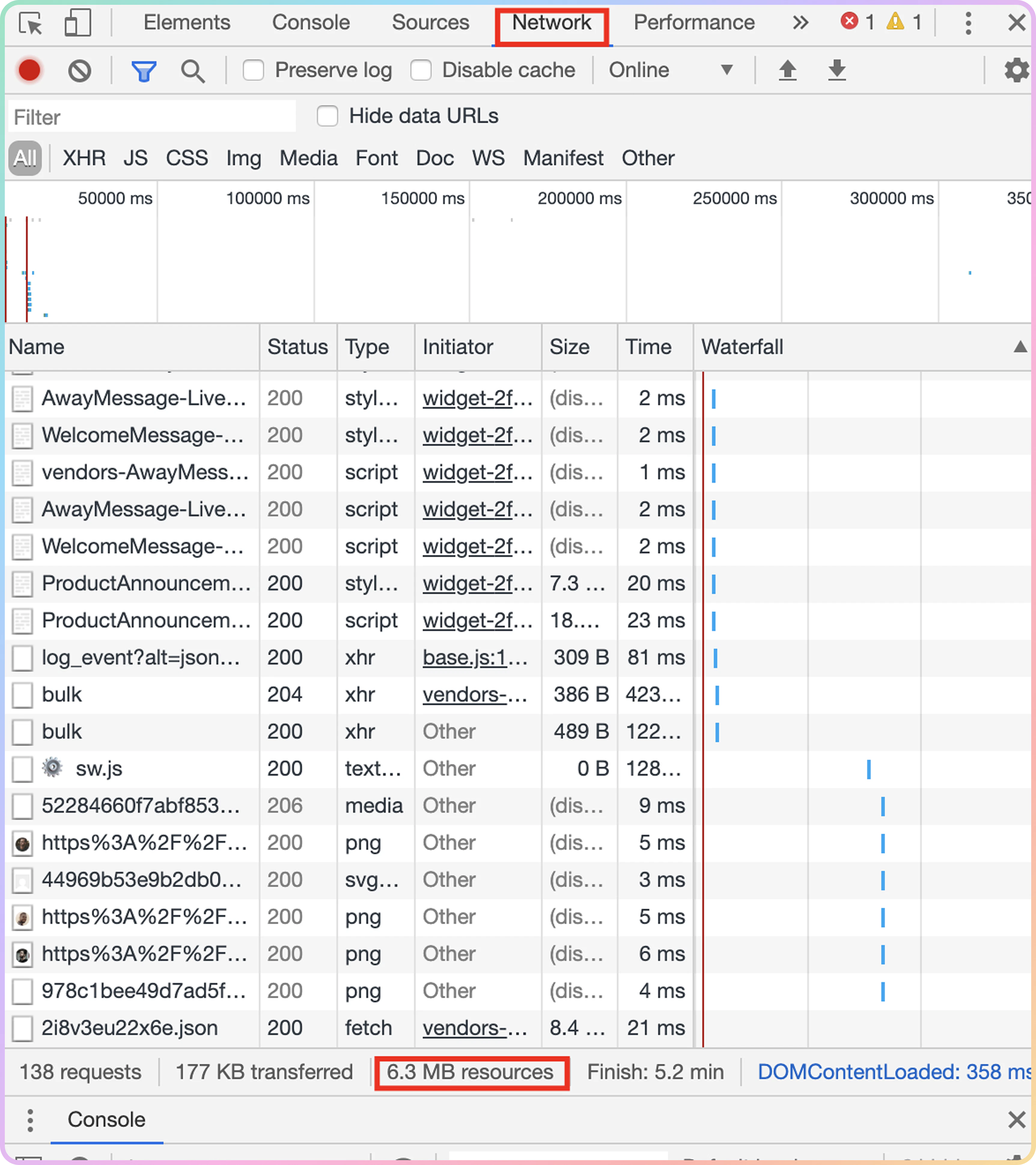
- For custom code solutions, a cURL request, or any other tool that loads only the backend of the webpage without any elements such as images, you can check the webpage size with the help of Pingdom Tools.
.png?fit=max&auto=format&n=7ZKpc3GV1DKO_XQr&q=85&s=95b26af51b1c8628610cbf27e58c9237)
If you are targeting different pages within a website, make sure to measure the size of each webpage to get a more accurate result.
Limiting Traffic Usage
You can limit the traffic usage for each proxy user created.- To do so, visit your dashboard and select the Proxy setup page, depending on your proxy subscription type.
- Then, click on Edit user to the right of your proxy user to set the limit.
- You can enter the traffic limit (up to
1000000GB) for each user individually and click on the checkmark to apply it.
You can set a bigger limit than your current subscription plan if needed. However, you are still limited to the amount of data your current plan has.
Reducing Traffic Usage
There are multiple ways you can reduce traffic consumption while using the proxies.Disabling Images
While using a browser, all loaded images and other website elements will account for your total data usage. When images are not necessary, you can disable them in both Chrome and Firefox by following the guidelines provided here.Loading Pages in Mobile Version
Some websites provide an alternative way for mobile users to access their page to consume less mobile data. While most websites provide a responsive design for mobile devices, others still have a separate mobile version. To check if your website supports the mobile layout, simply add an m. before the domain name in the URL field.Use Custom Solutions When Possible
No matter if you are purchasing sneakers, Amazon products, or creating new accounts for social media, try to look for custom solutions and bots when possible, as this will save you traffic data. Most of these solutions will request websites in a way that is the most data-efficient by calling them directly via cURL.If you find an unexpected traffic increase, follow the High Traffic Usage article for tips on what can be causing it.
Reaching Traffic Limit
Once you hit your monthly traffic limit, the proxy service will no longer be available. That means all proxy requests will return the407 HTTP response code.
If you’d like to keep using the proxies, you can purchase additional traffic according to your data rate or consider upgrading your plan.
Support
Need help or just want to say hello? Our support is available 24/7.
You can also reach us anytime via email at support@decodo.com.
You can also reach us anytime via email at support@decodo.com.
Feedback
Can’t find what you’re looking for? Request an article!
Have feedback? Share your thoughts on how we can improve.
Have feedback? Share your thoughts on how we can improve.