

Policies And Requirements
Submit your card or payment details to activate the free trial. You will only be charged after the trial ends if you don’t cancel it.- The 14-day money-back option does not apply when the free trial is activated.
- The trial can be upgraded anytime during the trial period.
- You can cancel at any time before the trial ends.
- Wallet token or cryptocurrency upgrades are not supported while the trial is active. Please contact our customer service here for assistance.
- You can activate the free trial with a credit or debit card, PayPal, Google Pay, Apple Pay, or Link.
- Trials are only available if you have not previously used one or subscribed to that specific product. This means that one trial is available for each proxy product if you have never tried it before.
Free Proxy Trials
- We offer a 3-day 100MB trial for the Pay per GB options.
- We offer a 3-day 100MB and 10IP trial for the Pay per IP options.
Free Web Data API Plan
Web Data API doesn’t have a trial. Instead, you can activate the free plan, which includes up to 10K requests per month and doesn’t require a credit card. The free plan works with every endpoint:/scrape, /search, /crawl, and /map. You can see the rates for each endpoint on the Billing page. When you need more requests, upgrade to a paid plan from your dashboard.
By activating the free Web Data API plan, you lose eligibility for a refund on Web Data API purchases. Learn more about our Refund Policy here.
Free Site Unblocker Trials
- We offer a 7-day 1k request trial for the Pay per request option.
- We offer a 7-day 100MB trial for the Pay per GB option.
Unsupported products
- Pay as you go plans with Residential and Mobile proxies.
- Dedicated Static Residential (ISP) proxies.
- Dedicated Datacenter proxies.
Activating a Trial
Registration
If you don’t have an account yet, please create one here.Activation
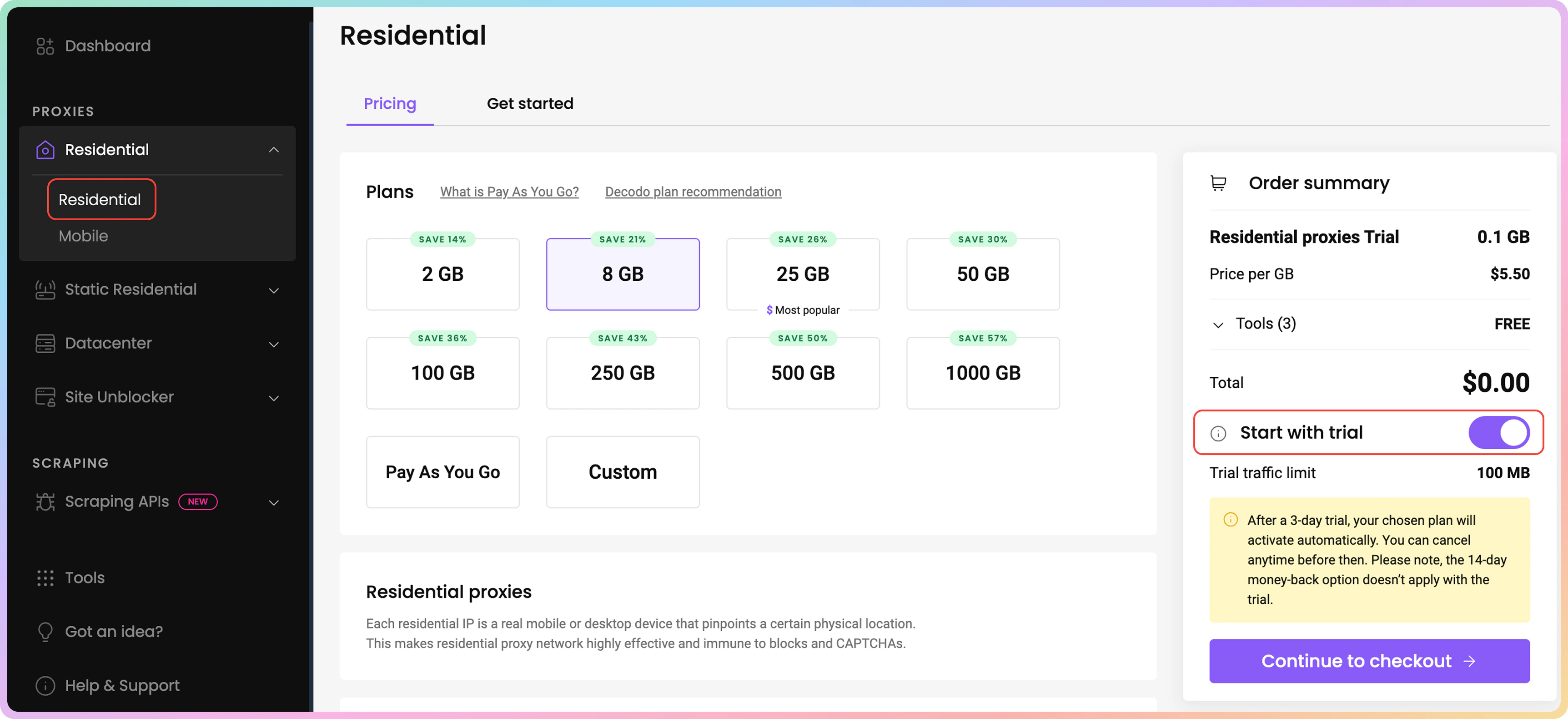
You can activate the free trial on your dashboard once you’re logged into your account. Here’s an example with a residential proxies:- Select Residential on the left side of your dashboard.
- Click Pricing and select the plan you want to use after the trial.
- On the right side, next to the plan price, click on the Start with trial option before proceeding to checkout (you won’t be charged now by doing so).
Card Details
Once you proceed to checkout, enter your email (which should be added automatically), location, and card details.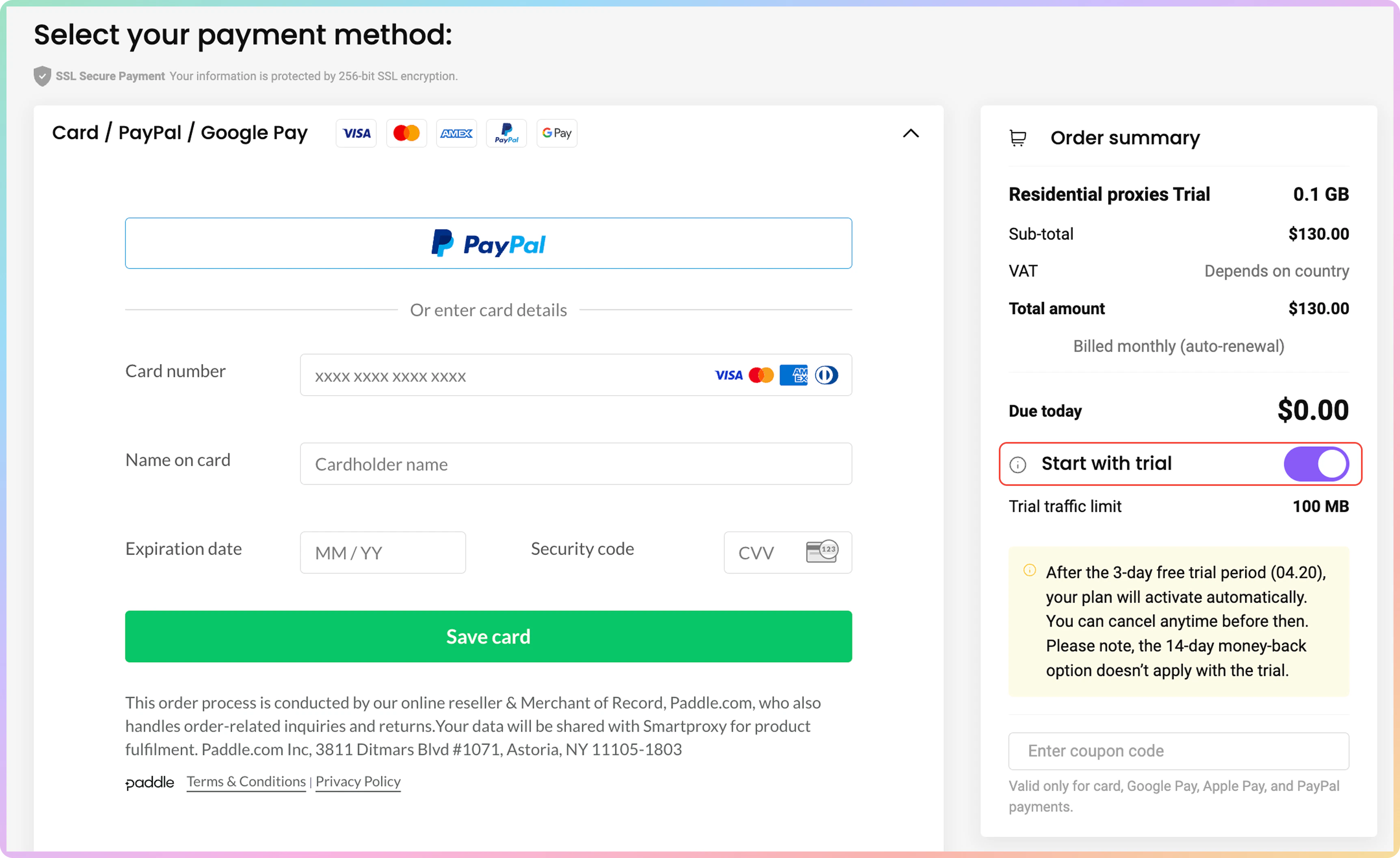
Using a card issued in India
You can activate a free trial with a card issued in India. However, due to Indian banking regulations, the automatic charge at the end of your trial can’t be processed without your confirmation. Once your trial ends, purchase a subscription from your dashboard to keep using our services.Seeing a $1 transaction when signing up for a free trial?
- You may see a $1.00 charge on your statement for free trials. This is a pre-authentication to ensure if it’s a real payment card or PayPal but there won’t be any charge made if the trial is free.
- This transaction will drop from the your statement shortly and you will not be charged.
Setup
Once you verify the card details, the trial will activate, and you can go to the proxy setup section to start configuring and using your proxies.Support
Need help or just want to say hello? Our support is available 24/7.
You can also reach us anytime via email at support@decodo.com.
Feedback
Can’t find what you’re looking for? Request an article!
Have feedback? Share your thoughts on how we can improve.