Core and Advanced plans are no longer available for purchase. Please consider migrating to the all-in-one Web Scraper API; check out the guide here.
Scraper APIs support performing a number of browser actions before retrieving a desired result.
Actions
click
| Name | Arguments | Description |
|---|
click | Selectors: type:“xpath”/“css”/“text” value: string | Performs a click action on a specified element and waits a set count of seconds. |
Example:
{
"target": "universal",
"url": "https://www.yahoo.com/",
"browser_actions": [
{
"type": "click",
"selector": {
"type": "xpath",
"value": "//button"
}
}
]
}
| Name | Arguments | Description |
|---|
input | Selectors: *type: “xpath”/“css”/“text” *value: string value: string | Inserts text into a specified input element on the page. |
Example:
{
"target": "universal",
"url": "https://www.yahoo.com/",
"browser_actions": [
{
"type": "input",
"selector": {
"type": "xpath",
"value": "//input"
},
"value": "Hello world"
}
]
}
| Name | Arguments | Description |
|---|
scroll | x: integer y: integer | Scrolls the content of a page a a specified number of pixels. |
Example:
{
"target": "universal",
"url": "https://www.yahoo.com/",
"browser_actions": [
{
"type": "scroll",
"x": "0",
"y": "300"
}
]
}
| Name | Arguments | Description |
|---|
scroll_to_bottom | timeout_s: integer | Scrolls down the page for a set amount of seconds. |
Example:
{
"target": "universal",
"url": "https://www.yahoo.com/",
"browser_actions": [
{
"type": "scroll_to_bottom",
"timeout_s": 5
}
]
}
wait
| Name | Arguments | Description |
|---|
wait | wait_time_s: integer | Pauses for a specified number of seconds. |
Example:
{
"target": "universal",
"url": "https://www.yahoo.com/",
"browser_actions": [
{
"type": "wait",
"wait_time_s": 5
}
]
}
wait_for_element
| Name | Arguments | Description |
|---|
wait_for_element | Selectors: *type: “xpath”/“css”/“text” *value: string timeout_s: integer | Waits for a specified duration for element to load. |
Example:
{
"target": "universal",
"url": "https://www.yahoo.com/",
"browser_actions": [
{
"type": "wait_for_element",
"selector": {
"type": "css",
"value": ".submit-button"
},
"timeout_s": 5
}
]
}
fetch_resource
fetch_resource cannot be combined with any other instructions and should be used with separate requests.
| Name | Arguments | Description |
|---|
fetch_resource | filter: regex on_error:“error”/“skip” | Retrieves the first Fetch or XHR resource that matches the specified pattern |
Example:
{
"target": "universal",
"url": "https://www.yahoo.com/",
"browser_actions": [
{
"type": "fetch_resource",
"filter": "https://api.example.com/products/*",
"on_error": "error"
}
]
}
General Arguments
Arguments available for all actions above
type
| Name | Description |
|---|
type | Type of browser action used |
timeout_s
| Name | Description |
|---|
timeout_s | How much time in seconds to wait at max until the execution of the action is terminated. |
wait_time_s
| Name | Description |
|---|
wait_time_s | How much time in seconds to use explicitly to execute the action. |
on_error
| Name | Description |
|---|
on_error | Indicates what to do with actions in case they fail: “error”: Stops the execution of browser actions. “skip”: Continues with the next action. |
Fetching a Network Request
If a website populates content by fetching a JSON object, you can scrape just the network request and thus avoid having to deal with HTML altogether. To do this, you can use the fetch_resource browser action, as shown below.
fetch_resource cannot be combined with any other instructions and can only be used with separate requests.
For example, when loading yahoo.com and opening the Network tab, we can see an exp.json file being loaded:
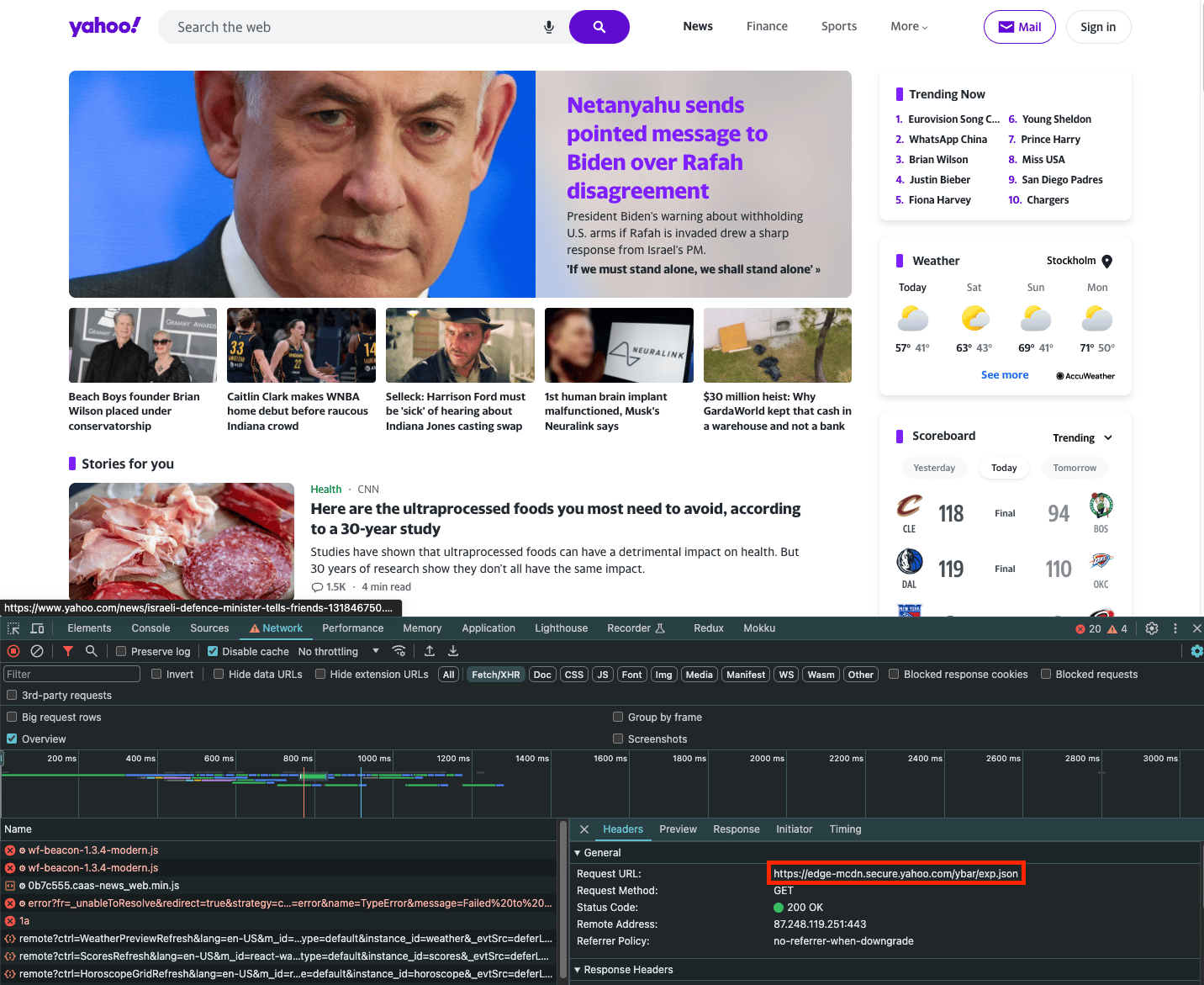
If you wish to scrape just the contents of this request, you can use the fetch_resource browser action. Note that filter is a regular expression that matches the filename:
{
"target": "universal",
"url": "https://www.yahoo.com/",
"browser_actions": [
{
"type": "fetch_resource",
"filter": "/ybar/exp"
}
]
}
Results:
{
"results": [
{
"content": "{\n \"expCount\":5,\n \"selection\":\"individual\",\n ... }",
"status_code": 200,
"url": "https://example.com/api/product/1",
"task_id": "7131940420107377665",
"created_at": "2023-11-19 09:46:41",
"updated_at": "2023-11-19 09:47:08"
}
]
}
Support
Need help or just want to say hello? Our support is available 24/7.
You can also reach us anytime via email at support@decodo.com. Feedback
Can’t find what you’re looking for? Request an article!
Have feedback? Share your thoughts on how we can improve.