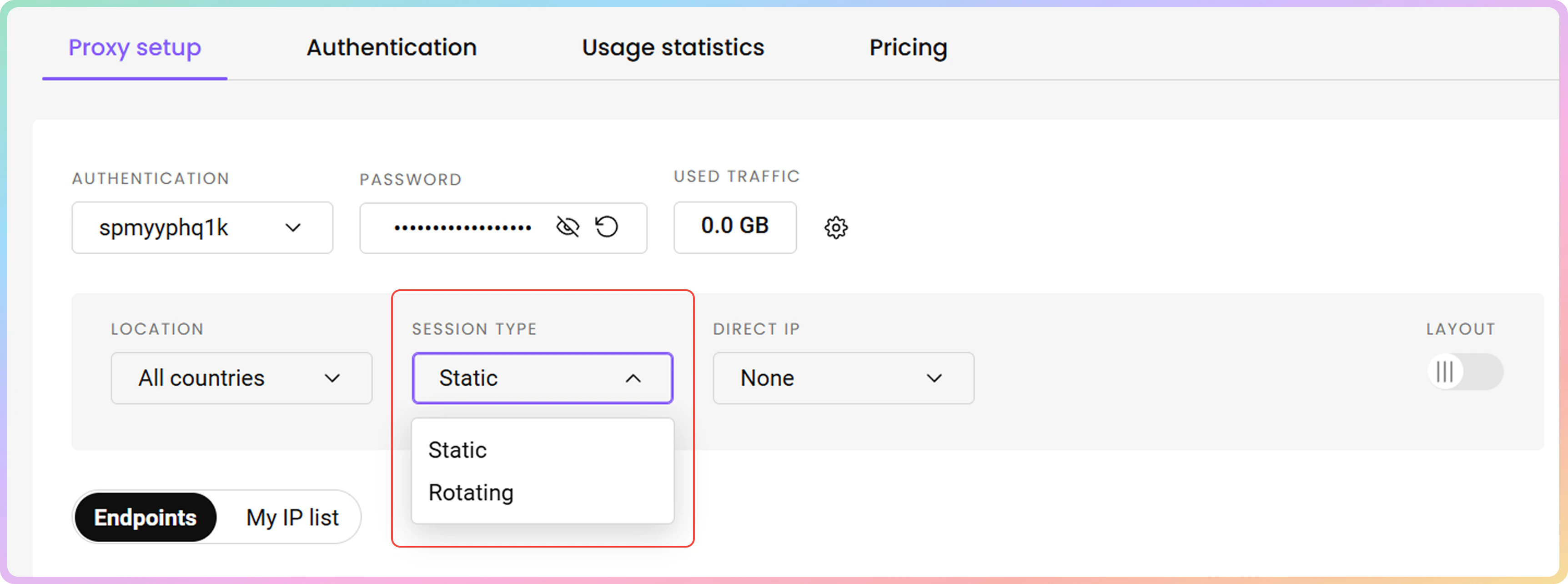
Session Types
Datacenter Pay/IP Static and Rotating Session Types
You can generate proxy port examples of your preferred session type in the Static Residential → DC Pay/IP → Proxy Setup section on your dashboard.

Selecting a Session Type.
Static Port
Ports 10001-63000 provide a static IP address that remains until you decide to change it or the session ends.
- Change the IP address manually by switching to a different port.
If you're using port numbers that exceed the total IP count you've purchased with your plan, the ports will iterate through your existing IPs.
User:pass example
User:pass exampleHere are a few basic request examples with a static port in various programming languages when authenticating via the username:password method.
curl -U "username:password" -x "dc.decodo.com:10001" "https://ip.decodo.com/json"import requests
url = 'https://ip.decodo.com/json'
username = 'username'
password = 'password'
proxy = f"http://{username}:{password}@dc.decodo.com:10001"
result = requests.get(url, proxies = {
'http': proxy,
'https': proxy
})
print(result.text)const axios = require('axios');
const { HttpsProxyAgent } = require('https-proxy-agent');
const url = 'https://ip.decodo.com/json';
const proxyAgent = new HttpsProxyAgent(
'http://username:[email protected]:10001');
axios
.get(url, {
httpsAgent: proxyAgent,
})
.then((response) => {
console.log(response.data);
});<?php
$url = 'ip.decodo.com/json';
$proxy = 'dc.decodo.com';
$port = 10001;
$user = 'username';
$psw = 'password';
$ch = curl_init($url);
curl_setopt($ch, CURLOPT_RETURNTRANSFER, 1);
curl_setopt($ch, CURLOPT_PROXY, "$proxy:$port");
curl_setopt($ch, CURLOPT_PROXYUSERPWD, "$user:$psw");
$result = curl_exec($ch);
curl_close($ch);
if ($result) {
echo $result . PHP_EOL;
}package main
import (
"log"
"net/http"
"net/url"
)
func main() {
proxyUrl, err := url.Parse("http://username:[email protected]:10001")
if err != nil {
log.Fatalln(err)
}
client := &http.Client{
Transport: &http.Transport{Proxy: http.ProxyURL(proxyUrl)},
}
req, err := http.NewRequest("GET", "https://ip.decodo.com/json", nil)
if err != nil {
log.Println(err)
}
res, err := client.Do(req)
log.Println(res)
if err != nil {
log.Println(err)
}
}Whitelisted IP example
Here are a few basic request examples with a static port in various programming languages when authenticating via the whitelisted IP method.
curl -x "dc.decodo.com:10001" "https://ip.decodo.com/json"import requests
url = 'https://ip.decodo.com/json'
proxy = f"http://dc.decodo.com:10001"
result = requests.get(url, proxies = {
'http': proxy,
'https': proxy
})
print(result.text)const axios = require('axios');
const { HttpsProxyAgent } = require('https-proxy-agent');
const url = 'https://ip.decodo.com/json';
const proxyAgent = new HttpsProxyAgent (
'http://dc.decodo.com:10001');
axios
.get(url, {
httpsAgent: proxyAgent,
})
.then((response) => {
console.log(response.data);
});<?php
$url = 'ip.decodo.com/json';
$proxy = 'dc.decodo.com';
$port = 10001;
$ch = curl_init($url);
curl_setopt($ch, CURLOPT_RETURNTRANSFER, 1);
curl_setopt($ch, CURLOPT_PROXY, "$proxy:$port");
$result = curl_exec($ch);
curl_close($ch);
if ($result) {
echo $result . PHP_EOL;
}package main
import (
"log"
"net/http"
"net/url"
)
func main() {
proxyUrl, err := url.Parse("http://dc.decodo.com:10001")
if err != nil {
log.Fatalln(err)
}
client := &http.Client{
Transport: &http.Transport{Proxy: http.ProxyURL(proxyUrl)},
}
req, err := http.NewRequest("GET", "https://ip.decodo.com/json", nil)
if err != nil {
log.Println(err)
}
res, err := client.Do(req)
log.Println(res)
if err != nil {
log.Println(err)
}
}Rotating Port
The port 10000 rotates the IP on every request you make and will choose the IPs from the list that you have purchased.
User:pass example
User:pass exampleHere are a few basic request examples with a rotating port in various programming languages when authenticating via the username:password method.
curl -U "username:password" -x "dc.decodo.com:10000" "https://ip.decodo.com/json"import requests
url = 'https://ip.decodo.com/json'
username = 'username'
password = 'password'
proxy = f"http://{username}:{password}@dc.decodo.com:10000"
result = requests.get(url, proxies = {
'http': proxy,
'https': proxy
})
print(result.text)const axios = require('axios');
const { HttpsProxyAgent } = require('https-proxy-agent');
const url = 'https://ip.decodo.com/json';
const proxyAgent = new HttpsProxyAgent(
'http://username:[email protected]:10000');
axios
.get(url, {
httpsAgent: proxyAgent,
})
.then((response) => {
console.log(response.data);
});<?php
$url = 'ip.decodo.com/json';
$proxy = 'dc.decodo.com';
$port = 10000;
$user = 'username';
$psw = 'password';
$ch = curl_init($url);
curl_setopt($ch, CURLOPT_RETURNTRANSFER, 1);
curl_setopt($ch, CURLOPT_PROXY, "$proxy:$port");
curl_setopt($ch, CURLOPT_PROXYUSERPWD, "$user:$psw");
$result = curl_exec($ch);
curl_close($ch);
if ($result) {
echo $result . PHP_EOL;
}package main
import (
"log"
"net/http"
"net/url"
)
func main() {
proxyUrl, err := url.Parse("http://username:[email protected]:10000")
if err != nil {
log.Fatalln(err)
}
client := &http.Client{
Transport: &http.Transport{Proxy: http.ProxyURL(proxyUrl)},
}
req, err := http.NewRequest("GET", "https://ip.decodo.com/json", nil)
if err != nil {
log.Println(err)
}
res, err := client.Do(req)
log.Println(res)
if err != nil {
log.Println(err)
}
}Whitelisted IP example
Here are a few basic request examples with a rotating port in various programming languages when authenticating via the whitelisted IP method.
curl -x "dc.decodo.com:10000" "https://ip.decodo.com/json"import requests
url = 'https://ip.decodo.com/json'
proxy = f"http://dc.decodo.com:10000"
result = requests.get(url, proxies = {
'http': proxy,
'https': proxy
})
print(result.text)const axios = require('axios');
const { HttpsProxyAgent } = require('https-proxy-agent');
const url = 'https://ip.decodo.com/json';
const proxyAgent = new HttpsProxyAgent (
'http://dc.decodo.com:10000');
axios
.get(url, {
httpsAgent: proxyAgent,
})
.then((response) => {
console.log(response.data);
});<?php
$url = 'ip.decodo.com/json';
$proxy = 'dc.decodo.com';
$port = 10000;
$ch = curl_init($url);
curl_setopt($ch, CURLOPT_RETURNTRANSFER, 1);
curl_setopt($ch, CURLOPT_PROXY, "$proxy:$port");
$result = curl_exec($ch);
curl_close($ch);
if ($result) {
echo $result . PHP_EOL;
}package main
import (
"log"
"net/http"
"net/url"
)
func main() {
proxyUrl, err := url.Parse("http://dc.decodo.com:10000")
if err != nil {
log.Fatalln(err)
}
client := &http.Client{
Transport: &http.Transport{Proxy: http.ProxyURL(proxyUrl)},
}
req, err := http.NewRequest("GET", "https://ip.decodo.com/json", nil)
if err != nil {
log.Println(err)
}
res, err := client.Do(req)
log.Println(res)
if err != nil {
log.Println(err)
}
}Support
Still can't find an answer? Want to say hi? We take pride in our 24/7 customer support. Alternatively, you can reach us via our support email at [email protected].
Updated 1 day ago